
You will learn
What a form is in NextTables, where it appears, who configures it, and which parts of a form apply to every channel that writes data into a table.
This article is for data platform owners and application builders who configure forms, and for key users who enter data through them.
📝 Note: This article covers concepts. For the hands-on steps, see How to set up a data entry form for a table.
Prerequisites
- A table in NextTables. Every table has a form already, so there is nothing to create first.
- Permission to edit the table, if you want to change the form. Entering data through a form needs only data-entry permission on the table.
What a form is
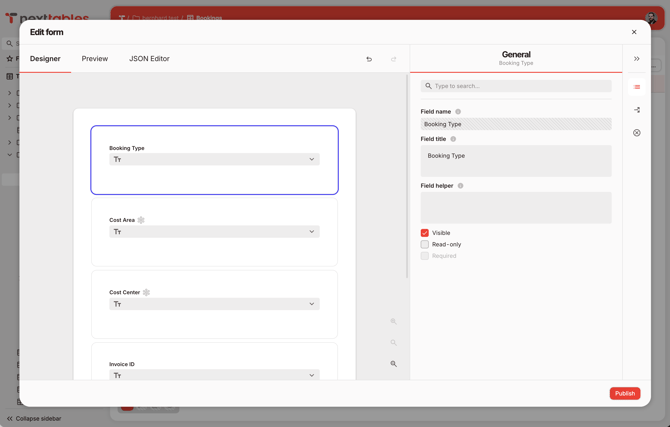
A form is the guided entry surface for a single table. It defines which of the table's fields a user sees, what each one is labeled, and which rules the entered values must satisfy.
Every table has exactly one form, and every form belongs to exactly one table. To offer two different entry experiences, create a second table.
Where a form appears
The form renders in three dialogs on a table:
- Add row
- Edit row
- Copy row
All three show the same form. The table stays available for spreadsheet-style inline editing alongside it.
Every view starts with a working form
NextTables generates a default form for each table: one input per field, in field order, labeled with the field name. Tables that existed before forms shipped have one too.
The default form works as soon as the table exists. Customize it when you want clearer labels, guidance text, conditional behavior, or validation beyond what the fields themselves enforce.
What the form controls, and what the field controls
Some properties belong to the table field and are inherited by the form. The form displays them and leaves them read-only.
Owned by the table field
- Data type
- Master data binding
- Key field semantics
- Whether the field is required
- Field order in the form
Owned by the form
- Field label and helper text
- Placeholder text
- Read-only state
- Conditions: visibility, conditional required, enablement
- Validation rules
A form can make a field required under a condition. A form cannot relax a field that the table already requires.
Which rules apply to which channel
Data reaches a table through four channels. Validation rules apply to all of them. Conditions divide into rules that restrict a value, which apply everywhere, and rules that produce a value, which apply in the form dialog.
| Form behavior | Form dialog | Inline editing | File import | API write |
|---|---|---|---|---|
| Validation rules (text, number, pattern, expression) | Applies | Applies | Applies | Applies |
| Conditional required | Applies | Applies | Applies | Applies |
| Visibility conditions | Shows and hides the field | Skips rules on a hidden field and clears its value | Skips rules on a hidden field and clears its value | Skips rules on a hidden field and clears its value |
| Read-only fields | Locks the field | Locks the field | Rejects a changed value | Rejects a changed value |
| Default values and set-value conditions | Applies | Form dialog only | Form dialog only | Form dialog only |
| Dependent dropdown filtering | Applies | Form dialog only | Form dialog only | Form dialog only |
One consequence is worth planning around: a value supplied for a field that a visibility condition hides for that row is cleared before the row is saved, and the result reports it as a correction. This keeps a hidden field from carrying a value the form would never have accepted.
Who does what
| Role | Responsibility |
|---|---|
| Data platform owner or application builder | Configures the form once per table: labels, helper text, conditions, validation rules |
| Key user | Enters and edits rows through the form dialog |
Troubleshooting / FAQs
- Q: Can I have two forms for the same table?
A: No. Each table carries one form. To offer a second entry experience, create a second table and configure its form. - Q: Can I add a field to the form that the table does not have?
A: No. Every form input binds to an existing field on the table. Add the field to the table first, and it becomes available in the form. - Q: Can I reorder the fields in the form?
A: Field order follows the table's field order. - Q: Can I publish a form as a public page for people without a NextTables account?
A: No. Forms render in the add, edit, and copy row dialogs on a table, for users who are signed in and permitted to enter data. In the future, a form page will also be available for logged-in users. - Q: Does a form replace inline editing?
A: No. Both stay available on the table. Inline editing keeps its spreadsheet-style behavior, and validation rules configured on the form apply to it as well. - Q: A field I made required in the form still accepts empty values on file import. Why?
A: Check whether the requirement is conditional and whether the condition holds for those rows. A conditional requirement applies only when its condition evaluates to true for the row being written.