

Validated, authorized, and auditable write-back to Databricks
On this page
Give business teams their own tables in Lakebase, and keep the workspace yours
Access lists, kept by the teams they protect
The access lists behind your row-level rules for Power BI or Tableau sit in one Lakebase schema. The domain that owns each list keeps it current in NextTables, and every change is validated at entry and on the record.
SAP master data as the check for Databricks tables
One application validates against HR reference data in SAP Business Data Cloud and writes the classification to Databricks. Your team works in one interface, under one set of rules across both platforms.
Rules and parameters your pipelines, models and agents read
Thresholds, mappings and decision inputs live as Lakebase tables, maintained by the people who own them and checked against your master data before they are written. How NextTables powers AI.
How a business change reaches Databricks
A business user edits
They work in a grid they already know, on their own or inside a Power BI or Tableau dashboard, signed in with your identity provider.
The entry is checked first
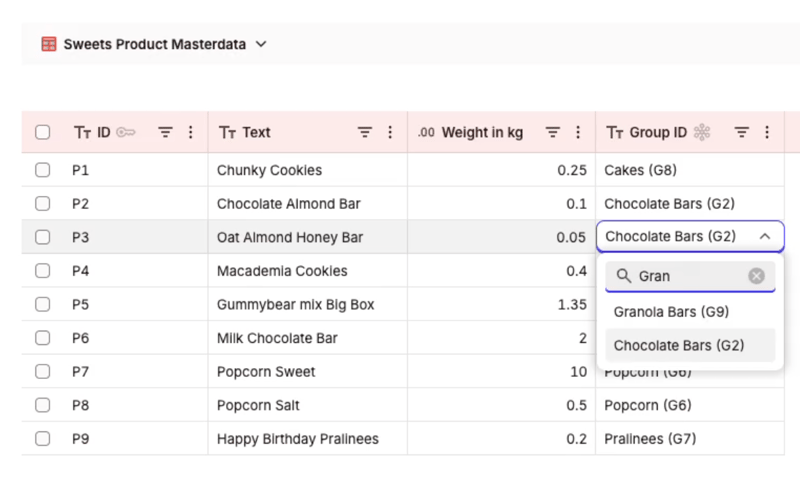
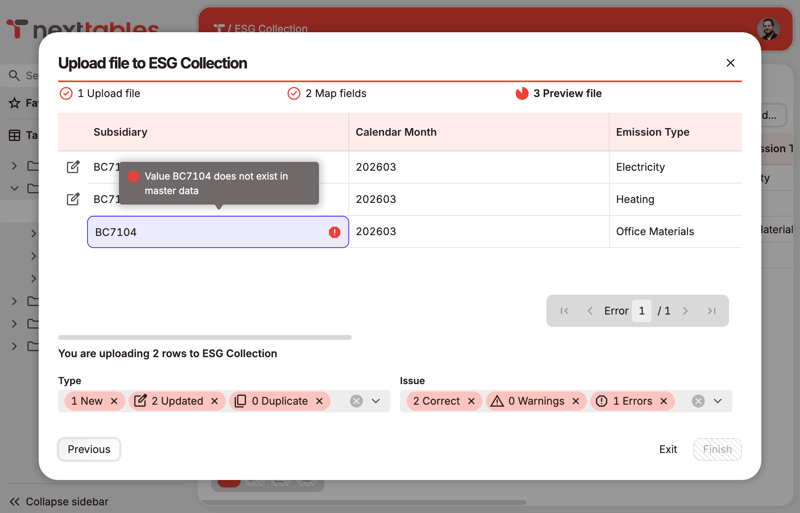
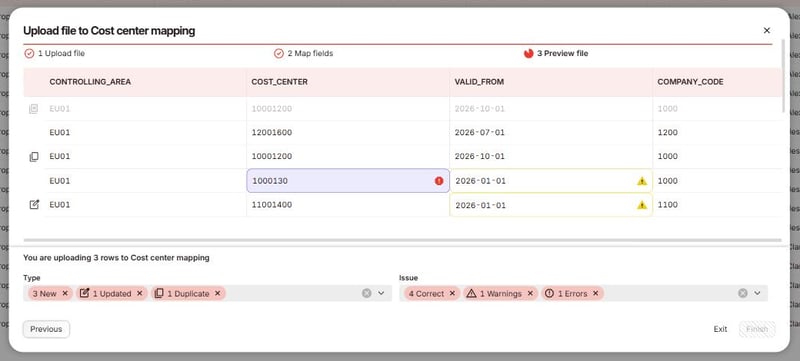
Values are validated against your master data and your rules while the person is still in the field, so what reaches the platform is already correct.
It is written into Lakebase
It goes into the Lakebase schema your administrator scoped, through one login role, under the roles you defined.
Dashboards read it through Unity Catalog
Your administrator registers the Lakebase database in Unity Catalog once, as a read-only catalog. Databricks SQL, Power BI or Tableau then query the maintained table on a serverless SQL warehouse, like every other table.
Embedded in your Power BI and Tableau dashboards
A NextTables application embeds in Power BI, Tableau or any tool that supports web objects, in a dedicated embedded mode that shows the grid alone. URL parameters carry the dashboard's context, so a user looking at one product group's report edits that group's rows, and only those.
Row-level rules can read the same access lists you keep for your BI reports, so the person who may see a row in the dashboard is the person who may maintain it.
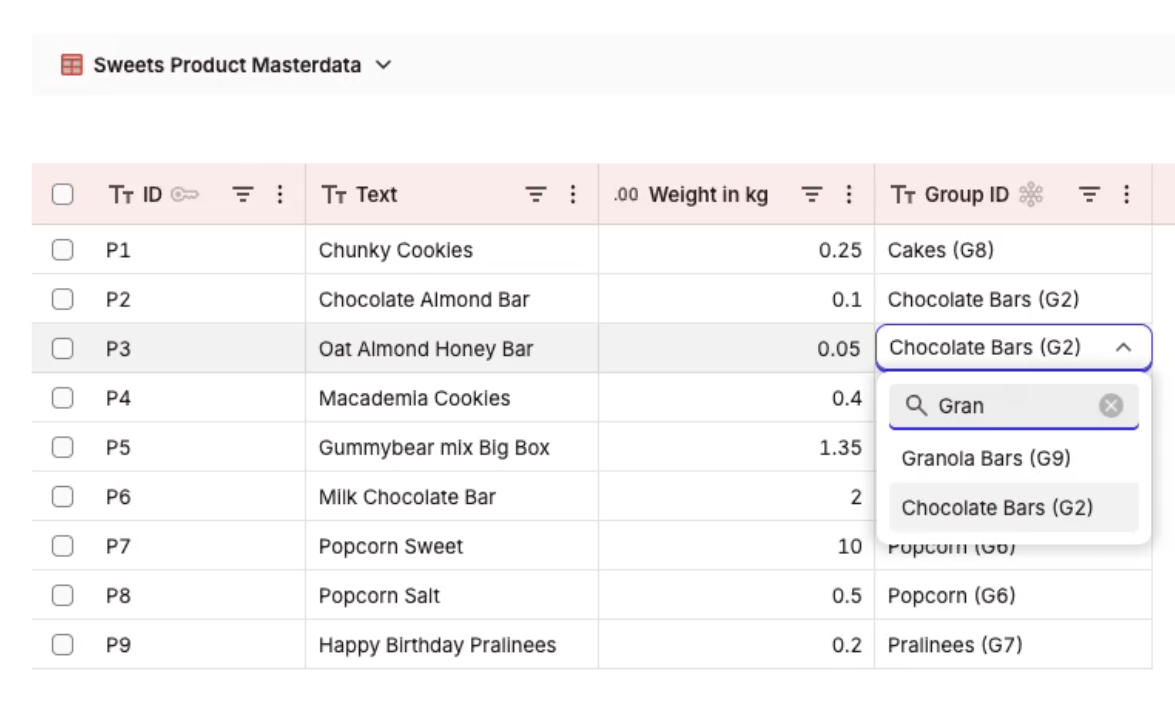
What the grid, the value help and the forms look like for the people who use them: Built for business teams.
Where NextTables fits, and where something else fits better
A good fit for
- Reference and mapping tables that business teams own and change often.
- Corrections to data already on the platform, made by the people accountable for it.
- Collections gathered from many contributors, for example ESG figures from subsidiaries.
- Row-level access lists for Power BI or Tableau, maintained by the domains they apply to.
- Business rule and parameter tables that pipelines, models and agents read.
- The context data that AI and analytics depend on, still waiting for an owner end to end.
Better served by something else
- Replacing an active master data management program. Where one already covers a domain, this sits outside it.
- Moving or transforming data at volume. Lakeflow Declarative Pipelines and your existing jobs keep that work.
- Analysis and visualization. Reporting stays in Databricks SQL, Power BI or Tableau, reading what is maintained here.
- High-frequency transactional writes from an operational application.
How NextTables connects to your Databricks workspace
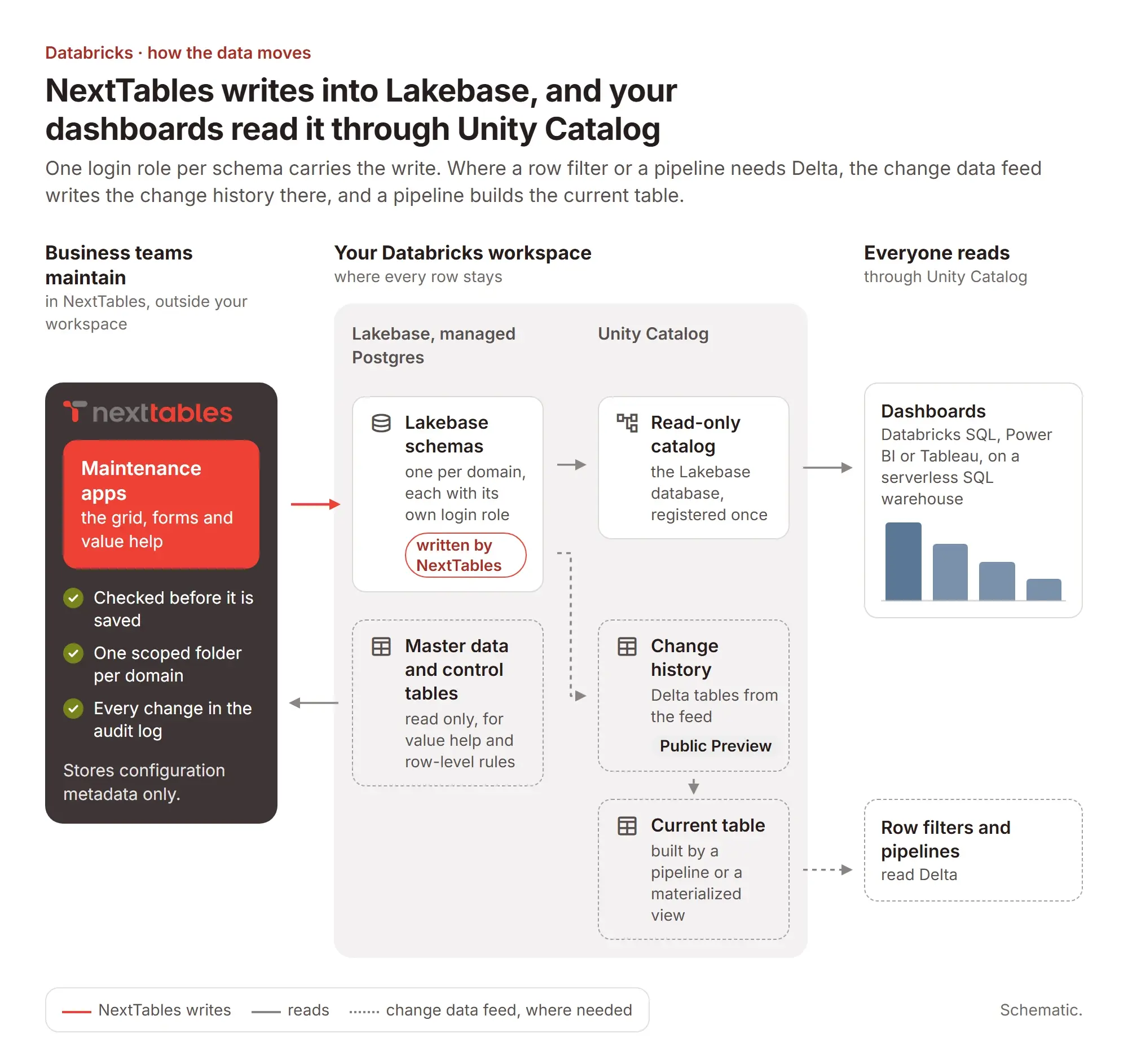
NextTables writes through one login role per schema into Lakebase and reads master data read only. Your dashboards read the maintained tables through Unity Catalog. Where a row filter or a pipeline needs Delta, the change data feed (Public Preview) writes the change history to Delta, and a pipeline builds the current table from it.
The questions an architecture board asks
Which of these landscapes is yours?
Central data platform team
One Lakebase database, one schema and one folder per domain: the platform team keeps the workspace and creates one login role per schema. Each business group maintains its own tables in its own folder, through its own role.
Data product teams own their domain
One schema, one role and one folder per team: the team that owns an area creates its tables in its own schema, maintains them and joins them to its models.
Access lists maintained like any other table
A security schema with its own role: the control tables behind your row-level rules for Power BI or Tableau live in one schema, and the domains that own them maintain them in NextTables, validated at entry and on the record.
The setup behind each shape, click by click: creating the database connection and scoping a connection to folders in our knowledge base.
What your Databricks administrator does, once per schema
Create the Lakebase database
Or use the one you have. Lakebase is Databricks' managed Postgres for real-time data applications, and the recommended target for maintenance.
Enable Postgres login and create a role
Turn on native Postgres role login, then create one login role with read and write on the single schema NextTables will use.
Allow one IP
The NextTables IP is shown at the top of the connection sheet. Add it to your network or platform allowlist once.
Hand over the values
Instance name, host, port, schema, username and password go into the connection, mapped to the folders that may use it. NextTables tests the connection before it is saved.
Step by step, including a dedicated role per connection and how to rotate a password: the Databricks integration guide in our knowledge base. Who may then maintain what is decided by folders, connection scoping, roles and row-level rules: Governed.
What you run, and what we run
| Concern | Your side | Our side |
|---|---|---|
| Connectivity | One allowlist entry for the NextTables IP, and one Postgres login role per schema with native login enabled. Both are changes your team already knows how to make. | We show the IP address in the connection sheet and test the connection before it is saved. Rotating the password means replacing one value in one field. |
| Authentication to Lakebase | Username and password on a login role scoped to one schema, least privilege. | Native Postgres login is the supported method for the Lakebase connection today. |
| Environments | One folder per environment, development, test and production, with each environment's connection scoped to its own folder. | Available today, and the recommended structure from the first day rather than a later migration. |
| Promotion | You decide what is ready to move and who may move it. | Export a folder or a table with everything it depends on and import it into another folder or another tenant. Coming Soon |
| Concurrent edits | Today, when two people edit the same row, the last write wins. Plan for that before rollout. | Concurrency checks that warn a second editor before they overwrite are on the way. Scoped folders and row-level rules keep most teams in their own rows in the first place. Coming Soon |
| When you stop using NextTables | Your schema, tables and data are in Databricks throughout, so they stay. | Your configuration travels with the same export used for promotion, so the application definitions leave with you too. Coming Soon |
Frequently asked questions
Hours to days once the connection exists. Setup is configuration rather than development, which is also why a trial against a sandbox schema is a realistic way to evaluate it.
They sign in to NextTables through your identity provider. The platform connection runs on one login role per schema, so maintenance-only users stay outside your workspace's user management and licensing.
SAP Business Data Cloud, Databricks and PostgreSQL are generally available. Snowflake and Microsoft Fabric are on the roadmap.
Yes. An application can validate against master data in SAP Business Data Cloud and write to Databricks, with validation, authorization and traceability applied across the boundary.
NextTables is licensed as a subscription, sized by users and tables. The details are on the pricing page.
An enterprise support model with one named path for your team, and a monthly release cycle, 30-plus releases and counting, so changes arrive on a predictable rhythm.
It stays where it has been the whole time: in Databricks. Switch off the connection and the schema, the tables and every row remain as they are.
Bring your own lakehouse
Take the deck to your architecture board first, or spend half an hour with us against your schemas, your roles and the ownership model you already run.