Skip to content

Maintain data that drives analytics and AI, directly on your enterprise data platform

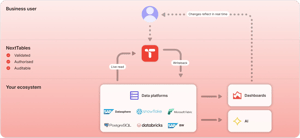
Build data maintenance apps, guided for business teams, trusted by IT. Business teams update their own data, with validation at entry, role-based authorisation, and a full audit trail behind every edit.

Works with your stack

Native read and write, direct to your tables
platform-works-with-your-stack-en-2x

Built for business teams

Familiar, guided, ready to use

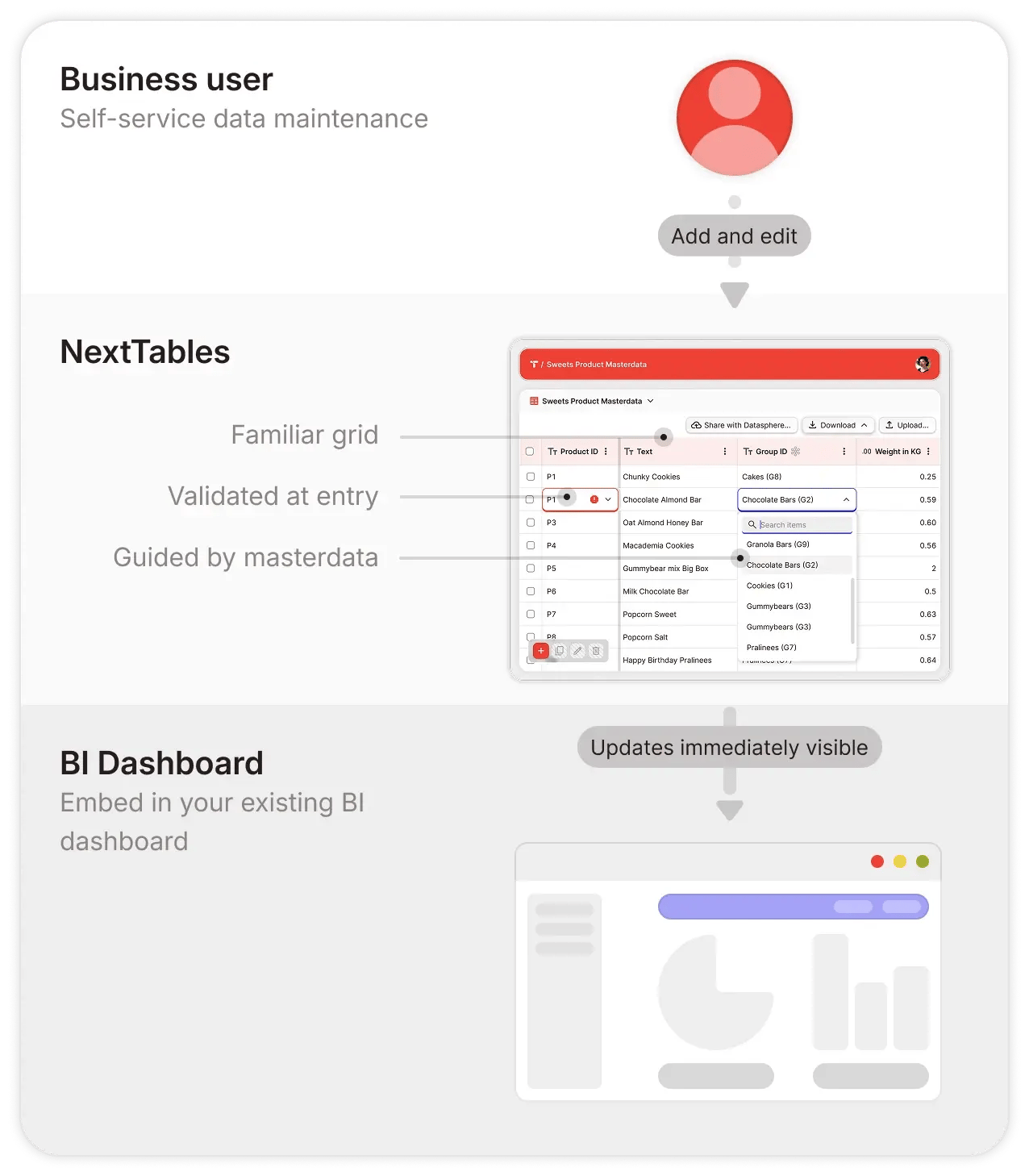
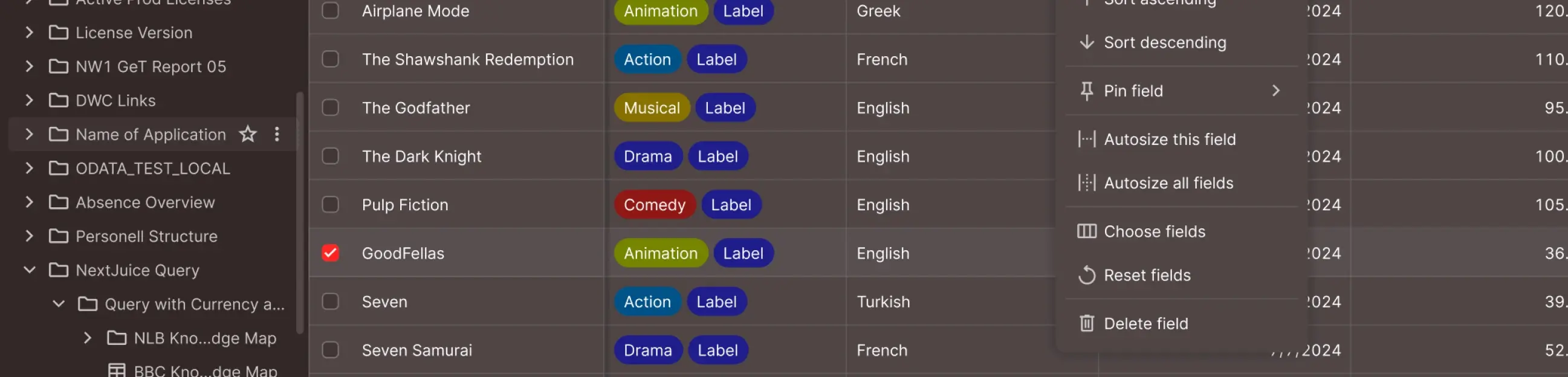
Familiar, business-friendly interface

Grid-based editing, filtering, sorting and import, in business terms, teams already know. Productive from day one.


Guided data entry

Built-in value help and instant validation feedback, so users find the right value and know immediately whether their entry is accepted.


Embeddable in any BI dashboard

Embed data write-back apps into any BI dashboard. Updates are validated, written to the platform, and visible in the dashboard, so maintenance happens where decisions are made.


End-to-end self-service data maintenance apps

The same team that owns the data owns the app, from idea to live. Validation, authorisation, and auditability are built in.

platform-built-for-business-teams-en-2x


Governed

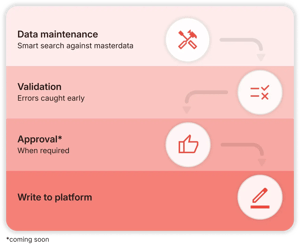
Validated, authorized, auditable
platform-governed-en-2x
Validation at entry Every entry is validated against your rules before it reaches the platform. Errors surface immediately so the business user can fix them on the spot, and only validated data is written.
Role-based and row-level access Built on role-based access control (RBAC) with row-level rules, scoped to folders. Roles cover two layers: data maintenance and object creation (apps, tables, connections). Row-level rules can reuse the access tables on your data platform, or be defined in NextTables.
Single sign-on with your enterprise identity provider Users sign in through your enterprise SSO with the credentials they already have, with no separate platform account. Currently supports Microsoft Entra ID and Google Workspace.
Business data stays on your enterprise data platform Only configuration metadata is stored by NextTables. Business data passes through during reads and writes and remains exclusively on your enterprise data platform.
Full audit trail coming soon Every change is captured: who, what, old and new values, and when, recorded on your enterprise data platform alongside the data.
Approval workflows coming soon For sensitive updates, edits will be proposed, reviewed, and only then written to the platform, for both human users and agent-driven changes. The approval decision becomes part of the audit record.
Reversible coming soon Every change can be rolled back to its previous value by authorised users. The rollback itself is recorded in the audit trail, alongside the original change.


lock

Tenant isolation
Dedicated K8s spaces

database

Dedicated Database
Per tenant, no sharing

globe_location_pin

EU-only hosting
Data & backups in EU

verified_user

Enterprise auth
RBAC, SSO, Row-level

cookie

GDPR compliant
DPA available

Running on

ms azure sap btp

Powering AI

Trusted data, intelligent assistance, agent-ready
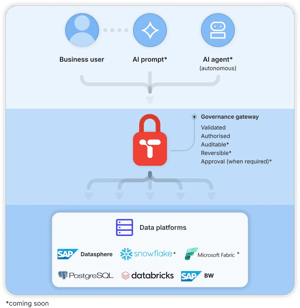
Business-maintained context for AI Business teams maintain the reference mappings, parameters, and context data that AI agents and models need to operate correctly, directly on the platform.
Talk to AI to edit your Data coming soon AI assists users in maintaining data through natural-language prompts. Filtering, updating, and mass-changing records according to prompted rules, with confirmation before every change and safe rollback at any point.
Talk to AI to create your Data Entry App coming soon Object creation through natural-language prompts. AI builds validation rules, tables, and complete data apps. Each configuration is reviewed and approved before it goes live.
Governed gateway for AI agents coming soon AI agents write to the enterprise data platform through the same gateway as human users. Agent-driven updates are validated, authorized, auditable, reversible, and can require human approval.
platform-powering-ai-en-2x


demo-cta-background

Ready to see NextTables in action?

Book a personalised demo, or try it yourself free for 30 days.


Frequently asked questions

1. How does NextTables connect to and write to our data platform?

NextTables connects through each platform's native interface and writes directly to your tables, so the platform you already run remains the single source of truth. NextTables itself runs as a managed SaaS app. Business data passes through during a read or write, and stays exclusively on your enterprise data platform afterwards. Only configuration metadata, such as apps, table and column config, validation rules, and role assignments, lives inside NextTables.

2. Is NextTables another system we have to integrate and maintain?

NextTables runs as a managed SaaS app, so upgrades and infrastructure are maintained by us. Your team configures apps, validation rules, and roles through the interface, in business terms. The platform you already run remains the single source of truth, with your tables, governance, and security perimeter intact. NextTables sits alongside as the maintenance layer that standardises how business teams update the data behind your reports, dashboards, and AI.

3. Can NextTables reuse our existing identity, roles, and access policies?

Yes. Identity stays with your enterprise SSO, so users sign in with the accounts they already have. Roles in NextTables are assigned at the folder level with read, write, create, approve, and delete rights, and permissions inherit downward to the data sources connected inside each folder. Row-level authorisation is driven by a separate control table that defines which user may access which rows. You can maintain that control table directly in NextTables, or point to an access-control table you already maintain on the data platform, in which case enforcement follows your existing policy automatically.

4. Where are validation rules defined and executed?

Validation rules live in NextTables. Each app validates entries against the enterprise master data tables it is connected to, so values are checked against your source of truth before anything is written. Every rule runs at the point of entry, ahead of the write to the data platform, so only validated data lands in your tables and users see and fix invalid entries on the spot. The rule definitions are stored as configuration metadata inside NextTables, while the business data they validate stays on your enterprise data platform.