
📝 Availability: NextTables for SAP BW, Professional and Enterprise editions.
You will learn
How to restrict which rows a user sees and may change, using the analysis authorizations your BW system already has. This is row-level security, and NextTables reads it rather than reimplementing it: no second authorization concept to maintain, and no code.
This article is for whoever configures tables in NextTables, together with whoever maintains analysis authorizations in BW.
Prerequisites
- Analysis authorizations already modeled in SAP BW for the InfoObjects you want to restrict on.
- Object authorizations in place, which decide whether the user can open the table at all. See How object authorizations work in NextTables for SAP BW.
- Config admin rights to change the table properties.
Object access and row access are two different checks
Object authorizations decide whether a user may reach an InfoProvider at all. They say nothing about its contents. Analysis authorizations restrict the data content, which is what the SQL world calls row-level security.
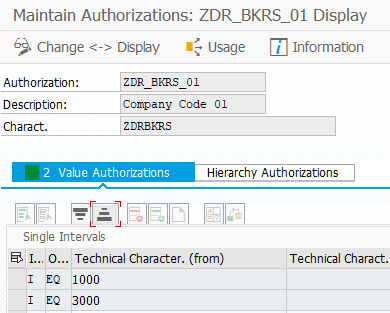
A table of sales by company code makes the split concrete: the object authorization decides whether you can open that table, and the analysis authorization decides whether you see company code 1000, company code 3000, or both.
Step-by-Step Instructions
1. Switch the check on for the table
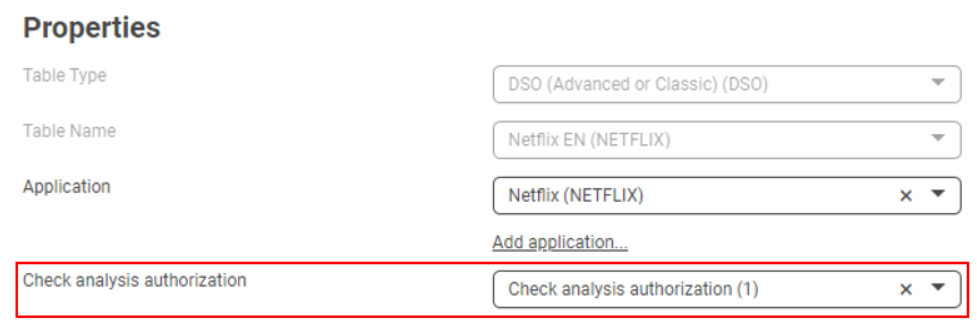
Go to Settings, Configurations and open the table. Set Check analysis authorization? to 1, check analysis authorization.
2. For an InfoObject, mark it usable as an InfoProvider
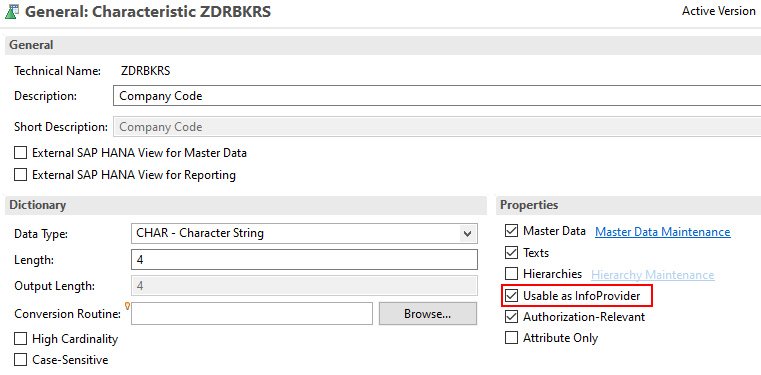
The check only works on an InfoObject if the characteristic is flagged as an InfoProvider. Open the properties of the characteristic and set Usable as InfoProvider.
3. Set the generated variables in the global filter
NextTables generates a variable for every InfoObject flagged as authorization relevant. Set them in the global filter.
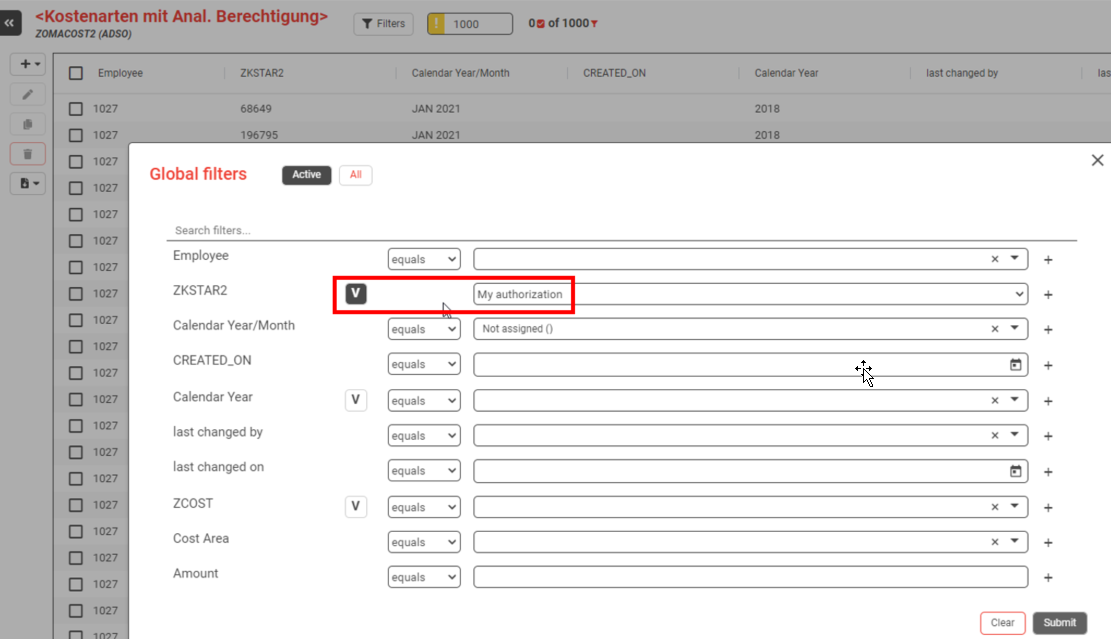
The user then sees only the values they are authorized for. In the example, company codes 1000 and 3000, exactly the ones in the analysis authorization.
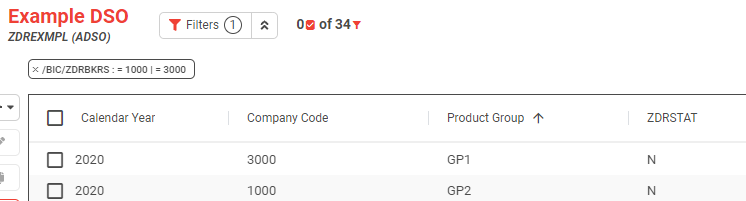
📝 Why variables rather than a silent filter: a variable is visible. The user can see that their view is restricted, which explains why their screen differs from a colleague's. It also means a template or bookmark can be saved and shared with the variable in it, so every recipient sees their own data through the same saved view. A silent filter would do neither.
4. Check what happens outside the authorization
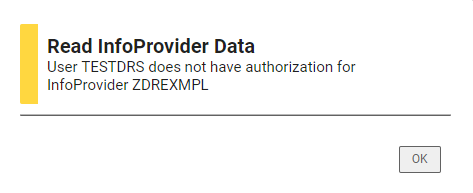
Requesting data the user is not authorized for produces an error message rather than a quietly shortened result.
What is checked, and where
| Object | Supported | Notes |
|---|---|---|
| ADSO | Yes | Several authorization-relevant InfoObjects in one DSO are supported; each gets its own variable. |
| Classic DSO | Yes | Including direct update DSOs. |
| InfoObject | Yes | The characteristic has to be usable as an InfoProvider. |
| Compounded InfoObjects | Yes | Checked on write as well. |
The check applies on the way out and on the way back. When data is written, every record is checked against the user's analysis authorizations, so a user cannot write a value into a row they are not allowed to see.
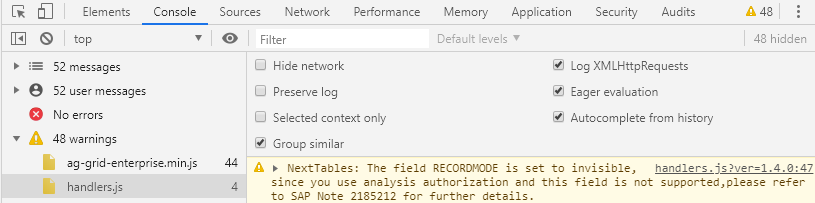
⚠️ Enabling the check changes how the data is read. NextTables then uses the function module RSDRI_INFOPROV_READ, which returns reporting-relevant fields only. Fields such as RECORDMODE cannot be fetched, and the browser console lists which fields were dropped. If a column disappears after you switch the check on, that is where to look.
Troubleshooting / FAQs
1. A column vanished after I switched the check on.
RSDRI_INFOPROV_READ only returns fields that are relevant for reporting. Open the browser console: it names the fields that were dropped. RECORDMODE is the usual one.
2. The check does nothing on an InfoObject.
The characteristic is probably not marked Usable as InfoProvider. Without that flag there is no InfoProvider for the check to run against.
3. NextTables demands an analysis authorization for a table that has nothing to restrict.
An InfoProvider is authorization relevant through 0TCAIPROV even when it holds no other relevant InfoObjects. Switch the check off in the table properties for that provider rather than modeling an authorization you do not want.
4. A user can see a row but not save a change to it.
Writing is checked separately, record by record, against the same authorizations. Check that the value being written is inside the user's authorization, not just the value being replaced.
5. Do I have to build a second authorization concept for NextTables?
No. NextTables reads the analysis authorizations that already exist in BW. What you maintain there is what applies here.
6. Should I restrict rows with a BAdI instead?
Only when analysis authorizations genuinely cannot express the rule. This route needs no code, survives upgrades, and is maintained by the people who already maintain BW authorizations. The Data method is the fallback, not the default: see The SET_DATA_EXIT method in NextTables for SAP BW.