
📝 Availability: NextTables for SAP BW, Enterprise edition. Custom buttons are defined in a BAdI; BAdI support is an Enterprise feature.
You will learn
How to give a table two buttons: one that starts a BW process chain, and one that reports what the last run is doing. Together they let the person maintaining the data trigger the processing that follows it, without a second tool and without asking anyone.
This article is for ABAP developers.
📝 There is no configuration route for this. Custom buttons exist only in the BAdI, so unlike most NextTables capabilities this one has no settings-only alternative. If you were hoping to avoid ABAP here, there is nothing to find.
The scenario
Someone corrects addresses in a table. Downstream, a process chain geocodes them. Without a button, the correction and the processing are two separate worlds: the person edits, then waits, or asks someone to run the chain, or the chain runs on a schedule that has nothing to do with when the data actually changed.
Two buttons close that gap. The first starts the chain, but refuses if it is already running. The second answers "what happened to my last run".
Prerequisites
- A table maintenance BAdI implementation for the table. How to implement the table maintenance BAdI in SAP BW.
- The button parameters. Custom buttons in NextTables for SAP BW is the full reference.
- An existing process chain, and authorization to start it.
Step-by-Step Instructions
1. Define the two buttons
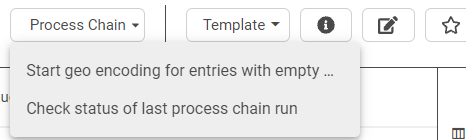
Both go under one submenu parent, so the top menu gains one entry rather than two:
METHOD /nly/if_editor~set_meta_exit.

  ch_s_table_info-buttons = VALUE #( BASE ch_s_table_info-buttons

    ( name     = 'NO_ACTION_T'
      descr    = 'Process Chain'
      action   = /nly/cl_table_rest_v3=>co_action_no_action
      location = /nly/cl_table_rest_v3=>co_location_top )

    ( name       = 'BUTTON_URL_T_1'
      descr      = 'Start geo encoding for entries with empty status'
      action     = /nly/cl_table_rest_v3=>co_action_button
      location   = /nly/cl_table_rest_v3=>co_location_top
      sort_order = '0'
      parent     = 'NO_ACTION_T' )

    ( name       = 'BUTTON_URL_T_2'
      descr      = 'Check status of last process chain run'
      action     = /nly/cl_table_rest_v3=>co_action_button
      location   = /nly/cl_table_rest_v3=>co_location_top
      sort_order = '1'
      parent     = 'NO_ACTION_T' ) ).

ENDMETHOD.
2. Check before you start
The start button reads today's runs first. If one is still active, it says so and stops rather than queueing a second run.
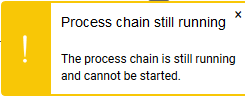
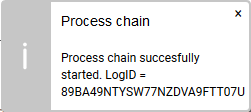
Otherwise it starts the chain and reports the log ID, so the run can be found again in RSPC.
3. Report the status of the last run
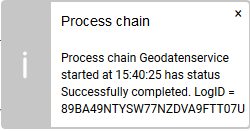
The status button reads the same log and translates the status code into the text SAP itself uses, so the message says Active rather than A.
4. The complete Update method
METHOD /nly/if_editor~set_update_exit.

  DATA: lt_logs  TYPE TABLE OF rspc_s_log_f4,
        l_active TYPE c,
        l_logid  TYPE rspc_logid,
        l_msg    TYPE string,
        l_dd07v  TYPE dd07v.

  CASE i_button.

    WHEN 'BUTTON_URL_T_1'.

      CALL FUNCTION 'RSPC_API_CHAIN_GET_RUNS'
        EXPORTING
          i_chain    = 'GEODATA'          " name of the process chain
          i_date     = sy-datum           " today, on the application server
        TABLES
          e_t_logs   = lt_logs
        EXCEPTIONS
          failed     = 1
          OTHERS     = 2.

*     The first record carries the status of the latest run. An empty status
*     on that first record means the chain has just started, not that it is idle.
      LOOP AT lt_logs ASSIGNING FIELD-SYMBOL(<ls_logs>).
        IF <ls_logs>-analyzed_status = 'A'
           OR ( <ls_logs>-analyzed_status = '' AND sy-tabix = 1 ).
          l_active = 'X'.
        ENDIF.
      ENDLOOP.

      IF l_active = 'X'.
        ct_messages = VALUE #( BASE ct_messages
          ( type      = /nly/cl_table_rest_v3=>co_msg_type_warning
            visu_type = /nly/cl_table_rest_v3=>co_visu_type_toast
            hdr       = 'Process chain still running'
            msg       = |The process chain is still running and cannot be started.| ) ).
        e_skip = 'X'.
        RETURN.
      ENDIF.

      CALL FUNCTION 'RSPC_API_CHAIN_START'
        EXPORTING
          i_chain = 'GEODATA'
        IMPORTING
          e_logid = l_logid.

      IF sy-subrc = 0.
        ct_messages = VALUE #( BASE ct_messages
          ( type      = /nly/cl_table_rest_v3=>co_msg_type_info
            visu_type = /nly/cl_table_rest_v3=>co_visu_type_toast
            hdr       = 'Process chain'
            msg       = |Process chain successfully started. LogID = { l_logid }| ) ).
      ENDIF.

      e_skip = 'X'.
      RETURN.

    WHEN 'BUTTON_URL_T_2'.

      CALL FUNCTION 'RSPC_API_CHAIN_GET_RUNS'
        EXPORTING
          i_chain  = 'GEODATA'
          i_date   = sy-datum
        TABLES
          e_t_logs = lt_logs
        EXCEPTIONS
          failed   = 1
          OTHERS   = 2.

      READ TABLE lt_logs ASSIGNING FIELD-SYMBOL(<ls_log>) INDEX 1.

      IF sy-subrc = 0.

*       An empty status means the chain is actually running.
        IF <ls_log>-analyzed_status IS INITIAL.
          <ls_log>-analyzed_status = 'A'.
        ENDIF.

*       Translate the status code into SAP's own text.
        CALL FUNCTION 'DD_DOMVALUE_TEXT_GET'
          EXPORTING
            domname  = 'RSPC_STATE'
            value    = CONV char10( <ls_log>-analyzed_status )
            langu    = sy-langu
          IMPORTING
            dd07v_wa = l_dd07v.

        l_msg = |Process chain { <ls_log>-txtlg } started at | &&
                |{ <ls_log>-zeit TIME = USER } has status { l_dd07v-ddtext }. | &&
                |LogID = { <ls_log>-log_id }|.

      ELSE.
        l_msg = |The process chain has not run today yet.|.
      ENDIF.

      ct_messages = VALUE #( BASE ct_messages
        ( type      = /nly/cl_table_rest_v3=>co_msg_type_info
          visu_type = /nly/cl_table_rest_v3=>co_visu_type_toast
          hdr       = 'Process chain'
          msg       = l_msg ) ).

      e_skip = 'X'.
      RETURN.

  ENDCASE.

ENDMETHOD.
⚠️ E_SKIP = 'X' and RETURN matter. The button is not a save. Without them the exit falls through into whatever the rest of the method does on a normal update, which is not what the user asked for by pressing a button.
📝 Both calls look at today only. I_DATE = SY-DATUM means a chain that started before midnight is invisible to both buttons. For a chain that can span midnight, widen the date range.
Troubleshooting / FAQs
1. Nothing happens when I press the button.
I_BUTTON is only filled when the button's action is BUTTON. With SEND_ALL or SEND_SEL, data is sent and no button name arrives.
2. The chain starts twice.
The active check is what prevents it. Note that an empty status on the first log record means "just started", not "idle", which is why the check treats it as active.
3. The status message shows a letter rather than a word.
The status code was not translated. DD_DOMVALUE_TEXT_GET against the domain RSPC_STATE turns it into the same text SAP shows in RSPC.
4. The status button says the chain has not run, but it did.
It ran on a different day. Both function calls pass SY-DATUM.
5. The table saved a change when I pressed the button.
The exit did not skip and return. Set E_SKIP = 'X' and RETURN in every button branch.
6. Can a user start a chain they are not authorized for?
The chain is started by the calling user, so the usual SAP authorizations apply. Check them before assuming the button is the problem.