
📝 Availability: NextTables for SAP BW, Professional and Enterprise editions.
You will learn
How to organize tables into applications and menu entries so that a hundred tables stay findable, how stacked applications let one menu serve several departments, and why the menu structure organizes the list while the authorizations decide who sees which part of it.
This article is for whoever sets NextTables up for more than a handful of tables.
Prerequisites
- Tables already configured in NextTables. Table and column configuration in NextTables for SAP BW.
- The ability to maintain roles for the
/NLY/TBLSauthorization object, or somebody who can. How object authorizations work in NextTables for SAP BW explains it.
Why structure is a setup task
The number of tables in NextTables grows quickly, and the menu gets less useful with every one of them. At a hundred entries an unstructured menu is a list nobody reads. Applications and menu entries are what keep it navigable.
💡 Use the wizards. NextTables provides a configuration wizard and a menu wizard. The guided route is quicker and materially less error-prone than maintaining the entries by hand.
The one rule that explains the rest
An application is the unit of authorization. Read, write, content admin and config admin are always granted per application. The menu structure organizes applications for the eye; it does not grant or restrict anything by itself.
That separation is what makes stacking work: a menu can be assembled from several applications, and each of them keeps its own authorizations. Two people opening the same menu can therefore see different amounts of it.
Step-by-Step Instructions
1. Decide the applications by who maintains what
Cut applications along responsibility, not along subject matter. If two groups of tables are always maintained by different people, they are two applications, however related their content.
The worked example: Controlling maintains the budget for personnel and material costs. HR should see and maintain only the personnel tables, Purchasing only the material tables, and the controller both.
2. Build the menu from stacked applications
Give the top level its own application, then hang the departmental applications beneath it:
| Menu level 1 | Menu level 2 | Tables | Application |
|---|---|---|---|
| Controlling | None | APP_CO | |
| Personnel Costs | PC_INPUT, PC_BUDGET, info page | APP_P_COSTS | |
| Material Costs | MC_INPUT, MC_BUDGET | APP_M_COSTS |
The top-level entry carries no tables of its own. It exists so the structure has a roof that can be authorized separately.
3. Cut the roles along the applications
| Role | Application | Activity |
|---|---|---|
CO_TOP | APP_CO | Read |
CO_PC | APP_P_COSTS | Read, Write |
CO_MC | APP_M_COSTS | Read, Write |
4. Pick what people should see
The same structure gives two quite different results depending on whether you grant the top-level role.
Everyone sees the full structure. Grant CO_TOP to everyone. A controller with CO_TOP, CO_PC and CO_MC sees all three. Someone from HR with CO_TOP and CO_PC sees the Controlling heading and Personnel Costs underneath it, and knows the rest of the structure exists.
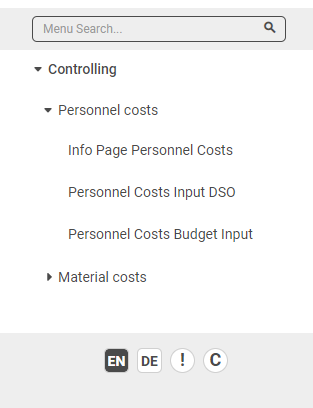
Everyone sees only their own part. Withhold CO_TOP. The HR user with only CO_PC sees Personnel Costs and nothing else, not even the heading above it.
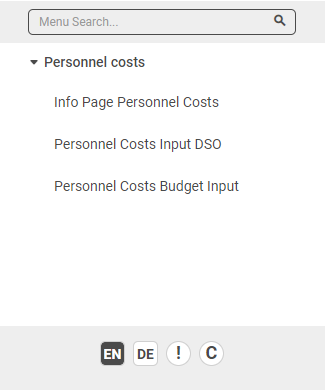
Neither is more correct. Showing the roof tells people the structure exists and who to ask; hiding it keeps the menu to what the person can act on.
5. Mix the activities per application
Because every activity is bound to an application, one person can hold read on one application, read and write on a second, and content admin on a third. Build the combination out of one role per application rather than one role per person.
Troubleshooting / FAQs
1. A user sees no applications at all.
The menu is built from the user's read permissions. Without read (activity R) on at least one application, nothing appears. Read has to be included for every application a user should reach, even one where they will also write.
2. A user sees a sub-entry but not the heading above it.
They do not hold the role for the top-level application. That is the second scenario above, and it is a choice, not a defect.
3. Rearranging the menu did not change anyone's access.
Correct, and by design. The menu structure organizes applications; the authorizations decide what is visible. Change the roles, not the menu, to change access.
4. Where do I start with a hundred tables?
Group by who maintains them, give each group an application, and add one top-level application as the roof. Then decide per group whether they should see the roof.
5. Should I build this by hand?
No. Use the configuration wizard and the menu wizard.