
📝 Availability: NextTables for SAP BW, Enterprise edition. This article documents a BAdI; BAdI support is an Enterprise feature.
You will learn
What the SET_DATA_EXIT method of the Table Maintenance BAdI can do on the read path: tighten or widen the selection before the database is read, change values after it is read, or take the read over completely. It is also the reference for C_QUERY_POST, the structure that carries the query the user's filters produced.
This article is for ABAP developers. It covers reading data; writing it is the Update method, and the shape of the table is the Meta method.
Prerequisites
- A Table Maintenance BAdI implementation for your table. How to implement the table maintenance BAdI covers the enhancement spot, the implementing class and the filter values.
- ABAP development access on the BW system.
The two steps
The exit runs whenever values are requested from the database, and it runs twice per request. I_STEP tells you which pass you are in:
I_STEP = 1, before the read. Change the selection inC_QUERY_POST-SELECT_OPTIONS, or setE_SKIP = 'X'to suppress the standard read entirely and fillCO_TABLEyourself.I_STEP = 2, after the read.CO_TABLEholds the rows that came back. Change values here to present them differently without changing what is stored.
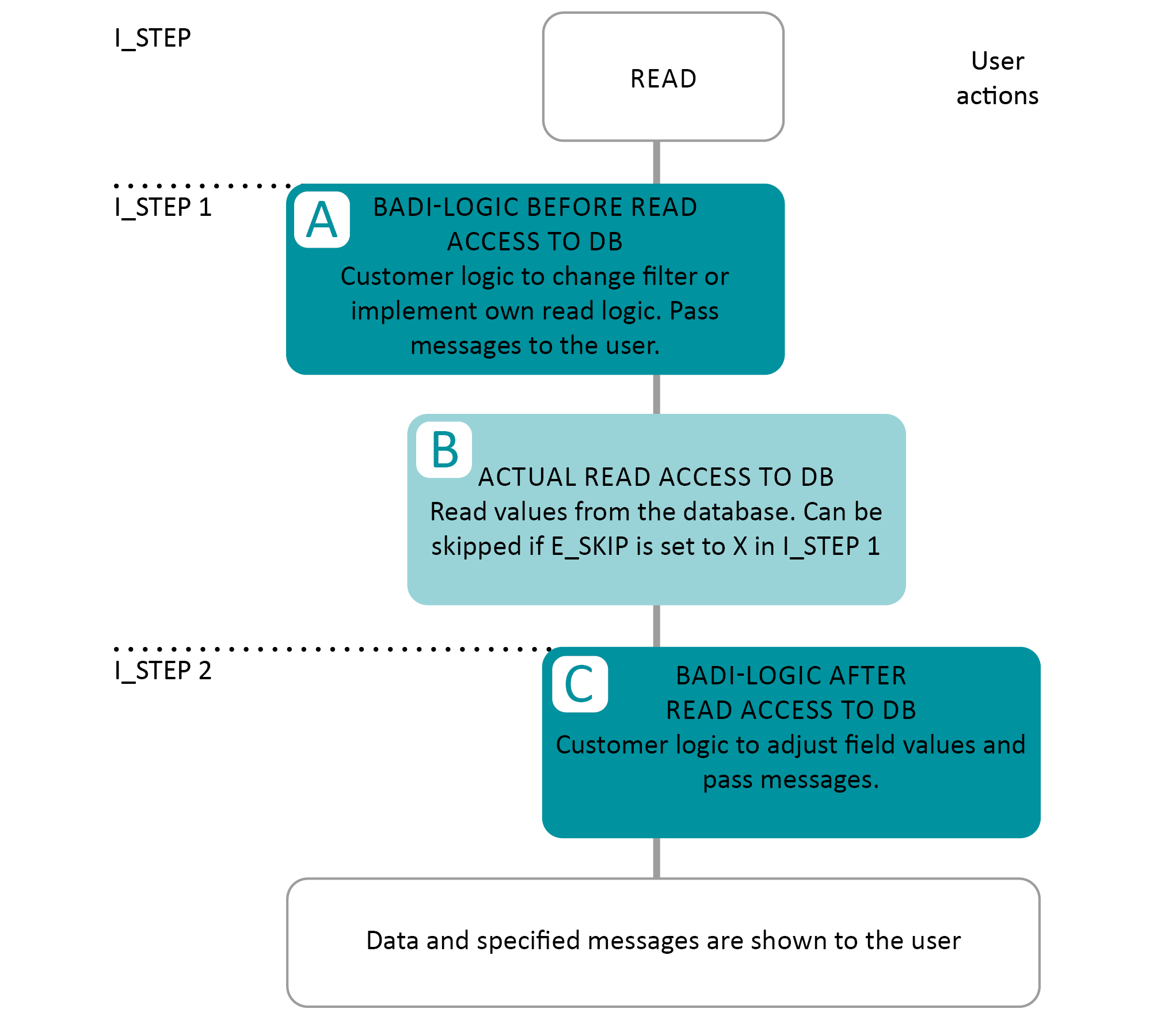
Messages can be raised in both steps through CT_MESSAGES. See Error handling in the table maintenance BAdI for SAP BW.
📝 Master item scenarios: the framework derives the item filters from the parent context after step 1 runs. While debugging in I_STEP = 1 you will therefore not yet see the derived master item filter in C_QUERY_POST-SELECT_OPTIONS. That is expected, not a defect.
Parameters
| Parameter | Type | Description | Possible values |
|---|---|---|---|
I_TECHNAME | CHAR 30 | Technical name of the table | For example /BIC/AZOMACOST2 |
I_TABNAME | CHAR 30 | Table name | For example ZOMACOST |
I_TTYPE | CHAR 10 | Table type | DDIC Data Dictionary tableDSO DSO, advanced or classicCUSTOM custom, usable for viewsIOBJ_ATT InfoObject attributesIOBJ_TXT InfoObject textsALIASTABLE alias table |
I_TOP | INT4 | Number of records to read | |
I_S_TABLE_INFO | Structure | Table info | The table properties described in the Meta method reference |
I_T_FIELDS_INFO | Table | Field info | The field properties described in the Meta method reference |
I_STEP | CHAR 1 | Step of the read access | 1 before the database read2 after the database read |
E_SKIP | CHAR 1 | Skip further processing | X skip the standard read logic, so you can implement your own |
CO_TABLE | Table | In step 2, the data read from the database | |
C_QUERY_POST | Structure | The query the user's selection produced | See below |
CT_MESSAGES | Table | Messages to show the user | See the error handling reference |
C_TOTAL_ROWS | INT4 | Total rows in the database for this selection. | Change it only for a custom table type, or when you implemented your own read with E_SKIP = 'X' in step 1. In most cases leave it alone. |
C_QUERY_POST
C_QUERY_POST groups every global query setting the Data method cares about: the requested fields, the sort order, the global filters and the select options from the user interface. Read it and change it in I_STEP = 1, before it is processed.
| Field | Type | Description |
|---|---|---|
SELECT | /NLY/TT_SELECT_FIELDS | The fields requested from the main table. |
SORT | /NLY/TT_SORT_FIELDS | Sort criteria for the result set: field and direction. |
FILTER | /NLY/TT_FILTER_FIELDS | Obsolete. Historic additional filter conditions. Use SELECT_OPTIONS instead. |
SELECT_OPTIONS | /NLY/TT_FIELD_SELECT_OPTIONS | Range-based filters per field, in the classic ABAP select-options form. This is the field to change. |
FIELDS_TEXT_DISPLAY | /NLY/TT_SELECT_FIELDS | Fields used for text display, for example text joins. |
PARENT_SELECT_OPTIONS | /NLY/TT_PARENT_SELECT_OPTIONS | The parent context and its field mappings in a master item scenario. Not a list of final item ranges: the framework derives those from it later. |
SELECT_OPTIONS
A table of type /NLY/TT_FIELD_SELECT_OPTIONS with line structure /NLY/TS_FIELD_SELECT_OPTIONS. It holds the global range filters in the classic ABAP select-options shape, so an ABAP developer can read and extend it without a translation step:
| Field | Type | Description |
|---|---|---|
FIELDNAME | CHAR 30 | Technical field name the criterion belongs to. |
SIGN | CHAR 1 | Include or exclude, I or E. |
OPTION | CHAR 2 | Operator, for example EQ, BT, GE, LE. |
LOW | CHAR 255 | Single value, or the lower bound of an interval. |
HIGH | CHAR 255 | Upper bound when OPTION = 'BT', empty otherwise. |
PARENT_SELECT_OPTIONS
In a master item scenario the item table is read in the context of a selected master row. PARENT_SELECT_OPTIONS, of type /NLY/TT_PARENT_SELECT_OPTIONS, carries that context:
| Field | Type | Description |
|---|---|---|
LEVEL | INT8 | Hierarchy level of the parent context. 0 is the direct parent, higher numbers are nested. |
MAPPINGS | /NLY/TT_MAPPING | Mapping between the parent fields and the current entity's fields. |
TABNAME | /NLY/DE_TABNAME | Name of the parent table. |
TTYPE | /NLY/DE_TTYPE | Type of the parent entity. |
The table can hold several rows, one per parent level. The mappings that matter may sit on a nested level rather than on level 0; that is expected as long as the level representing the driving master context supplies them.
MAPPINGS
MAPPINGS is more than join metadata. Each row of /NLY/TS_MAPPING is already a selection criterion that will restrict the item table from the selected master context:
| Field | Type | Description |
|---|---|---|
FIELDNAME | CHAR 30 | Technical field name on the item entity that the derived selection applies to. |
LOW | CHAR 250 | The derived value for that field, taken from the selected master row. |
Step-by-Step Instructions
1. Branch on the step
Split the method by I_STEP first. The two passes see different data and almost never share logic:
IF i_step = 1.
* your logic before the read access
ELSEIF i_step = 2.
* your logic after the read access
ENDIF.
2. Change the selection, or take the read over
In step 1, add or tighten entries in C_QUERY_POST-SELECT_OPTIONS to restrict what the user sees. To read the data yourself instead, set E_SKIP = 'X' in step 1 and fill CO_TABLE with your own result. Set C_TOTAL_ROWS as well in that case; nothing else knows how many rows your selection found.
3. Adjust values after the read
In step 2, loop CO_TABLE and change field values before they reach the user. This changes the presentation only. Nothing here is written back, so it is the wrong place to correct stored data.
4. Refuse the read when it should not happen, and say why
This example closes planning once the round is over. November is the cut-off: the exit skips the read and raises a toast, so the user sees a reason instead of an empty grid.
IF i_step = 1.
  IF sy-datum+4(2) = '11'.

    e_skip = 'X'.

    ct_messages = VALUE #( BASE ct_messages
      ( type      = /nly/cl_table_rest_v3=>co_msg_type_error
        visu_type = /nly/cl_table_rest_v3=>co_visu_type_toast
        hdr       = 'Planning not allowed'
        msg       = 'The planning round is over, no values will be displayed' ) ).

  ENDIF.
ENDIF.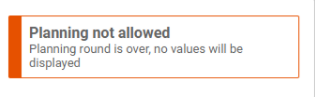
Troubleshooting / FAQs
1. My filter change in step 1 has no effect.
Check that you changed C_QUERY_POST-SELECT_OPTIONS and not the obsolete FILTER field. FILTER is historic and no longer evaluated.
2. The master item filter is missing while I debug step 1.
By design. The framework derives item filters from PARENT_SELECT_OPTIONS after step 1 returns, so the complete filter is not visible at that point. Read the parent context from PARENT_SELECT_OPTIONS and its MAPPINGS instead.
3. I set E_SKIP and the grid is empty.
E_SKIP = 'X' suppresses the standard read. Nothing else fills CO_TABLE afterwards, so your own read logic has to. Set C_TOTAL_ROWS too, or paging will count rows that were never selected.
4. Row counts are wrong on a custom table.
C_TOTAL_ROWS is the only source for the total. For a custom entity type, or after your own read, set it explicitly. For a standard table type, leave it untouched.
5. My value change in step 2 was saved to the database.
It was not. Step 2 changes what is displayed. If the stored value is wrong, correct it on the write path in the Update method.