
📝 Availability: NextTables for SAP BW, Enterprise edition. This article documents a BAdI; BAdI support is an Enterprise feature.
You will learn
When the SET_UPDATE_EXIT method of the Table Maintenance BAdI runs, which event and step combinations exist, what every parameter carries, and how to use the method to derive values, validate input, or react after the database write. This is the reference; two worked examples are linked at the end.
Prerequisites
- A BAdI implementation for your table. How to implement a BAdI for NextTables covers the enhancement spot, the implementing class and the filter values.
- ABAP development access on the BW system.
The method
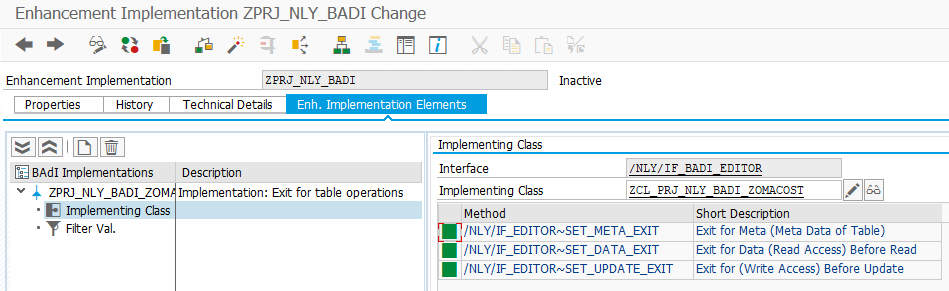
The Table Maintenance BAdI's interface is /NLY/IF_BADI_EDITOR. It includes the component interface /NLY/IF_EDITOR, which carries the three exits: SET_META_EXIT, SET_DATA_EXIT and SET_UPDATE_EXIT. Custom logic for saving data therefore runs in the method /NLY/IF_EDITOR~SET_UPDATE_EXIT of your implementing class. With it you can populate additional fields, enhance or correct data the user entered, and add your own validations. A typical use is deriving Changed by and Changed on to track changes automatically.
Events: when the exit is called
When data is entered in the table, whether via clipboard, a new manual entry or an edit of an existing value, the exit is triggered with the parameter I_TYPE naming the event:
Constant (/nly/cl_table_rest_v3=>) |
I_TYPE |
Fires when |
|---|---|---|
co_type_default |
default |
A new row is created or existing rows are copied. Runs before the input dialog opens, so it cannot react to dialog input, but it can calculate, check and prefill the dialog's fields. |
co_type_validate |
validate |
Data is updated, inserted or deleted; the validation pass runs before the write. |
co_type_insert |
insert |
New records are inserted, via Insert Row or the Import dialog. |
co_type_update |
update |
Existing records are updated. |
co_type_delete |
delete |
Existing records are deleted. |
📝 Note: Delete requests carry keys only. When I_TYPE = 'delete', all non-key fields in CO_TABLE are initial by design. If your exit logic needs other attributes of the deleted rows, look them up in the target table or ADSO using the keys from CO_TABLE and apply your checks to the looked-up data.
Steps: before and after
Each event executes in two steps, distinguished by I_STEP:
co_step_before_update(I_STEP = 1): correct or enhance the data before any standard validation or update logic runs.co_step_after_update(I_STEP = 2): work with the data after the standard validation or update logic ran. During validation this is where you add custom checks or remove standard messages; after the database write it is where you can start a process chain that uses the updated data.
Both steps execute during the validate event and then again during the insert, update or delete event. Your logic therefore runs up to four times per save; guard it with CHECK statements on I_TYPE and I_STEP as in the skeleton below.
The full sequence
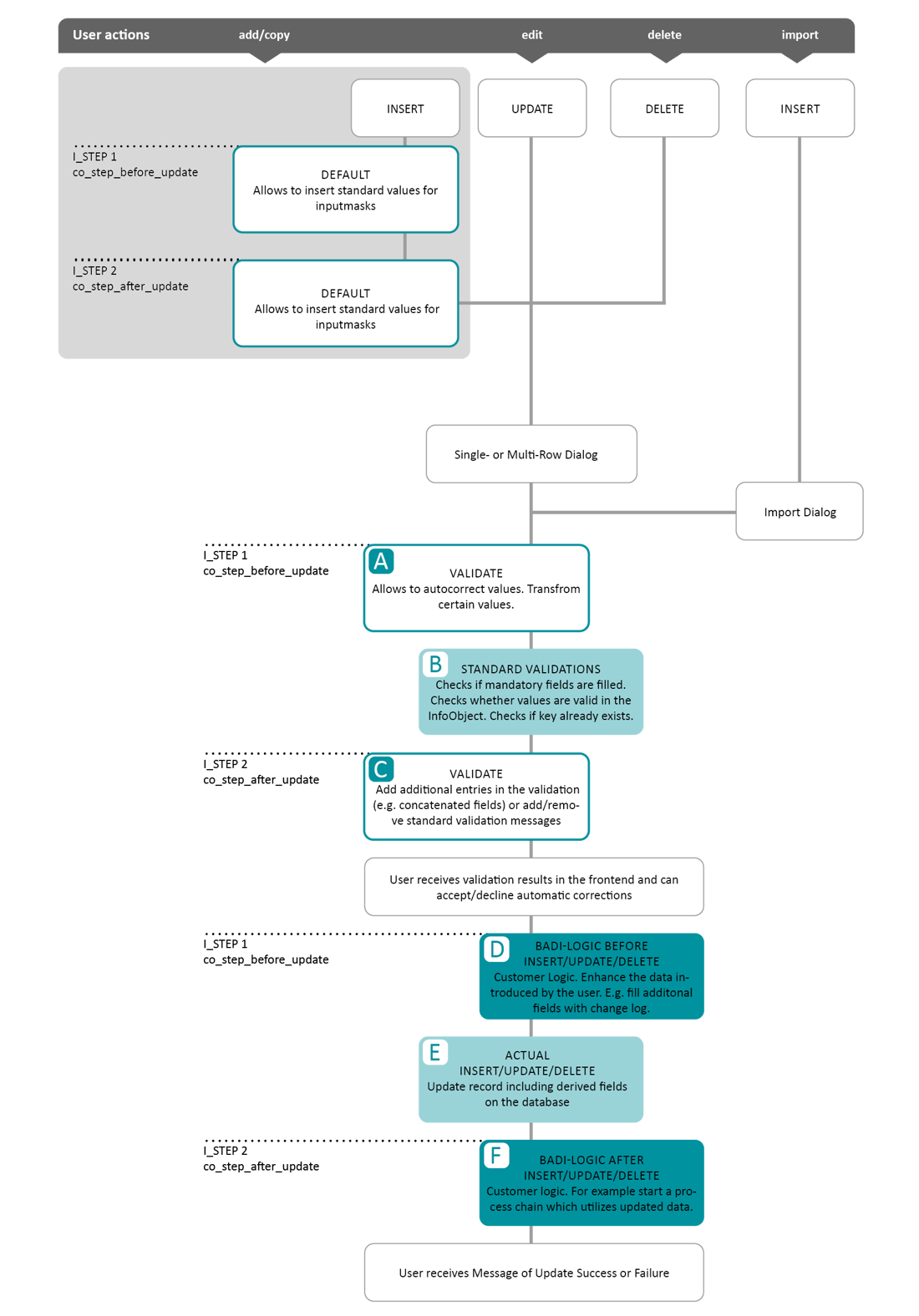
After a user executes an insert, update or delete action, the validation event runs first. In step 1 you can autocorrect or transform values. The standard validation checks execute next; they always run, regardless of your custom logic, and cover mandatory fields, existing keys and valid InfoObject values. In step 2 you can add further checks or modify validation messages. The results are then presented to the user, who can accept or decline automatic corrections.
The write event follows. In step 1 you can enhance the data just before the database access, for example filling derived fields. The insert, update or delete then executes. In step 2, after the database access, you can trigger follow-up logic such as a process chain. Finally the user receives the success or failure message.
Validation behavior
The ideal place for custom validations is after the standard validations, in step 2 of the validate event. Two message types produce different system behavior:
co_msg_type_warning: the data can be saved. The user gets a message informing them about the issue.co_msg_type_error: the data is not saved. A log is generated for the user to download, check and correct.
During validation, I_TYPE_VAL tells you which operation (insert, update or delete) triggered the validation pass, so you can act on each differently. Custom validation entries go into CT_VALIDATION; its structure is below.
Parameter reference
| Parameter | Type | Carries | Values |
|---|---|---|---|
I_TECHNAME |
CHAR 30 | Technical name of the table | e.g. /BIC/AZOMACOST2 |
I_TABNAME |
CHAR 30 | Table name | e.g. ZOMACOST |
I_TTYPE |
CHAR 10 | Table type | DDIC Data Dictionary table · DSO DSO (advanced or classic) · CUSTOM custom (views etc.) · IOBJ_ATT InfoObject attributes · IOBJ_TXT InfoObject texts · ALIASTABLE alias table |
I_TYPE |
CHAR 10 | Event | update · insert · delete · validate · default · sel_del (selective deletion) |
I_TYPE_VAL |
CHAR 10 | Operation that triggered the validation pass | insert · update · delete |
I_FIELD_VAL |
CHAR 60 | Name of the field that triggered the validation | |
I_S_TABLE_INFO |
Structure | Table information | |
I_T_FIELDS_INFO |
Structure | Field information | |
I_STEP |
CHAR 1 | Step relative to the database access | 1 before · 2 after |
I_BUTTON |
CHAR 30 | Name of the custom button that triggered the call, if any | |
I_S_IMPORT_SETTINGS |
Structure | Import settings of the current file import | See the structure below |
E_SKIP |
CHAR 1 | Skip further processing | X skips |
CO_TABLE |
Table | The changed rows, and only those | |
CO_TABLE_XXL_FILES |
Table | File contents for XXL columns of the changed rows | |
CT_UPDATE_FIELDS_PROPERTIES |
Structure | Updates to field properties | |
CT_VALIDATION |
Structure | Validation messages | See the structure below |
CT_SELECT_OPTIONS |
Structure | Selection criteria | |
CT_MESSAGES |
Structure | Messages shown to the user |
The CT_VALIDATION structure
| Field | Type | Carries | Values |
|---|---|---|---|
ROWIDX |
INT4 | Row number | |
COLUMN |
CHAR 30 | Field name | |
TYPE |
CHAR 30 | Message type | WARNING · ERROR · INFO · SUCCESS |
HDR |
STRING | Message header | |
MSG |
STRING | Message text |
The I_S_IMPORT_SETTINGS structure
| Field | Type | Carries |
|---|---|---|
FILE_ID |
CHAR 26 | File ID |
FILE_NAME |
CHAR 255 | File name |
FILE_MODE |
CHAR 5 | File mode: SMALL or LARGE |
FILE_TYPE |
CHAR 5 | File type: csv or excel |
FILE_SIZE |
INT4 | File size in bytes |
HEADER |
CHAR 1 | First line is a header |
THOUSANDSSEPARATOR |
CHAR 1 | Thousands separator |
DECIMALSEPARATOR |
CHAR 1 | Decimal separator |
DELIMITER |
CHAR 1 | CSV delimiter |
DATEFORMAT |
CHAR 10 | Date format |
A skeleton to start from
The CASE structure below routes every event and step combination to its own branch. Keep the branches you need and delete the rest.
METHOD /nly/if_editor~set_update_exit.

  FIELD-SYMBOLS <fs_t_table> TYPE ANY TABLE.

  ASSIGN co_table->* TO <fs_t_table>.

  CASE i_type.

    WHEN /nly/cl_table_rest_v3=>co_type_validate.
      CASE i_step.
        WHEN /nly/cl_table_rest_v3=>co_step_before_update.
          " autocorrect or transform values before the standard validation
        WHEN /nly/cl_table_rest_v3=>co_step_after_update.
          " add custom checks, or adjust standard validation messages
      ENDCASE.

    WHEN /nly/cl_table_rest_v3=>co_type_update
      OR /nly/cl_table_rest_v3=>co_type_insert
      OR /nly/cl_table_rest_v3=>co_type_delete.
      CASE i_step.
        WHEN /nly/cl_table_rest_v3=>co_step_before_update.
          " derive or enhance values just before the database write
        WHEN /nly/cl_table_rest_v3=>co_step_after_update.
          " react to the completed write, e.g. start a process chain
      ENDCASE.

  ENDCASE.

ENDMETHOD.
Two complete, worked implementations of this method are in How to track changes in NextTables for SAP BW (deriving a stamp from an authorization check) and How to call an external API to update data in NextTables for SAP BW (calling an external service before the write).
Troubleshooting / FAQs
1. My logic runs more than once per save.
By design. Both steps execute during the validate event and again during the write event, so an unguarded method body runs up to four times. Add CHECK statements on I_TYPE and I_STEP so each piece of logic runs in exactly one combination.
2. The exit does not run at all.
Almost always one of two things: the filter values of the BAdI implementation do not match the table name and table type, or the enhancement implementation was never activated. Check both before debugging the code.
3. My validation message does not stop the save.
Only co_msg_type_error blocks the save; co_msg_type_warning saves the data and informs the user. Check which type you append to CT_VALIDATION.
4. On delete, the rows in CO_TABLE are almost empty.
Delete requests carry keys only; all non-key fields are initial in this event. Read the full rows from the target table using the keys, then apply your checks.