
📝 Availability: NextTables for SAP BW, Enterprise edition. This article documents a BAdI; BAdI support is an Enterprise feature.
You will learn
What the Import BAdI is for, why it is the exception rather than the normal way to check imported data, every parameter of SET_IMPORT_EXIT, and a complete worked implementation that turns a company code description into its technical key, with a fuzzy match when the description is not exact.
This article is for ABAP developers. It merges the Import BAdI parameter reference and its implementation tutorial into one place, because neither is much use without the other.
⚠️ Read this before you start. The Import BAdI is not where import validation belongs, and it is not the main way data gets into NextTables. It does one narrow job: it reaches a field value before the value has to be compatible with the target data type, so it can map something the type would otherwise reject. It runs only for imports from a file or the clipboard, so anything implemented here is invisible to a user editing in the grid. Put custom validation in the Update BAdI's Validate step instead, where it covers both paths. How import validation works in NextTables for SAP BW shows the whole pipeline and which hook a given requirement needs.
Prerequisites
- ABAP development access on the BW system, with a package and a transport.
- Knowing how to create a BAdI implementation. How to implement a BAdI for NextTables in SAP BW covers the enhancement spot, SE19 and activation.
- A configured table to import into. Table and column configuration in NextTables for SAP BW.
What it is good for
The classic case is a value that is right but written in a form the field cannot store. A spreadsheet column holds Yes, YES and yes; the target field is NUMC1 and only accepts 1. Standard processing rejects all three, because by the time it looks at them they are already expected to be type compatible. The Import BAdI sees them one step earlier and can map them.
The second case, worked through below, is a file that carries descriptions where the table expects keys. A file listing company code descriptions can be turned into technical keys during the import, including a fuzzy match when the description in the file is not written exactly as it is in the system.
The two steps
The exit runs twice per imported value, distinguished by I_STEP:
I_STEP = 1, before the type check.I_VALUEholds the raw value from the file. Return the mapped value inE_VALUE. This is where nearly all Import BAdI logic belongs.I_STEP = 2, after auto-correction and the type check have run and the validation messages have been produced. Here you can read those messages and adjust them.
After step 2 the data is written and the Update BAdI is called, which is where validation and derivation proper happen.
The filter
Like every NextTables BAdI, the Import BAdI runs only when its filter matches. Set the table name, the table type and the field name in the Filter Values section.
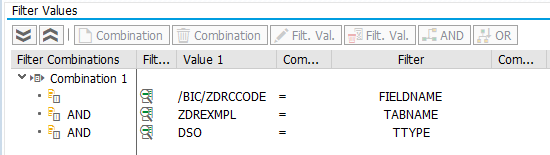
⚠️ Always fill FIELDNAME. You can leave it empty and branch on the field inside the implementation, but do not: the exit then runs for every field of every imported row. On a real import that is a measurable performance cost for logic that applies to one column.
Parameters
| Parameter | Type | Description | Possible values |
|---|---|---|---|
I_TECHNAME | CHAR 30 | Technical name of the table | For example /BIC/AZOMACOST2 |
I_TABNAME | CHAR 30 | Table name | For example ZOMACOST |
I_TTYPE | CHAR 10 | Table type | DDIC Data Dictionary tableDSO DSO, advanced or classicCUSTOM custom, usable for viewsIOBJ_ATT InfoObject attributesIOBJ_TXT InfoObject texts |
IS_FIELDS_INFO | Structure | Field information for the column being imported | The field properties described in the Meta method reference |
I_STEP | CHAR 1 | Step | 1 before auto-correction and the data type check2 after auto-correction and the data type check |
I_VALUE | STRING | Field value before conversion and validation | |
I_TABIX | INT4 | Row number in the imported data | |
E_SKIP | BOOLEAN | Skip further processing | X skip further processing |
E_VALUE | ANY | Field value after your conversion. This is what gets stored. | |
CT_VALIDATION | Table | Validation messages shown in the import report | See below |
CT_VALIDATION
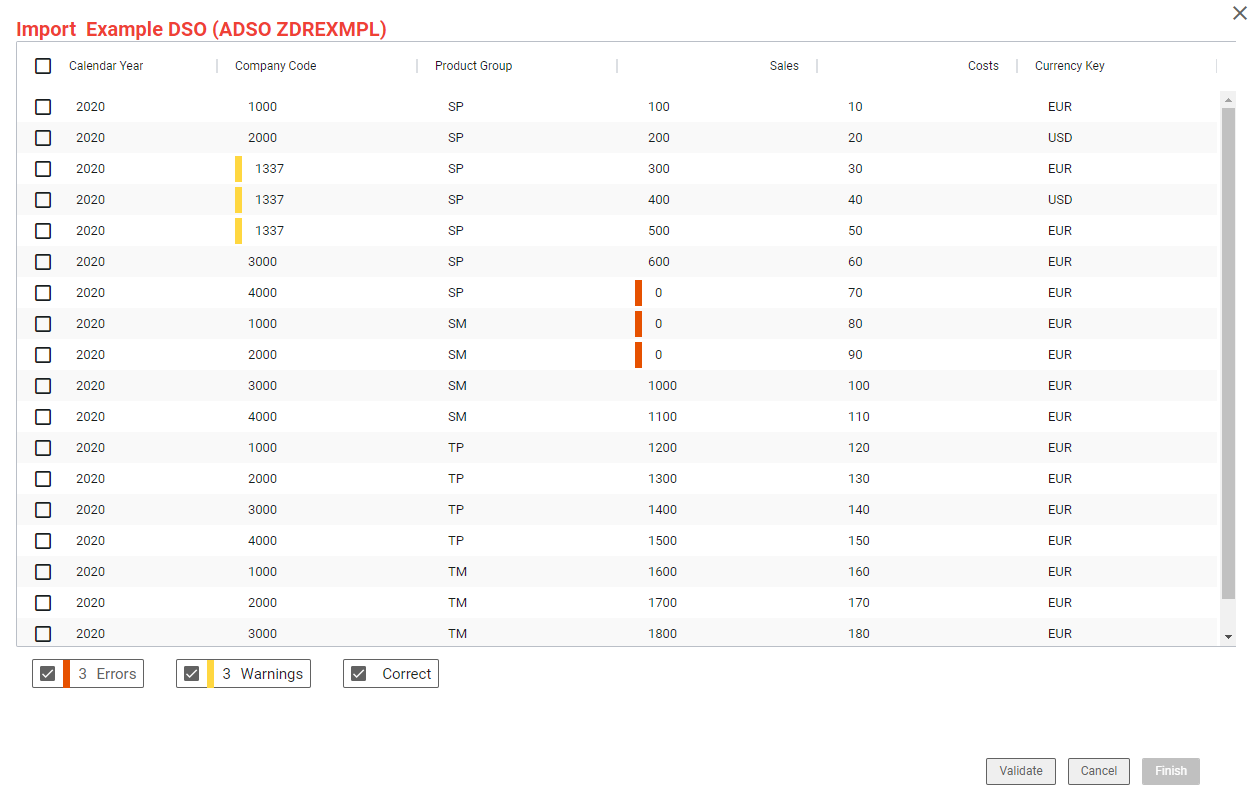
Each line is one message against one cell, which is why it carries a row and a column rather than just text:
| Field | Type | Description | Possible values |
|---|---|---|---|
ROWIDX | INT4 | Row number | Normally I_TABIX |
COLUMN | CHAR 30 | Field name | Normally IS_FIELDS_INFO-FNAME |
TYPE | CHAR 30 | Message type | WARNING, ERROR, INFO, SUCCESS |
HDR | STRING | Message header | |
MSG | STRING | Message |
Report every change you make. A value the BAdI silently rewrote is a value nobody can account for later.
Step-by-Step Instructions
1. Create the implementation and set the filter
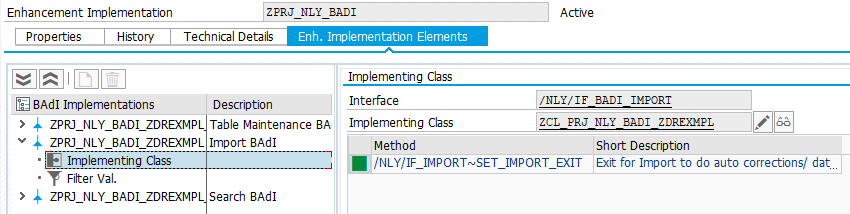
Create a BAdI implementation for the definition /NLY/BADI_IMPORT inside your project's enhancement implementation. Set the table name, the table type and the field name in the filter. The worked example uses the DSO ZDREXMPL and the company code field /BIC/ZDRCCODE.
2. Implement SET_IMPORT_EXIT
Double-click the method /NLY/IF_IMPORT~SET_IMPORT_EXIT to create the implementation.
3. A simple mapping
The smallest useful implementation replaces one value and says that it did:
DATA ls_validation TYPE /nly/ts_validation.

IF i_step = 1.
  IF i_value = 'Test Company CA'.

    e_value = '9999'.

    ls_validation = VALUE #(
      rowidx = i_tabix
      column = is_fields_info-fname
      hdr    = 'Value was mapped'
      msg    = 'The cost area "Test Company CA" was mapped to "9999" by a custom BAdI exit.'
      type   = /nly/cl_table_rest_v3=>co_msg_type_warning ).

    APPEND ls_validation TO ct_validation.

  ENDIF.
ENDIF.
The target field is CHAR4, so Test Company CA could never have been stored. Mapping it in step 1 is exactly the job this BAdI exists for.
4. A worked example: descriptions to keys, with a fuzzy fallback
The file carries company code descriptions rather than keys. The exit first looks the description up in the text table. If it finds an exact match, it uses that key. If it does not, it runs a fuzzy search against the text table and takes the best-scoring result, so a description that is spelled slightly differently in the file still lands on the right company code.
Both branches append a message, and the second one reports the score, so a reviewer can see how confident the match was.
METHOD /nly/if_import~set_import_exit.

  TYPES:
    BEGIN OF ts_changes,
      score TYPE decfloat34,
      ccode TYPE /b787/oibukrs,
      txtmd TYPE rstxtmd,
    END OF ts_changes,
    tt_changes TYPE TABLE OF ts_changes.

  DATA: ls_validation  TYPE /nly/ts_validation,
        lv_sql         TYPE string,
        lo_t_table     TYPE REF TO data,
        lv_search_term TYPE string,
        lv_ccode       TYPE /b787/oibukrs.

  FIELD-SYMBOLS:
    <fs_s_table> TYPE ts_changes,
    <fs_t_table> TYPE tt_changes.

  IF i_step = 1.

*   Search term
    lv_search_term = i_value.
    REPLACE ALL OCCURRENCES OF '%20' IN lv_search_term WITH ` `.
    REPLACE ALL OCCURRENCES OF '%22' IN lv_search_term WITH `"`.

*   Check whether the description exists
    SELECT SINGLE /b787/s_bukrs FROM /b787/tbukrs
      INTO lv_ccode
      WHERE txtmd = lv_search_term.

    IF lv_ccode IS NOT INITIAL.

      e_value = lv_ccode.

      ls_validation = VALUE #(
        rowidx = i_tabix
        column = is_fields_info-fname
        hdr    = 'Value was successfully assigned'
        msg    = |Company code { e_value } corresponds to the description { i_value }.|
        type   = /nly/cl_table_rest_v3=>co_msg_type_warning ).

      APPEND ls_validation TO ct_validation.

    ELSE.

*     Nothing found, so fall back to a fuzzy search
      CREATE DATA lo_t_table TYPE tt_changes.
      ASSIGN lo_t_table->* TO <fs_t_table>.

      lv_sql = |SELECT TOP 300 DISTINCT SCORE() AS SCORE, "/B787/S_BUKRS", TXTMD |
            && |FROM "/B787/TBUKRS" |
            && |WHERE CONTAINS(("/B787/S_BUKRS", "TXTMD"), '{ lv_search_term }', |
            && |FUZZY(0.7, 'similarCalculationMode=compare'), weight(0.8, 1)) |
            && |ORDER BY score() DESC|.

      TRY.
          DATA(lo_result) = cl_sql_connection=>get_connection(
                              )->create_statement(
                              )->execute_query( lv_sql ).

          lo_result->set_param_table( REF #( <fs_t_table> ) ).
          lo_result->next_package( ).
          lo_result->close( ).

        CATCH cx_sql_exception INTO DATA(err).
          DATA l_error(200) TYPE c.
          l_error = |{ err->get_text( ) }|.

          RAISE EXCEPTION TYPE /nly/cx_table_rest
            EXPORTING
              textid = /nly/cx_table_rest=>custom_message
              msgv1  = l_error(50)
              msgv2  = l_error+50(50)
              msgv3  = l_error+100(50)
              msgv4  = l_error+150(50).
      ENDTRY.

      READ TABLE <fs_t_table> ASSIGNING <fs_s_table> INDEX 1.

      e_value = <fs_s_table>-ccode.

      ls_validation = VALUE #(
        rowidx = i_tabix
        column = is_fields_info-fname
        hdr    = 'Value was adjusted'
        msg    = |Company code { i_value } does not exist. Company code { e_value } | &&
                 |with description { <fs_s_table>-txtmd } was determined with a score | &&
                 |{ ROUND( val = <fs_s_table>-score dec = 2 mode = 2 ) } and used instead.|
        type   = /nly/cl_table_rest_v3=>co_msg_type_warning ).

      APPEND ls_validation TO ct_validation.

    ENDIF.

  ENDIF.

ENDMETHOD.
📝 Adapt the names. /B787/OIBUKRS and /B787/TBUKRS are the InfoObject and text table of one demo system. Replace them with the InfoObject your own company code characteristic uses. The fuzzy score of 0.7 is a starting point, not a recommendation: raise it if the fallback matches too eagerly.
5. Activate everything
Activate the implementing class with its methods, the BAdI implementation and the enhancement implementation. Missing one of the three is the usual reason the exit appears to do nothing.
6. Import a test file and read the report
Import a small file that exercises both branches. Every message you appended appears in the validation report against its row and column, so the report is how you confirm the exit ran at all.
Troubleshooting / FAQs
1. My exit does not run when a user edits a cell in the grid.
By design. The Import BAdI runs only for imports from a file or the clipboard. For logic that has to apply to grid editing as well, use the Update BAdI. How import validation works in NextTables for SAP BW compares the hooks.
2. The import is slow since I added the BAdI.
Check whether FIELDNAME is set in the filter. With it empty the exit is called for every field of every row rather than for the one column it is about.
3. My mapped value is rejected anyway.
Make sure you set E_VALUE and not just read I_VALUE. E_VALUE is what continues into the type check; I_VALUE is the untouched input.
4. Should validation go here or in the Update BAdI?
In the Update BAdI's Validate step, in almost every case. It covers grid editing and imports alike. Use the Import BAdI only when the value has to be changed before it can be type checked at all, which is the one thing the Update BAdI cannot do.
5. The fuzzy search returns nothing and the row fails.
The example reads index 1 without checking that the result table has a row. In production, test sy-subrc after the READ TABLE and append an error message when there is no match, instead of leaving E_VALUE unset.