
📝 Availability: NextTables for SAP BW, Professional and Enterprise editions.
You will learn
Which SAP authorization objects a user needs before NextTables can open a table at all, what the NextTables authorization object /NLY/TBLS controls, and how to build roles out of its four fields.
This article is for whoever maintains roles in SAP BW.
📝 Object authorizations are only half the picture. They decide whether a user may reach an object at all. They say nothing about which rows inside it the user may see. An InfoProvider holding several company codes is a single object: object authorizations decide whether you can open it, analysis authorizations decide whether you see company code A, company code B, or both. See Row-level security with analysis authorizations in SAP BW.
Prerequisites
- The ability to maintain roles and authorization objects in SAP BW.
- NextTables installed, which is what creates
/NLY/TBLS.
The standard SAP objects
These are the ordinary BW authorizations. A user needs them whatever tool they use, NextTables included.
ADSO
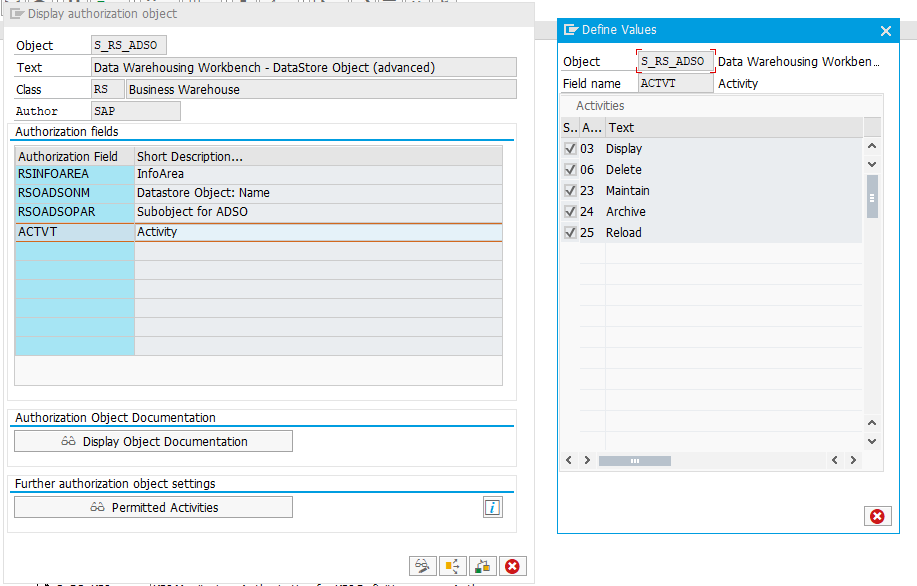
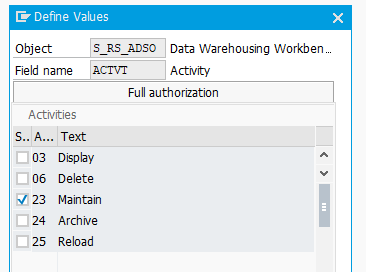
Working with an ADSO needs S_RS_ADSO. Besides the name of the DataStore object, specify the relevant InfoArea. The Activity field restricts what the user may do: changing the contents requires activity 23, Maintain. In Subobject for ADSO, select DATA to reach the data.

InfoObject
Which object you need depends on the release:
| Situation | Authorization object | Note |
|---|---|---|
| SAP BW/4HANA | S_RS_IOBJA | S_RS_ADMWB is no longer needed. |
| SAP BW 7.5 | S_RS_IOBJA, plus S_RS_ADMWB | Set the Display activity for the administrator workbench object InfoObject. |
| Still using InfoObject catalogs | S_RS_IOBJ | Use this instead. |


DDIC table
No additional object authorizations are needed. The user still needs access through /NLY/TBLS, below.
⚠️ If your InfoProvider contains no authorization-relevant InfoObjects, switch the analysis authorization check off in the settings. Otherwise you have to set up an analysis authorization for the InfoProvider itself, because it is authorization relevant through the InfoObject 0TCAIPROV. This catches people out on tables that were never meant to be row-restricted.
The NextTables authorization object
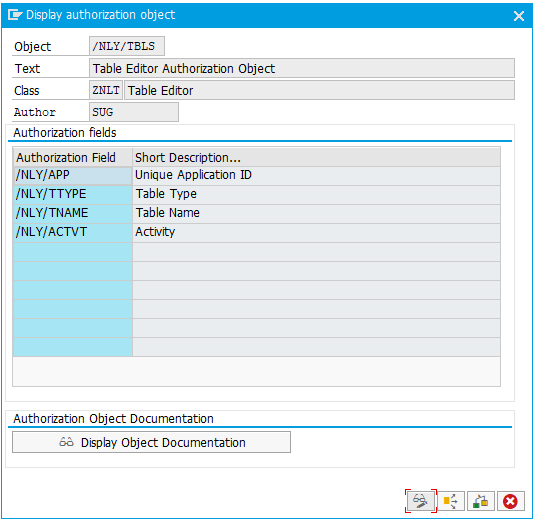
Installing NextTables creates the authorization object /NLY/TBLS. Every NextTables-specific permission lives on it, through four fields:
| Field | Meaning | Values |
|---|---|---|
/NLY/APP | Unique application ID | The application name you created during setup |
/NLY/TTYPE | Table type | DDIC, DSO, CUSTOM, IOBJ_ATT, IOBJ_TXT, ALIASTABLE |
/NLY/TNAME | Table name | The table to be accessed |
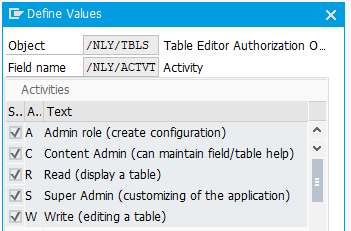
/NLY/ACTVT | Activity | R, W, A, C, S, see below |
The activities
| Activity | Allows |
|---|---|
R Read | Display a table. |
W Write | Insert, edit and delete in a table. |
A Config admin | Create and configure tables, menus and pages. |
C Content admin | Create table, field and site documentation; edit templates and save them globally. |
S Super admin | Change the global NextTables settings: design, application properties, the welcome page. |
⚠️ Read is not optional. Activity R has to be granted for every application a user should reach, including applications where they will also write. The menu is built from the user's read permissions, so a user with no read permission on any application sees no applications at all.
The three admin roles
| Can change | Super admin (S) | Config admin (A) | Content admin (C) |
|---|---|---|---|
| Global settings: design, application properties, welcome page | Yes | No | No |
| Configuration: create and configure tables and menus, create pages | No | Yes | No |
| Documentation: table, field and site documentation; global templates | No | No | Yes |
The three are separate, not a hierarchy. A super admin cannot configure a table, and a config admin cannot save a global template.
Step-by-Step Instructions
1. Grant the standard BW authorizations first
S_RS_ADSO with activity 23 and subobject DATA for ADSOs, and the InfoObject object that matches your release. Without these, no NextTables permission helps.
2. Build one role per application
Because every activity is bound to an application, roles compose cleanly when each covers one application. A user then holds several roles rather than one large one. How to group tables into applications and menus in SAP BW works through a full example.
3. Separate operations from configuration
A pattern that holds up in practice:
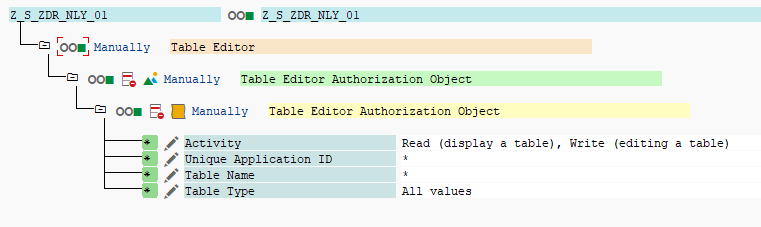
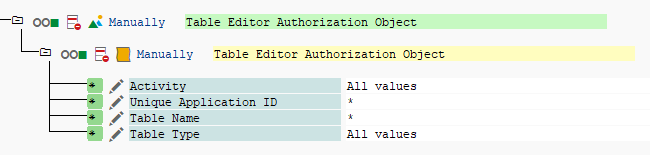
| Role | Assigned on | App / Table / Type | Activity |
|---|---|---|---|
| Operation control | All systems | * / * / * | R, W, and where wanted C |
| Admin | Development only | * / * / * | * all values |
Operations can read, write, import and delete data everywhere, but cannot bring in new tables or change configuration. The admin role, held by few people and only in development, can. Configuration is then made in development and transported forward, which is the sequence How to transport a NextTables configuration between SAP BW systems describes.
📝 One exception: the global settings a super admin controls, such as themes and the welcome page, cannot be transported. They have to be set in each system.
4. Check the result against real people
Worked examples for one application called SALES:
| Person | Activities on SALES | What they can do |
|---|---|---|
| Paul | Read, Write | Read and write the configured tables of SALES. |
| Mary | Read | Read the configured tables of SALES. |
| John | Read, Content admin | Read the data, and add or edit documentation and global templates within SALES. |
| Steve | Read, Config admin | Read the data, and add or edit table configurations and menu entries within SALES through the wizards. |
| Joe | Read, Write, Config admin | Read and write the data, and edit configurations and menu entries within SALES. |
Sue (/NLY/APP = *) | Read, Write, Config admin, Content admin, Super admin | Everything: read and write all tables, add and edit tables, applications and menu entries, maintain documentation and templates, and change global settings such as additional languages, theme colors and the welcome page. |
Each example assumes the person also holds the matching standard BW authorization, S_RS_ADSO or the InfoObject equivalent.
Troubleshooting / FAQs
1. A user sees no applications at all.
They hold no read activity anywhere. The menu is built from read permissions, so read has to be granted for every application the user should reach.
2. A user can open a table but sees no rows.
That is analysis authorizations, not object authorizations. Object access and row access are separate checks. See Row-level security with analysis authorizations in SAP BW.
3. NextTables asks for an analysis authorization on a table that has nothing to restrict.
The InfoProvider is authorization relevant through 0TCAIPROV even when it holds no other relevant InfoObjects. Switch the analysis authorization check off in the settings for that provider.
4. A user cannot change the contents of an ADSO although they have write.
Check S_RS_ADSO: they need activity 23, Maintain, and subobject DATA. The NextTables write activity does not substitute for the BW authorization.
5. Our super admin cannot configure a table.
Correct. The three admin roles are separate. Configuring tables and menus is config admin (A); the super admin activity covers global settings.
6. Themes did not arrive with the transport.
Global settings such as themes and the welcome page are not transportable. Set them in each system.