
📝 Availability: NextTables for SAP BW, Professional and Enterprise editions.
You will learn
Which SAP objects NextTables can read and write, and what changes from one object type to the next. The short answer is DDIC tables, DataStore objects both advanced and classic, InfoObject attributes and texts, and CDS views for reading. The longer answer is what each ADSO template allows, because that is where the differences are.
This article is for whoever decides which object a maintenance scenario should sit on.
Prerequisites
- Access to the object in SAP BW, and the SAP authorizations that go with it. NextTables never widens what your authorizations allow.
- For an ADSO, knowing which template it was modeled with in the BW Modeling Tools. That single fact decides most of what follows.
- A table configuration in NextTables once you have chosen the object. See Table and column configuration in NextTables for SAP BW.
The object types
| Object | What NextTables does with it |
|---|---|
| SAP DDIC tables (transparent tables) | Read and write. |
| SAP BW DataStore objects (ADSO) | Read and write, request-based or writing directly. The template decides the detail; see below. |
| SAP BW classic DataStore objects | Read request-based, write directly. |
| SAP BW InfoObjects | Read and write attributes and texts. |
| ABAP CDS views (through DDIC) | Read. |
NextTables for SAP BW is built and tested for SAP BW/4HANA, SAP S/4HANA and SAP BW on HANA.
On SAP S/4HANA
The same product runs on S/4HANA, where the typical scenarios are:
- Maintaining any custom table, your own Z tables, in a validated grid.
- Maintaining the data in an embedded SAP BW the same way as in a standalone SAP BW.
- Keeping a custom table current that feeds a grouping for a CDS view, so reports read the values the business owns.
Access is decided by your SAP authorizations in every case. See Row-level security with analysis authorizations in SAP BW and How object authorizations work in NextTables for SAP BW.
ADSO templates, and what each one allows
An ADSO's behavior in NextTables follows from the template it was modeled with in the BW Modeling Tools. Most templates work; two carry consequences worth knowing before you build on them, and one is not supported at all.
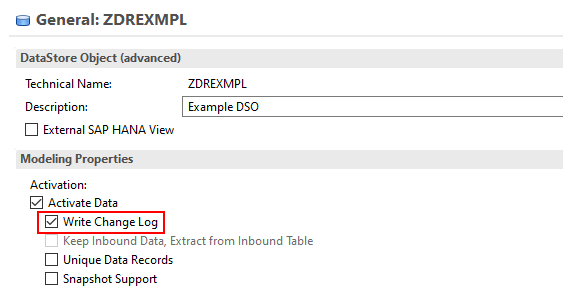
💡 The general recommendation is an ADSO with a change log, which is what the Data Warehouse Layer, delta calculation template produces. You then have a history of changes and can recover data that was deleted by accident. Other templates work; this one costs you nothing and buys you a way back.
| Template | Insert | Edit | Delete | What to know |
|---|---|---|---|---|
| Data Warehouse Layer, delta calculation Recommended |
Yes | Yes | Yes | Has a change log, so changes are traceable and deletions are recoverable. |
| Data acquisition layer, including corporate memory | Yes | No | No | Behaves like a write-optimized DSO. Editing and deletion are switched off automatically. An artificial key is generated from the request transaction sequence number, data package and data record number. |
| Corporate memory, compression capabilities | Yes | Yes | Yes | Works, but without the change log's safety net. |
| Corporate memory, reporting capabilities | Yes | Yes | Yes | Works, but without the change log's safety net. |
| Data Warehouse Layer, data mart | Yes | Yes | See note | All characteristics become key. Deleting a record does not remove it, it sets every key figure to zero. Reporting runs on the union of inbound and active table, but NextTables reads the active table only, so the ADSO has to be activated with every change. |
| Planning on InfoCube-like | Yes | Yes | See note | As data mart, plus planning mode. Values entered through a planning query in parallel create requests that are not activated by default. |
| Planning on Direct Update | Yes | Yes | Yes | Defines the ADSO as a direct update DataStore with planning mode. |
| Snapshot DSO | Not supported | NextTables shows an error if you try to use one. Model the scenario on a different template. | ||
Classic objects
The classic templates map onto the ones above:
| Classic object | Behaves as |
|---|---|
| Standard DataStore object | Data Warehouse Layer, delta calculation. The recommended case. |
| Write-optimized DataStore object | Data acquisition layer. Insert only. |
| InfoCube | Data Warehouse Layer, data mart. Deleting zeroes the key figures. |
Two consequences worth planning around
Deleting on a data mart or InfoCube-like ADSO
The record stays; its key figures become zero. That is how these objects work, not a NextTables limitation, but it changes what "delete" means for the person using the grid. If the business needs records to actually disappear, model the table on a template with a change log.
Activation on data mart and InfoCube-like ADSOs
NextTables reads the active table only. Every change therefore activates the object, and that activation also activates any other requests sitting unactivated in the inbound queue. Leaving requests unactivated there while people edit in NextTables can produce inconsistent data. Keep the inbound queue clean on these templates.
📝 Aggregated InfoCube read errors: on cube-like ADSOs you may see "InfoCube <CUBENAME> is aggregated. Read request cannot be executed" when reporting runs on the ADSO while someone edits the same object in NextTables. The behavior is described in SAP note 2724783. Disabling the delta cache for the query does not always suppress it. Contact support if you run into it.
Back-end properties the templates set for you
Two table properties follow from the template, and both can be read or overridden in the table maintenance BAdI's Meta method. See The SET_META_EXIT method in NextTables for SAP BW.
| Property | Set to | When |
|---|---|---|
CH_S_TABLE_INFO-EDITABLE |
2 Insertable |
Automatically, on write-optimized ADSOs, because editing and deletion do not work there. |
CH_S_TABLE_INFO-ACTIVATION |
1 activate at once, the default2 no activation |
With no entry maintained, activation happens automatically. |
Troubleshooting / FAQs
1. My ADSO opens but I cannot edit or delete anything.
It is almost certainly modeled on the data acquisition layer or as a classic write-optimized DSO, where only inserting is supported. NextTables switches editing and deletion off and sets EDITABLE to 2. The browser console carries the message explaining it.
2. I deleted a row and it is still there, with zeroes.
Expected on a data mart, InfoCube-like or InfoCube object: deletion initializes the key figures rather than removing the record.
3. My Snapshot DSO produces an error.
Snapshot support is not supported by NextTables. Use a different template for the object.
4. Reporting fails while someone is editing.
On cube-like ADSOs, see SAP note 2724783. It is an interaction between aggregation and the concurrent change, not a NextTables error.
5. Which template should a new maintenance table use?
Data Warehouse Layer with delta calculation, unless something specific argues against it. It gives you a change log, full insert, edit and delete, and no surprises about what deletion means.
6. Can NextTables write to a CDS view?
No. CDS views are readable through DDIC. To let the business own values a CDS view consumes, maintain the underlying custom table and let the view read it.