
📝 Availability: NextTables for SAP BW, Professional and Enterprise editions. Option 1 works in the Professional edition. Option 2 uses a BAdI and requires the Enterprise edition.
You will learn
How to let two departments maintain the same SAP BW object without either of them being able to touch the other's data. The mechanism is the table alias: several NextTables tables pointing at one physical object, each with its own settings, its own application and therefore its own authorizations.
This article is for whoever configures NextTables. The second option additionally needs an ABAP developer.
The problem
Master data is usually owned by the business but maintained by IT, because the object is one object and the tools around it are all-or-nothing. Cost center master data is the standard case: HR owns the person responsible, Controlling owns the business division, and neither should be able to change the other's field or add and delete cost centers at all.
Splitting the object is not an option. Delegating it to both departments in full is not either. The alias solves it by splitting the view of the object instead.
Prerequisites
- Config admin rights, and the ability to maintain roles for
/NLY/TBLS. See How object authorizations work in NextTables for SAP BW. - For option 2 only: ABAP development access, and How to implement the table maintenance BAdI in SAP BW.
How to create an alias table
Follow the menu path Config, Wizard, Table Properties and create an entry:
- Select Alias Table (
ALIASTABLE) as the table type. - Enter the name of your alias in Table Name.
- In Alias Table Type, select the type of the physical object you are referencing.
- In Alias Table Name, enter the technical name of that physical object.
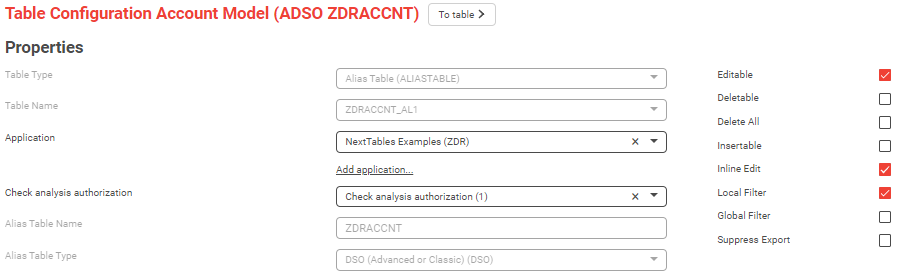
From then on the alias behaves like any other table: it has its own table settings and its own column settings, and you change them without affecting the physical object or any other alias on it.
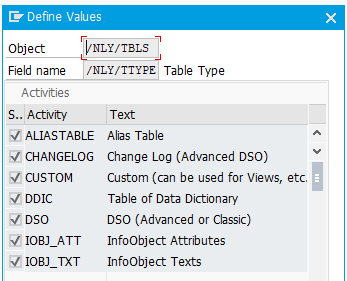
⚠️ Aliases need their own authorization. In /NLY/TBLS, the field /NLY/TTYPE must include ALIASTABLE, or the user cannot open an alias at all. Maintain the application and table name as usual on top of that.
Step-by-Step Instructions
Option 1: two departments, different fields, no code
Cost center master data, where HR maintains the person responsible and Controlling the business division. Neither may add or delete cost centers.
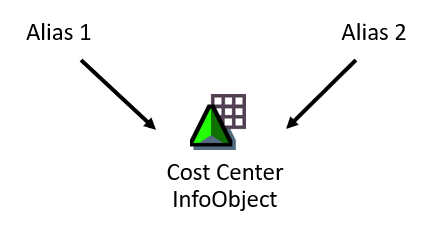
1. Create two aliases on the same InfoObject. In the table properties, set Alias Table Type to InfoObject and Alias Table Name to the cost center InfoObject, for both.
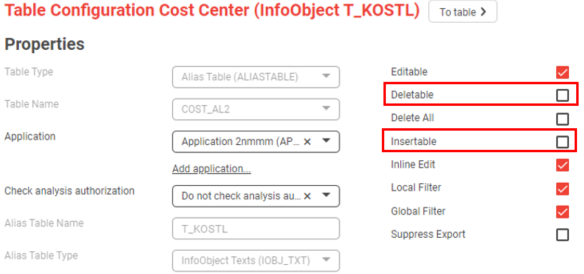
2. Switch inserting and deleting off in each alias's own settings. This is a per-alias setting, so the physical object stays fully maintainable elsewhere.
3. Assign each alias to a different application. This is what makes the authorizations separable: each department is granted its own application and therefore sees only its own alias.
4. Lock every column except the one that department owns. In the column properties, lock all fields in alias 1 except Person Responsible, and all fields in alias 2 except Business Division. Settings are maintained per field and per alias.

📝 Text fields have their own field names. Lock them as TXTSH, TXTMD and TXTLG for the short, medium and long text.
5. Check the result. In the first table, only Person Responsible is editable, and there is no way to add or remove entries. In the second, only the descriptions can be changed.
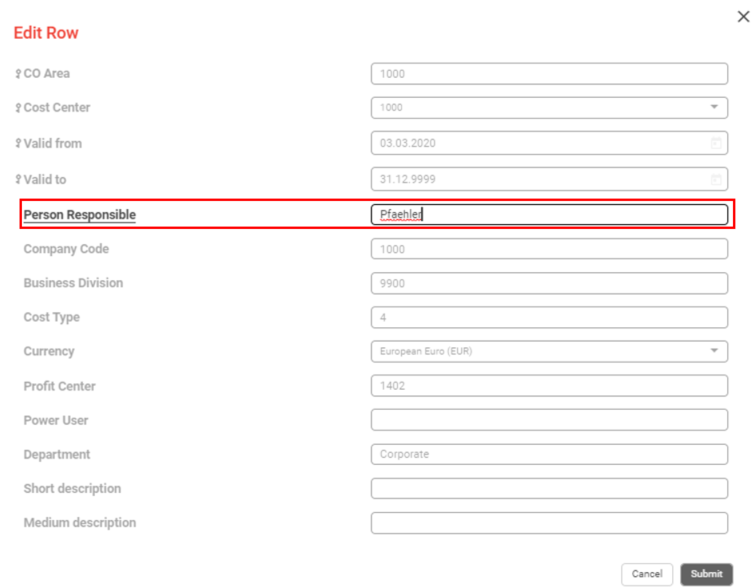
Nothing in this option required code.
Option 2: two departments, different rows, with a BAdI
Now the split is by data rather than by field. A DSO in the account model holds several key figures: one department maintains revenue, account 100, the other costs, account 200.

1. Create one alias per department and assign each to its own application, as in option 1.
2. Turn the global filter off in the alias settings. Otherwise a user can filter their way to the other department's account, which would defeat the whole arrangement.
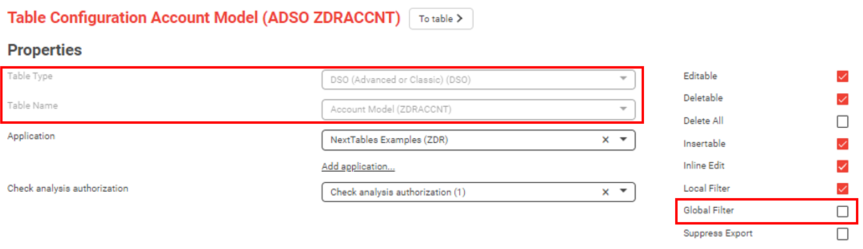
3. Restrict the selection in the Data method. The exit adds a fixed filter per alias, so each table can only ever read its own account:
METHOD /nly/if_editor~set_data_exit.

* Restrict a table to a certain field value. If the user should not be able
* to add filters of their own, switch the global filter off in the metadata
* as well.

  CASE i_step.
    WHEN /nly/cl_table_rest_v3=>co_step_before_read.

      IF i_tabname = 'ZDRACCNT_AL1'.        " revenue only
        APPEND VALUE #( fieldname = '/BIC/ZACCOUNT'
                        sign      = 'I'
                        option    = 'EQ'
                        low       = '100'
                        high      = '' )
          TO c_query_post-select_options.

      ELSEIF i_tabname = 'ZDRACCNT_AL2'.    " costs only
        APPEND VALUE #( fieldname = '/BIC/ZACCOUNT'
                        sign      = 'I'
                        option    = 'EQ'
                        low       = '200'
                        high      = '' )
          TO c_query_post-select_options.
      ENDIF.

  ENDCASE.

ENDMETHOD.
4. Maintain both aliases in the BAdI filter. One implementation covers both and branches on I_TABNAME. Separate implementations with a filter each work equally well, and are worth it once the logic per alias grows.
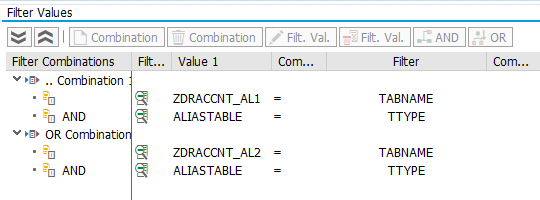
📝 To use an alias in a BAdI filter, set TTYPE to ALIASTABLE and TABNAME to the alias name, for example ZDREXMPL_AL1, not to the physical object.
5. Check the result. Each table now shows only its own account, and the user cannot filter their way out of it.

Which option
| The split is by | Use | Edition |
|---|---|---|
| Which columns a department may change | Option 1, column settings per alias | Professional |
| Whether a department may insert or delete | Option 1, table settings per alias | Professional |
| Which rows a department may see, following BW authorizations | Neither. Use analysis authorizations. | Professional |
| Which rows a department may see, by a rule BW authorizations cannot express | Option 2, a Data method filter per alias | Enterprise |
Troubleshooting / FAQs
1. A user cannot open the alias table at all.
Their role probably lacks ALIASTABLE in the /NLY/TTYPE field. An alias needs that table type in the authorization, on top of the application and table name.
2. Both departments see the same data.
The aliases are in the same application. Assign them to different applications; the application is the unit of authorization.
3. A user filtered their way to the other department's rows.
The global filter is still on for that alias. Switch it off in the alias settings, as well as restricting the selection in the Data method.
4. My BAdI does not run for the alias.
Check the filter: TTYPE has to be ALIASTABLE and TABNAME the alias name. A filter naming the physical object will not match.
5. Two people from the same department edit the same alias at the same time.
That is a different mechanism, and it is on by default. NextTables shows who else has the table open and locks the record being edited. See How record locking and presence work in NextTables for SAP BW.
6. Do I need option 2 to restrict rows?
Usually not. If the restriction follows BW authorizations, analysis authorizations do it without code and without a second concept to maintain. Option 2 is for rules that are properties of the alias rather than of the user.
7. Does an alias copy the data?
No. It is another view of the same physical object. A change made through one alias is visible through the other, subject to what that alias allows.