
📝 Availability: NextTables for SAP BW, Enterprise edition. This article uses a BAdI; BAdI support is an Enterprise feature. The column locking in step 1 also works in the Professional edition.
You will learn
How to call an external API from NextTables the moment a row is saved, and write the response back into the row. The pattern has five moving parts that only work as a whole: result columns locked in configuration, an Update BAdI that calls the service, one small ABAP class that talks to the outside world, a custom button with a process chain for the mass case, and the same class reused in a BW transformation so your ETL derives identical values.
This article is for ABAP developers, and for the admins who configure the table beside them. The worked example calls the Google Geocoding API to turn addresses into coordinates; the pattern is the same for any HTTP service.
The pattern, and when to reach for it
Some values belong in a row but should never be typed into it, because a system outside SAP BW knows them better: coordinates for an address, a validated VAT or bank identifier, a normalized company name, a current exchange rate. The pattern in this article derives such values at the moment a user saves, so the person maintains only the input field and the system fills the rest.
These are the moving parts, and every one of them has a job:
| Part | Its job in the pattern |
|---|---|
| Locked result columns (configuration) | The derived fields are visible but never editable, so a hand-typed value can never disagree with the input. Step 1. |
| The Update BAdI | Calls the service once per changed row, just before the database write. Steps 2 and 3. |
| Your API class | The one place that knows the provider, the endpoint and the key. Everything else stays provider-agnostic. See Your API class: the contract. |
| A custom button with a process chain | The mass case. Above a row threshold the BAdI refuses to call the service inline and the user starts the background run from the toolbar instead. Step 5. |
| The same class in a BW transformation | Rows arriving through the ETL flow get the same derivation from the same code, so there is one version of the truth. Step 6. |
The worked example
A user types or pastes an address into a NextTables table. On save, NextTables writes the address through to the ADSO, and alongside it the latitude, longitude and the normalized address that the geocoding service resolved. The user never types a coordinate and cannot overwrite one.
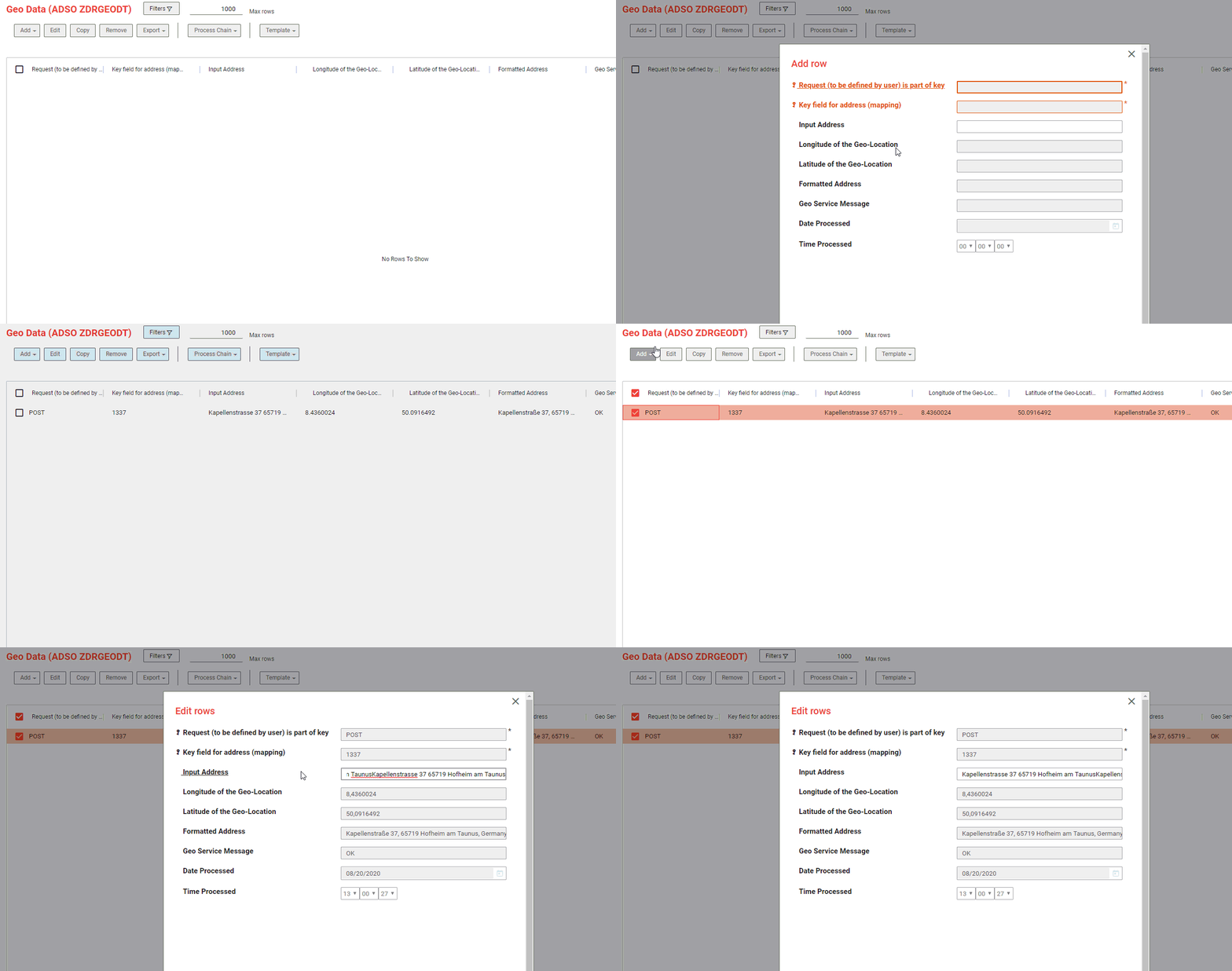
Geocoding shows the pattern well because it exercises every part: single rows and spreadsheet pastes, a billable third-party call worth guarding, and the same addresses arriving again through a data flow. Once the coordinates sit in the ADSO they behave like any other characteristic: you can build map visualizations on them, cluster records by location, or join them to anything else in the warehouse.
Prerequisites
| What you need | Detail |
|---|---|
| NextTables Enterprise | This walkthrough uses a BAdI, which is an Enterprise feature. The column locking in step 1 works in Professional too. |
| A configured table | An ADSO with an input field the user maintains, already set up in NextTables. In the example, an address field. See How to configure a table in NextTables for SAP BW. |
| Columns for the result | Additional fields on the ADSO for what the service returns. The example uses the six listed below. |
| Your API class | A small ABAP class that calls your service. You provide this; see Your API class: the contract below. |
| Outbound HTTPS and an API key | The BW application server must be able to reach the service endpoint, and the provider's root certificate must be in STRUST. |
The columns in the example
Define result columns to match what your service returns. For geocoding, these six have proven themselves; the last three are worth copying into any variant of the pattern, whatever the service does:
| Field | Type | Holds |
|---|---|---|
LATITUDE |
Number | Latitude returned by the service |
LONGITUDE |
Number | Longitude returned by the service |
ADDRESS_FORMATTED |
Short text | The address as the provider normalized it. Useful for spotting a bad match at a glance. |
GEO_MSG |
Short text | The provider's status for this row, for example OK or ZERO_RESULTS |
DATE_PROCESSED |
Date | When the row was last processed |
TIME_PROCESSED |
Time | Together with the date, tells you whether a row is stale |
💡 Tip: Store the provider's status rather than discarding it. When a derived value looks wrong, the difference between "the service could not resolve this input" and "the service matched something else" is the first thing you will want to know. ADDRESS_FORMATTED plus GEO_MSG answer it without re-running anything.
Your API class: the contract
NextTables does not ship a client for any particular service, and this article deliberately shows only the contract: which provider you use, how you authenticate and what you are contractually allowed to send are your decisions. Whatever runs behind the method, the NextTables side of the pattern stays identical. The BAdI needs one class from you, with one static method and a predictable result structure. For the geocoding example:
CLASS zcl_google_geo_api DEFINITION PUBLIC FINAL CREATE PUBLIC.

  PUBLIC SECTION.

    TYPES: BEGIN OF ts_geo_result,
             formatted_address TYPE string,
             lat               TYPE p LENGTH 9 DECIMALS 6,
             lng               TYPE p LENGTH 9 DECIMALS 6,
             status            TYPE string,
           END OF ts_geo_result.

    CLASS-METHODS get_geodata
      IMPORTING i_address TYPE string
                i_api_key TYPE string OPTIONAL
      EXPORTING es_result TYPE ts_geo_result.

ENDCLASS.
The implementation is short. It URL-encodes the input into the provider's endpoint, issues the request with cl_http_client=>create_by_url, parses the JSON response, and returns the first result together with the provider's status. Roughly forty lines, most of which is error handling. For a different service, only this class changes; every step below stays as it is.
⚠️ Caution: Every call sends data to a third party and is usually billable. Before you roll this out, confirm that sending this data off-premise is allowed. Keep the API key out of the source code: read it from a secure store. The 500-row guard in step 3 exists as much to protect your bill as your response time.
Step-by-Step Instructions
1) Lock the derived columns (configuration, no code)
The result columns are written by the system and must never be typed into. This is a pure configuration setting.
Go to Settings → Configurations, open your table, and in the Column Configuration set Edit options to Locked: keep target value for LATITUDE, LONGITUDE, ADDRESS_FORMATTED, GEO_MSG, DATE_PROCESSED and TIME_PROCESSED. All column settings are documented in Table and column configuration in NextTables for SAP BW.
"Keep target value" is the important half of that setting: the field is not editable in the front end, and whatever your BAdI writes in step 3 survives the save. Leave the input field itself editable. That is the one thing the user is supposed to change.
📝 Note: You can also lock fields from the SET_META_EXIT method of the Table Maintenance BAdI, by setting <fs_fields_info>-editable = '1'. Reach for that only when the lock has to be conditional, for example when one user group may correct a derived value manually and another may not. For a column that is always system-maintained, the configuration setting has fewer moving parts and is visible to anyone who opens the table configuration.
2) Set the BAdI filter
The derivation happens in the Update BAdI, in the step just before the database write. See How to implement a BAdI for NextTables if you have not created a BAdI implementation before.
In the Filter Values of your BAdI implementation, enter the table name and table type of your ADSO, so the implementation only runs for this table. A BAdI without a filter runs for everything and will call your service for tables you never intended to touch.
3) Implement SET_UPDATE_EXIT
METHOD /nly/if_editor~set_update_exit.

  FIELD-SYMBOLS:
    <lt_data> TYPE ANY TABLE,
    <ls_row>  TYPE /bic/azdrgeodt2.   " active table of the ADSO

  CHECK co_table IS BOUND.
  ASSIGN co_table->* TO <lt_data>.

  " Only derive on the way in, and only once, just before the write
  CHECK i_type = /nly/cl_table_rest_v3=>co_type_update
     OR i_type = /nly/cl_table_rest_v3=>co_type_insert.
  CHECK i_step = /nly/cl_table_rest_v3=>co_step_before_update.

  DESCRIBE TABLE <lt_data> LINES DATA(lv_lines).

  IF lv_lines > 500.
    " Too many rows to call the service for synchronously - see step 5
    ct_messages = VALUE #( BASE ct_messages
      ( type      = /nly/cl_table_rest_v3=>co_msg_type_info
        visu_type = /nly/cl_table_rest_v3=>co_visu_type_modal
        hdr       = 'More than 500 records'
        msg       = 'Ad-hoc geocoding is disabled above 500 records. ' &&
                    'Save the rows and start the geocoding process chain from the toolbar.' ) ).
    RETURN.
  ENDIF.

  LOOP AT <lt_data> ASSIGNING <ls_row>.

    CHECK <ls_row>-address IS NOT INITIAL.

    zcl_google_geo_api=>get_geodata(
      EXPORTING i_address = CONV string( <ls_row>-address )
      IMPORTING es_result = DATA(ls_geo) ).

    <ls_row>-address_formatted = ls_geo-formatted_address.
    <ls_row>-latitude          = ls_geo-lat.
    <ls_row>-longitude         = ls_geo-lng.
    <ls_row>-geo_msg           = ls_geo-status.
    <ls_row>-date_processed    = sy-datum.
    <ls_row>-time_processed    = sy-timlo.

  ENDLOOP.

ENDMETHOD.
Three things in this code matter:
co_tableholds only the rows being written. Looping over it calls the service for exactly the records the user just touched, without any "has this changed?" comparison.- The
CHECK i_stepline prevents duplicate calls. The Update exit runs several times per save; without the check you would call, and pay for, the service more than once per row. When each event fires and what every parameter carries is documented in The Update BAdI (SET_UPDATE_EXIT) in NextTables for SAP BW. - Writing
sy-datumandsy-timlointo the processed fields gives you a cheap way to find stale rows later, and to prove when a value was derived.
4) Activate everything
Activating the implementing class alone is not enough. Activate all three:
- the implementing class together with its methods
- the BAdI implementation
- the enhancement implementation
5) Put the mass case behind a button and a process chain
An external call is an HTTP round trip per row. At a handful of rows nobody notices; at several thousand the user is staring at a spinner and the dialog work process is at risk of timing out. That is what the 500-row guard in step 3 is for: above the threshold it refuses to call the service inline and tells the user what to do instead.
The instruction it gives them is to start a process chain that processes the not-yet-derived rows in the background. Put that chain behind a custom button in the NextTables toolbar, and the whole pattern stays inside the application: paste the rows, save, press the button, come back to a completed table. How to start a process chain with NextTables covers the button and the RSPC calls. The chain itself selects the rows where DATE_PROCESSED is initial and runs the same zcl_google_geo_api class over them.
💡 Tip: Derive the threshold from your provider's rate limit and your dialog timeout; the 500 in this example is a placeholder. If your service allows 50 requests a second and rdisp/max_wprun_time is 600 seconds, 500 rows is comfortable; on a throttled free tier it is far too high.
6) Reuse the same logic in a BW transformation
Everything above derives values for rows a person maintained. The same inputs usually also arrive through a data flow, and if the ETL route derives its values differently, you end up with two versions of the truth in the same warehouse.
Because the service call lives in a class rather than in the BAdI, there is nothing to duplicate. Call it from an end routine in the transformation:
* Transformation, end routine
LOOP AT RESULT_PACKAGE ASSIGNING FIELD-SYMBOL(<ls_result>).

  CHECK <ls_result>-address IS NOT INITIAL.

  zcl_google_geo_api=>get_geodata(
    EXPORTING i_address = CONV string( <ls_result>-address )
    IMPORTING es_result = DATA(ls_geo) ).

  <ls_result>-latitude          = ls_geo-lat.
  <ls_result>-longitude         = ls_geo-lng.
  <ls_result>-address_formatted = ls_geo-formatted_address.
  <ls_result>-geo_msg           = ls_geo-status.

ENDLOOP.
⚠️ Caution: Use an end routine. A field routine runs once per field, so filling latitude and longitude from field routines would call the service twice for every record and double the bill. An end routine calls it once per record and writes all four fields from the one response.
In a transformation you should also cache: if the same input appears in ten thousand records, look it up once. A sorted table keyed on the input, checked before the call, typically removes the large majority of the requests in a real load.
Best practices
- Keep the service call in one class. It is the only thing that makes the interactive path and the ETL path agree, and the only place you have to change when you switch provider.
- Never let a user type a derived value. Lock the result columns in configuration (step 1). A hand-typed value that disagrees with the input is almost impossible to spot later.
- Store the provider's status alongside the result. A row with
ZERO_RESULTSand empty values is a data-quality finding; a row with values and no status is a mystery. - Fail soft. If the service is unreachable, write the status and leave the result columns empty rather than raising an exception. Otherwise an outage at the provider blocks users from saving their data at all.
- Re-derive only when the input changes. The Update exit already gives you only the changed rows; if you later add a scheduled refresh, drive it from
DATE_PROCESSED.
Troubleshooting / FAQs
1. The result columns stay empty and the status field is blank.
The exit is probably not running. Check that the BAdI implementation, the enhancement implementation and the class are all active, and that the filter values match the table name and table type exactly.
2. The status comes back with an SSL or certificate error.
The provider's root certificate is missing from STRUST. This is the single most common failure the first time an ABAP system calls an external HTTPS API, and it has nothing to do with NextTables.
3. A user reports that their edit to a derived value disappeared.
That is step 1 working as intended. The result columns are locked and re-derived from the input. If the value is genuinely wrong, correct the input.
4. Saving a large paste times out.
The 500-row guard was not reached because the rows arrived in smaller batches, or the threshold is too high for your provider's rate limit. Lower it, and move the bulk work to the process chain.