A reporting unit sits on no master record, so a rule table decides which cost line reports where. On SAP Datasphere, finance maintains that table itself, and the management report shows which profit centers still need a rule.

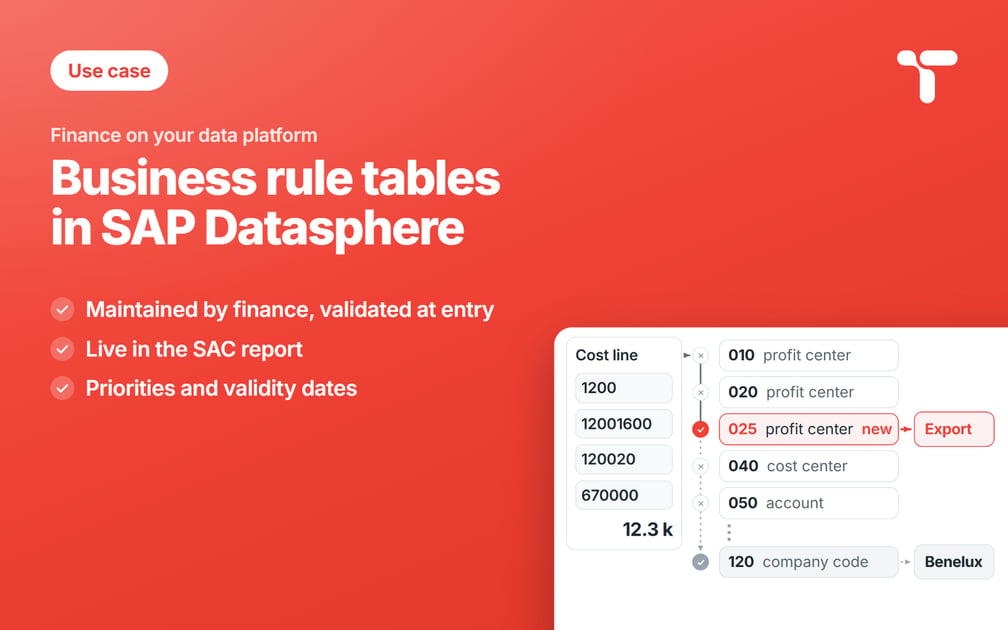
The export team that started on July 1 books its first cost on a new cost center and a new profit center, and your management report files it under the market of the company that hired it, because the profit center still waits for the rule that says it reports as Export. Finance writes that rule itself, on the day the report flags the gap, into a table on SAP Datasphere that the report in SAP Analytics Cloud reads. Each rule line in it carries its start date and its owner.
Sweets Co, our demo group, stands behind every example in this series, and every company, person, and amount in it is generated for the demo. Its confectionery division is the first part of the group to run its cost reporting on SAP Datasphere, with five company codes in two controlling areas. EU01 covers the three European companies, and AP01 the Asia Pacific group acquired in 2024, which kept its own cost center numbers. Costs report under four business lines taken from the product hierarchy, Chocolate, Confectionery, Baked Goods, and Snacks, and every amount is in euros.
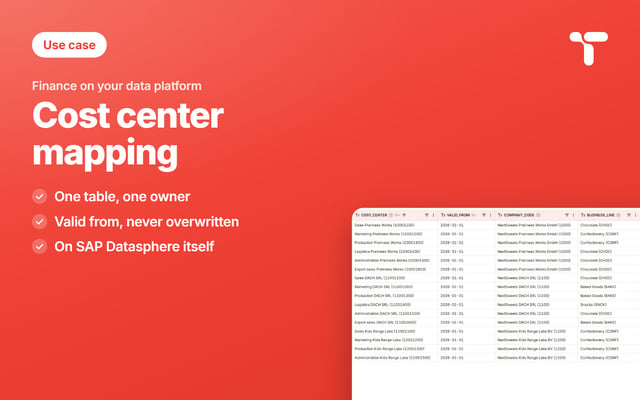
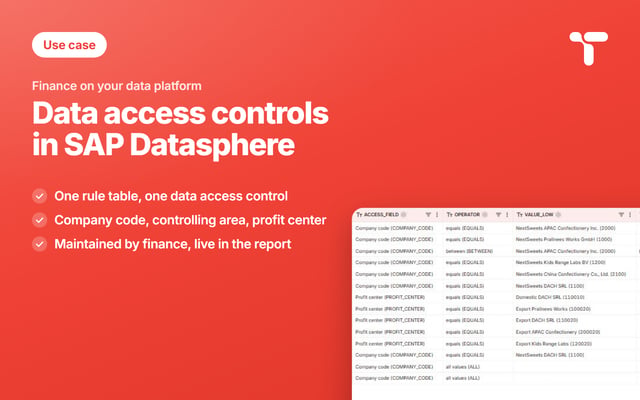
Act 2 of 3 derives the reporting unit by rule, from fields every cost line already carries. Act 1 gives every cost center its business line from a given date, in a cost center mapping each controller maintains for their own company code. Act 3 sets the data access controls that decide who sees the numbers of both. All three tables belong to the reference data finance maintains for its management reports.
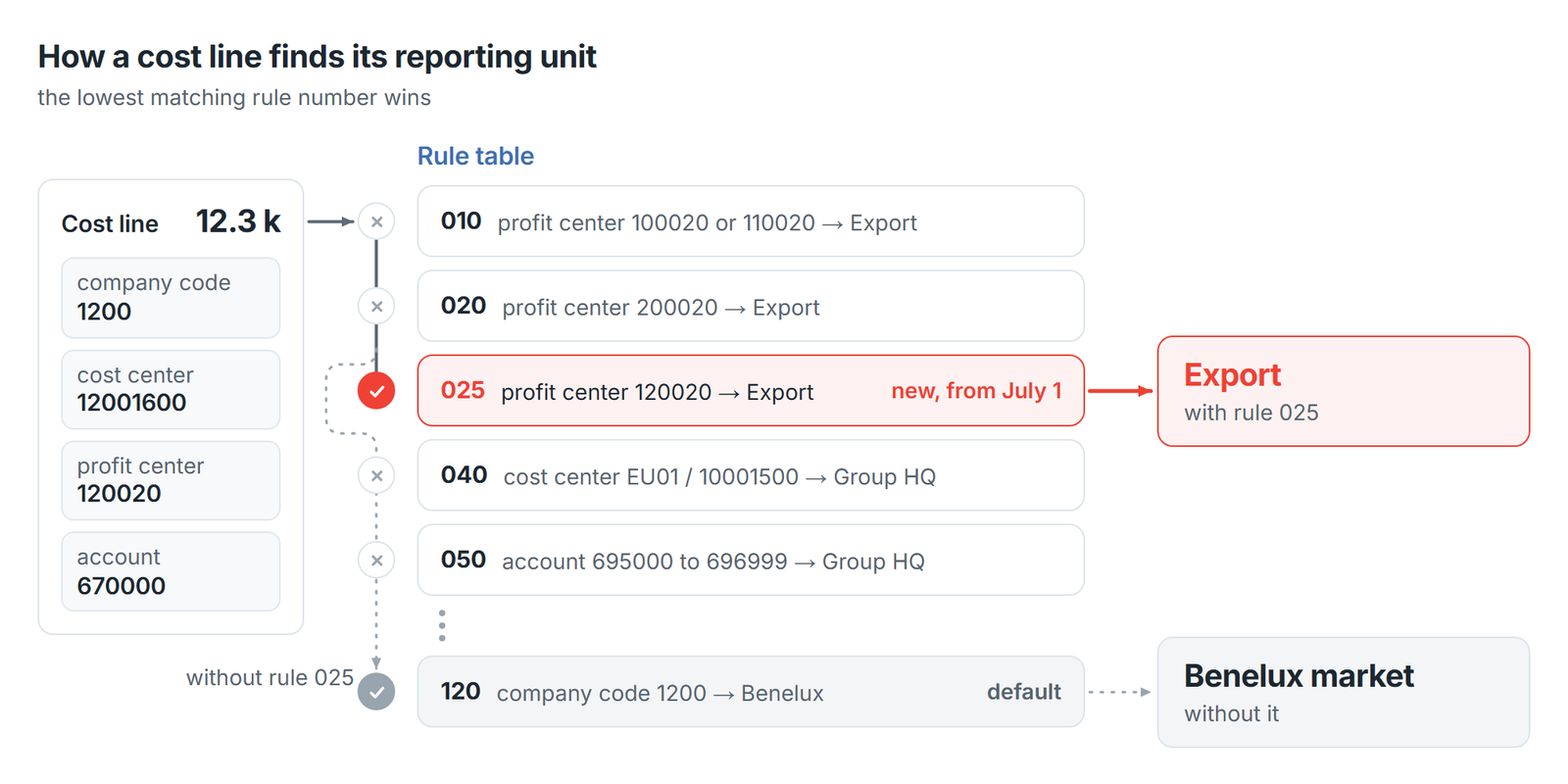
At Sweets Co the export team belongs to Kids Range Labs, company code 1200. Its cost center 12001600 opened on July 1 with the new profit center 120020, and it is the same team act 1 found behind its red bar. Export sits on no master record, so a row in a table finance owns assigns this profit center to it.
In an ERP a derivation like this usually lives in configuration, so IT writes the rule and a transport carries it to production. That work follows the release calendar, and the close that needed it has passed by the time it lands. On SAP Datasphere the rule is a row, and the controller who knows the business writes it. At the July close the report's second tab, Rules at work, listed one profit center still waiting for a rule and 24,400 euros on it. Clara Ward, the controller of Kids Range Labs, added rule 025, valid from July 1. The July report went out right the first time, and months already signed off kept the assignment they had.
A reporting unit is derived from fields the cost line already carries
Management reporting rarely follows the legal structure, because the way a group sells is rarely the way it is incorporated. Next to the business lines of act 1, Sweets Co reports by market: DACH, Benelux, APAC, Export, and Group headquarters. Each of those five reporting units is a management unit, and the consolidation units of the group close stay outside this table.
Five fields the cost line already carries decide which unit takes it: the company code, the controlling area, the cost center, the profit center, and the account. A controller knows the account twice, because in S/4HANA it is also the primary cost element. A rule table says which of those fields to read, which value to look for, and which reporting unit takes the line.
Rule numbers are priorities, and the gaps between them are deliberate
Every rule carries a three-digit number, and the lowest number that matches a line wins it. Some derivations run every step and let a later step overwrite an earlier one. This table stops at the first rule that matches, so the specific rules carry the low numbers and the defaults the high ones. The numbers go in tens, the way step numbers run in any derivation table, so a rule can be slotted in later while its neighbors keep their numbers. The excerpt below shows ten of the eighteen lines the table holds at the end of July.
| Rule | Line | Condition | Reporting unit |
|---|---|---|---|
| 010 | 1 | profit center 100020 | Export |
| 010 | 2 | profit center 110020 | Export |
| 020 | 1 | profit center 200020 | Export |
| 025 | 1 | profit center 120020 | Export |
| 040 | 1 | cost center EU01 / 10001500 | Group headquarters |
| 050 | 1 | account 695000 to 696999 | Group headquarters |
| 060 | 1 | company code 1100 | Group headquarters |
| 060 | 2 | account 690000 | Group headquarters |
| 074 | 1 | profit center 120010 | Benelux market |
| 120 | 1 | company code 1200 | Benelux market |
A rule is written as one or more lines, numbered inside the rule, so a rule number and a line number together name exactly one condition. Rule 010 is one rule in two lines that read the same field, so a cost line matches it when it carries profit center 100020 or 110020. Rule 060 is one rule in two lines that read different fields, so company code 1100 and account 690000 both have to match before that cost reaches Group headquarters.
Sixteen rules cover the whole group in eighteen lines, written by the people who report the numbers, and rule 025 sits in a gap the numbering left open.
The default rules at the bottom are the safety net
From 100 upward the table holds one default per company code, and those five rules take everything the specific rules above them let through. Every line of cost therefore reports somewhere, and the five reporting units stay the only buckets in the report. The view returns the rule that caught each line, so a controller can see why any line landed where it did.
In July the lines of the export team traveled past every specific rule to the Benelux default 120, because no rule named profit center 120020 yet. That is the right answer while its rule is still to come, and also the signal that the rule is due.
The report's second tab lists the profit centers that still need a rule
The tile on that tab holds the cost a default rule caught on a line carrying a profit center. That line should have been claimed further up the table, so the default names a profit center still waiting for its rule.
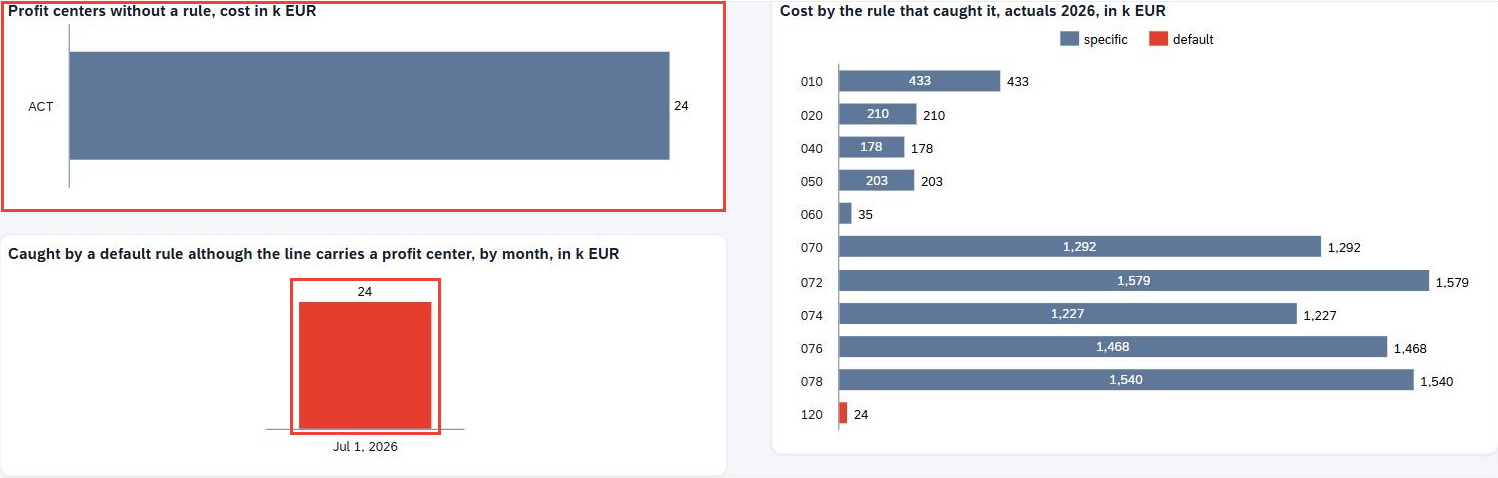
At the July close only one default carries any cost, rule 120 with the export team's 24,400 euros, while the specific rules carry the other 8,164,100 euros of the first seven months.
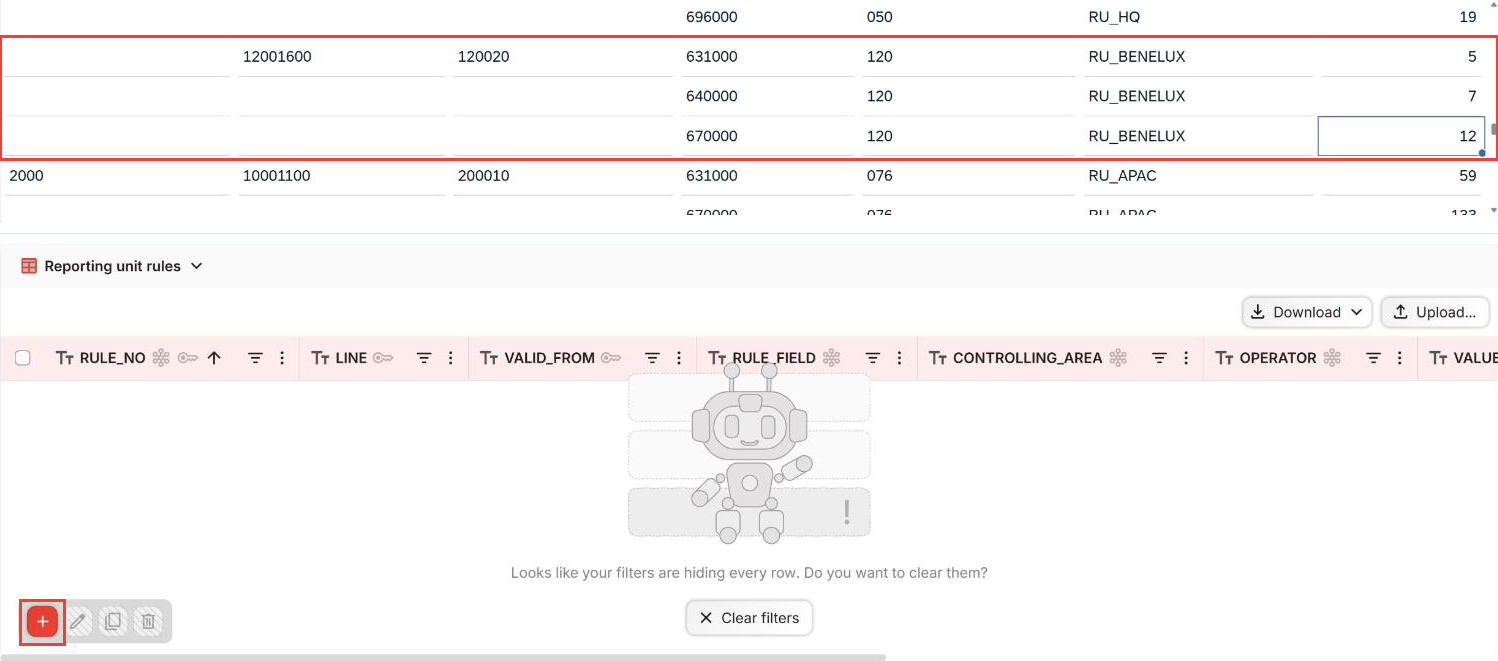
A controller writes the missing rule on that same tab, in the rule table embedded under the charts, and the screen itself is described further down. The cost lines sit under the charts, and a few lines of story script do the narrowing. A click on a bar narrows the lines to what that rule caught, and a click on a line narrows the rule table to the rules that read its profit center or its cost center.
SAP Datasphere models the derivation and leaves the rule table to you
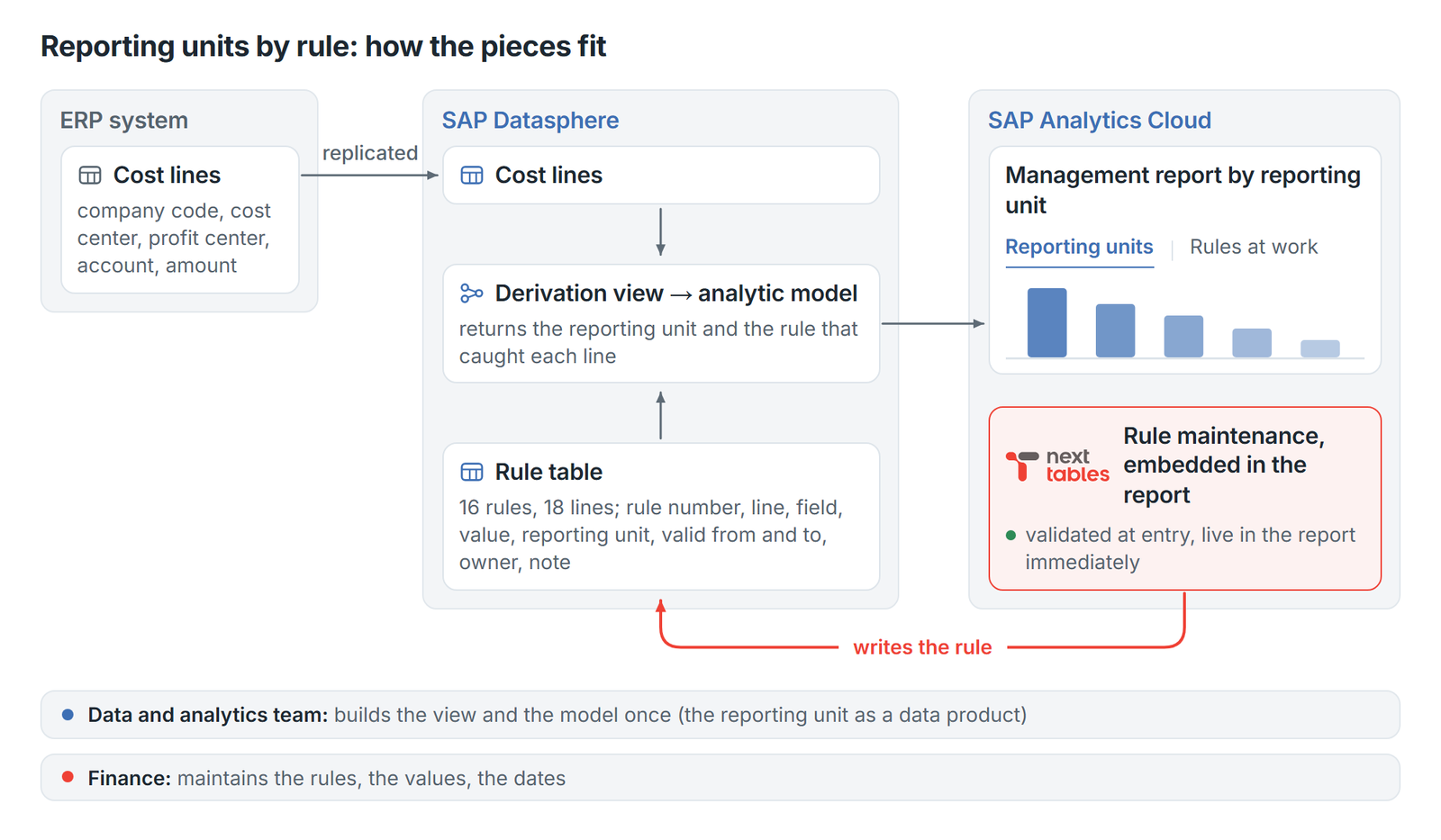
The reporting half of this sits on SAP Datasphere, where three objects do the work. A local table holds the rules, and a view joins them to the cost lines, reading for every month the version of each rule line in force and returning the winning rule. An analytic model exposes the result to SAP Analytics Cloud, and all three are built once and then left alone. A new rule needs no transport, because the view derives every line again on the next query.
Maintaining the rules is the half that stays open. Rows reach a local table through the Data Builder, a data flow, or an API, and all three are built for the team that models the space. A controller who writes rules needs a value help that follows the rule field, a check before the row is saved, an owner on every row, and an upload that updates the rows already there.
What the screen that maintains these rules has to get right
The rule maintenance in that drawing and in these figures is NextTables. Every entry is validated against the master data before it is written to SAP Datasphere, and the report reads the new rule on its next refresh. Five things decide whether a finance team keeps a rule table current.
The rule field decides which value help opens
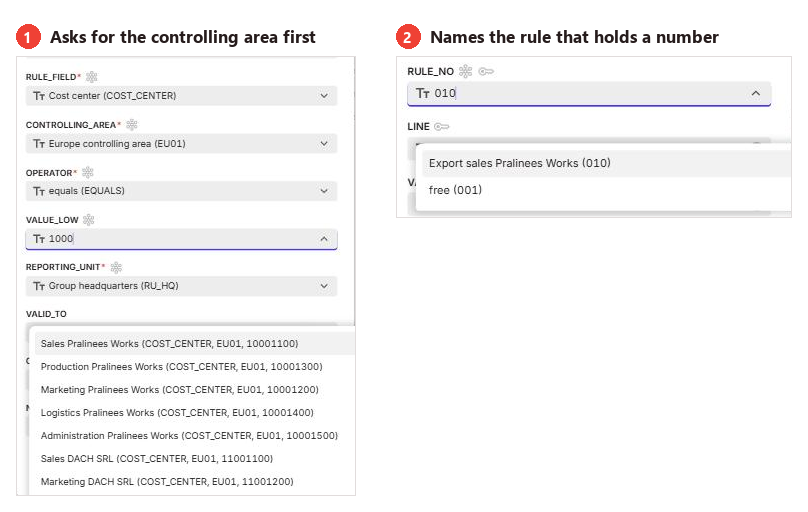
After the rule number, the line and the start date, the form asks for the rule field and offers the five fields a rule may read. The value below takes its list from that choice, so one value help serves every rule: Profit center opens the profit centers of the group, each key with its name, and Account lists the accounts.
A cost center rule asks two questions, because a cost center number is unique only inside its controlling area. The Asia Pacific numbering overlaps the European one, so 10001500 is Administration at Pralinees Works in EU01 and at APAC Confectionery in AP01. The form asks for the controlling area first and then offers only its cost centers.
The rule number carries a value help of its own
In a table where the order decides the answer, the number is the first decision of a new rule. The form offers every number from 001 to 300 as a list. A free number is labeled free, and a number in use carries the note of the rule that holds it.
A range belongs to the fields that are numbered in blocks
Accounts, cost centers and company codes are numbered in blocks, so each of them takes a range. Rule 050 reads accounts 695000 to 696999 and stays right on the day a new group recharge account opens inside that block. A company code range of 2000 to 2990 covers every company in Asia Pacific the same way. The lower bound is checked against the list, while the upper bound may be a number nothing carries yet, which is how 696999 closes a block that stops at 696000 today.
Profit centers take a single value, because their number joins a company code to a purpose, and a range across them would mix domestic and export. The operator All values belongs to the access rules of act 3, and the form refuses it here with that reason.
A specific rule numbered among the defaults gets a warning
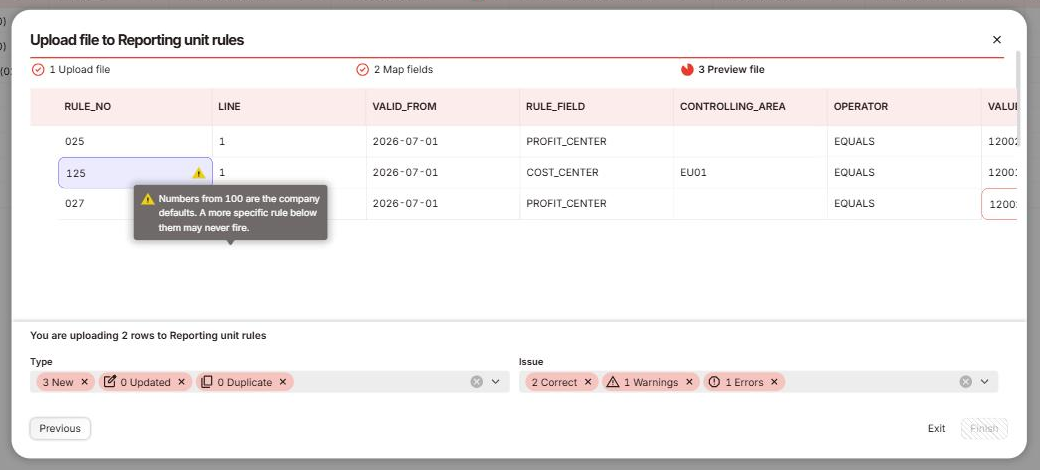
The check reads a single row, the rule number against the rule field on it, and it runs in the file check before anything is written. A number from 100 upward that carries anything but a company code raises a warning, because those numbers are the company defaults, and a default takes every line of its company first.
Rule 125 in the July file reads cost center 12001300 in EU01, below the defaults. It would never fire, because default 120 takes every line of company code 1200 before 125 is read, and rule 074 already claims this cost center through its profit center. The preview says what would happen to each line: the warning line would go in with its reason, while rule 027, with a profit center of seven digits, keeps Finish disabled until somebody corrects it. The file goes in complete or it waits, so the rule table stays consistent either way.
Every rule line is dated, and the specific ones carry a note
A change is a new version of the line, keyed by rule number, line and start date. For each month the view reads the latest version that has started by then, so the previous one ends the day before. Every month before the new start date keeps the version it was closed with. An end date stays available for a rule meant to run out.
The form insists on a note for every line that reads a field other than the company code, because the next controller reads that note before touching the number.
Back in SAP Analytics Cloud: Export rises, Benelux falls, the total stays
Rule 025 sits above the defaults and below the export rules already in the table, where a new export profit center belongs.
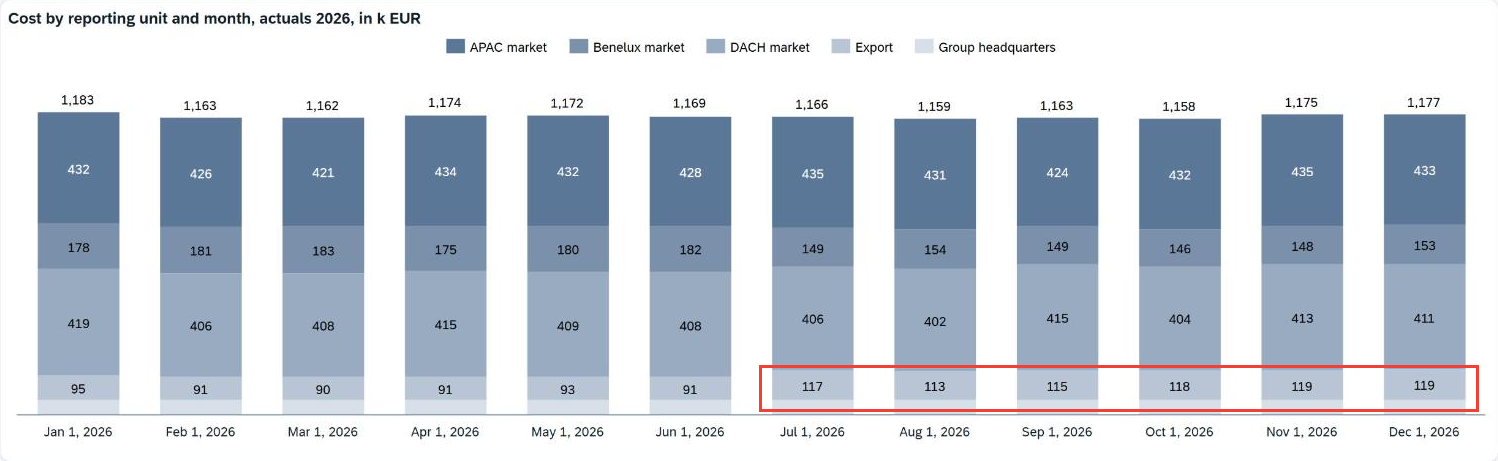
Export rises from 1,100,000 to 1,249,200 euros for the year, and Benelux comes down from 2,124,700 to 1,975,500, about 25,000 euros a month from July on. The group total stays at 14,020,200 euros, because the 149,200 euros between those two units only changed which market reports them.
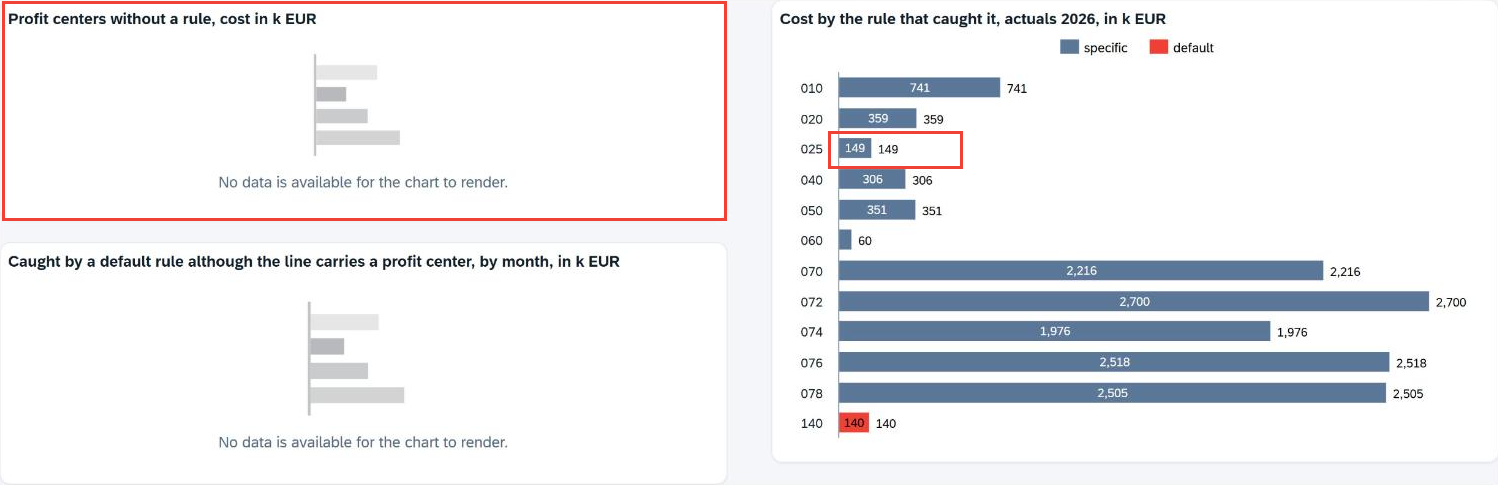
The tile on the second tab has nothing left to report, because every line on 120020 has a rule of its own from July 1. From August on the tile is part of the close: somebody opens it and works through what is on it.
Default 140, China Confectionery's, still carries 140,100 euros at year end, all of it on the dummy profit center of its logistics cost center, 11001400 in AP01, which has posted there since September. The view keeps the dummy off the tile, because its fix belongs in the cost center master, and a rule would only hide that gap.
Rule-based reporting units: our conclusion
The derivation is a solved problem: a view with a table behind it. The table decides whether the report stays right, so the people who know that an export team started in July need to write that rule on the day they learn it. A rule table is finance's own logic written down, with the order and the dates the team chose.
Every derivation table grows, because the business keeps opening profit centers and cost centers. The tile on the second tab turns that growth into work somebody finishes in the month it happens.
The data team builds the view and the model once, and finance keeps the rules, their values and the timing of every change, the part that moves as often as the business does. That division of labor turns a new profit center into a rule somebody writes in July.
FAQ: reporting unit derivation rules
1. How do you derive a reporting unit from transaction data in SAP Datasphere?
You hold the rules in a local table and let a view join them to the cost lines, assigning each line by the first rule whose conditions it matches. For every month the view reads the version of each rule in force and returns the winning rule beside the unit, for an analytic model to expose to SAP Analytics Cloud.
2. What belongs in a derivation rule table on SAP Datasphere, and who should maintain it?
A rule carries a number that sets its priority and one or more lines. Each line names the field it reads, the value or range it looks for, the reporting unit, the date it starts, an owner and a note. The rules are business decisions about which cost belongs to which market, so the table belongs to finance, while the view and the model belong to the data team.
3. How do priorities work in a rule-based derivation table on SAP Datasphere?
The lowest rule number that matches a line wins it and the table stops there, so the specific rules carry the low numbers and the defaults the high ones. Numbers are spaced in tens so that a rule can be added between two existing ones later. Giving a specific rule a number from 100 upward, among the defaults, is the mistake to watch for, because the default of its company takes the line first.
4. Can one SAP Datasphere derivation rule check two fields at the same time?
Yes, you give both conditions the same rule number on two lines. Two lines under one number that read different fields are an and, so a rule can say company code 1100 together with account 690000. Two lines that read the same field are an or instead.
5. How do you find out which reporting unit rules are still missing in SAP Datasphere?
Return the winning rule for every line and watch the defaults: one that catches a line carrying a profit center names a profit center that still needs a rule. Lines on the dummy profit center stay off that list and show under their default, because their gap sits in the cost center master. Both come out of the view the report reads.
6. What happens to closed months when you change a derivation rule on SAP Datasphere?
A change is a new version of the rule line, dated from the day it applies, and for every month the view picks the latest version that had started. Months before the new version's start date keep the assignment they were signed off with, even though the view derives every line again on the next query.
7. Do reporting unit rules work the same way on Databricks?
Yes, the rule table, the conditions and the priorities all carry over: the table sits in Lakebase, federated into Unity Catalog and joined to the cost lines there like any other, so the rules live where the reporting already reads them.
Next step
Which rule assigned last month's cost to each of your reporting units, and can your report tell you which rules are still missing? Finance teams maintain rule tables like this one on SAP Datasphere, inside the reports that read them. Tell us how your reporting units are derived today, and we look at it with you.