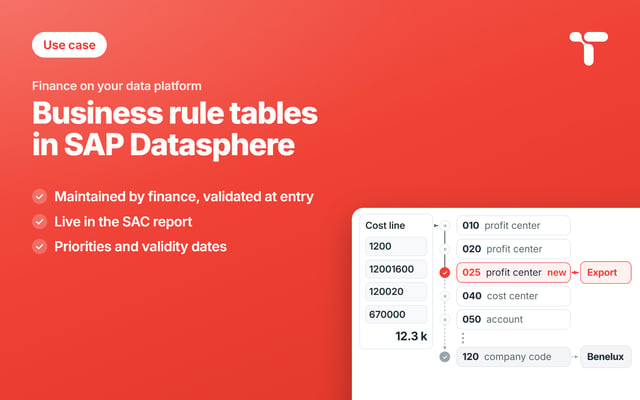
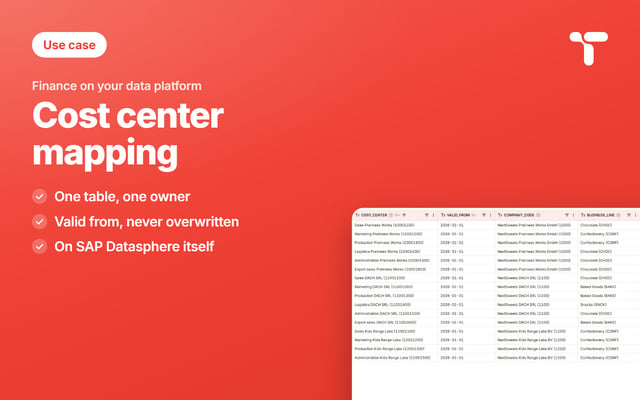
A data access control in SAP Datasphere reads a table: who sees which values, and from which date. Finance maintains that table itself, and the data team keeps the model, the control, and the boundary.

Somewhere in finance a spreadsheet says who may see which company code, somewhere in the data team a table actually decides it, and the two have not been identical since the last reorganization. That second table sits on SAP Datasphere and decides what the finance reports in SAP Analytics Cloud return. Finance can keep it current once a value help stands at the field, a validity date bounds each line, and an audit log stands behind the table.
Sweets Co, our demo group, stands behind every example in this series, and every company, person, and amount in it is generated for the demo. Its confectionery division is the first part of the group to run its cost reporting on SAP Datasphere, with five company codes in two controlling areas. EU01 covers the three European companies, and AP01 the Asia Pacific group acquired in 2024, which kept its own cost center numbers. Costs report under four business lines taken from the product hierarchy, Chocolate, Confectionery, Baked Goods, and Snacks, and every amount is in euros.
Act 3 of 3 sets the data access controls that decide who sees the numbers of acts 1 and 2, with the rule logic of act 2. Act 1 gives each cost center its business line from a given date, in a cost center mapping, and act 2 derives the reporting unit by rule from fields every cost line already carries. All three tables belong to the reference data finance maintains for its management reports.
A table in SAP Datasphere decides who sees which rows in SAP Analytics Cloud
When a controller opens the cost story, SAP Analytics Cloud asks SAP Datasphere for the numbers, and the platform decides row by row what that user may get back. The decision comes out of a table: one column names a user, the others name the values that user may see. SAP Datasphere reads that table through an object called a data access control, and that object is how the platform does row-level security. Finance maintains the rules inside the table it reads, and in daily use both go by one name, data access controls.
The control is attached to the view that holds the facts, and every analytic model and every story above that view inherits the restriction. Because the restriction sits inside the data, it survives the second story somebody builds next quarter, a preview in the Data Builder, and anything reading the view over an API.
Maintaining the permissions table in SAP Datasphere takes the Data Builder
In SAP Datasphere, a data access control is a modeler object, and its permissions table lives in the space. The ways to maintain that table lead through the Data Builder, a data flow, or an API, all of them built for the team that models the space. That means typing a company code and trusting that it exists, and removing a row by hand when someone leaves, because a row carries no validity of its own. It also means a row that carries no name and no timestamp, so the table cannot answer who put a line there. The people who know the answer, finance, have no seat there. So they send emails to the people who have the seat.
Finance keeps its own list beside the table, a file built for the last audit that travels by email and gains a column with every audit question. By the time anyone compares the two, one version has the new export team and the other still carries the interim auditor. The file says nothing about who added a line, so the question of who was allowed to see the numbers of Pralinees Works in August is answered from memory. Table and file match on the day somebody copies one into the other, and they start drifting apart the day after.
What the access table carries, and how its rules add up
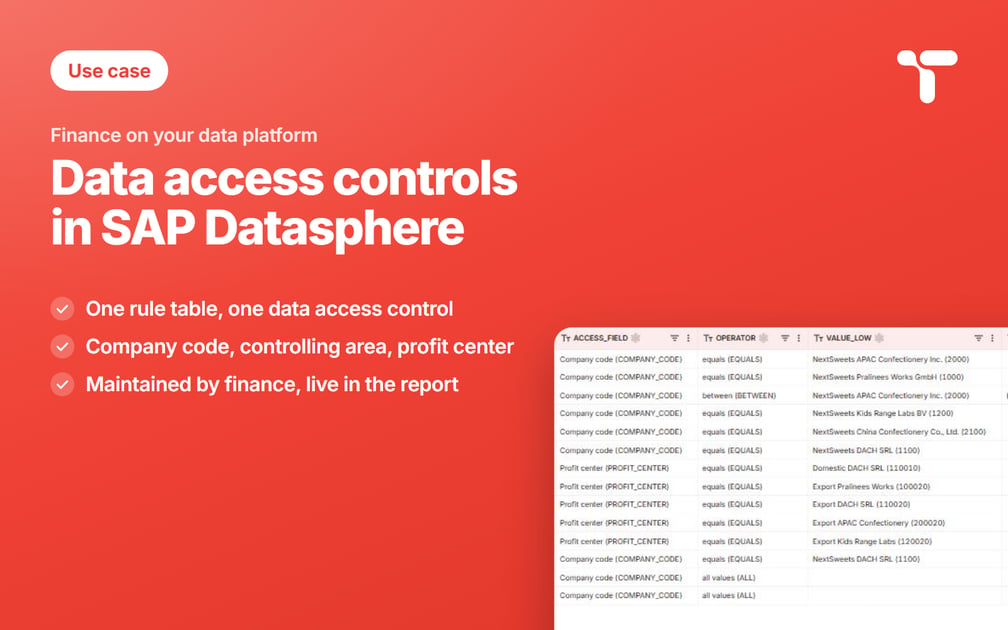
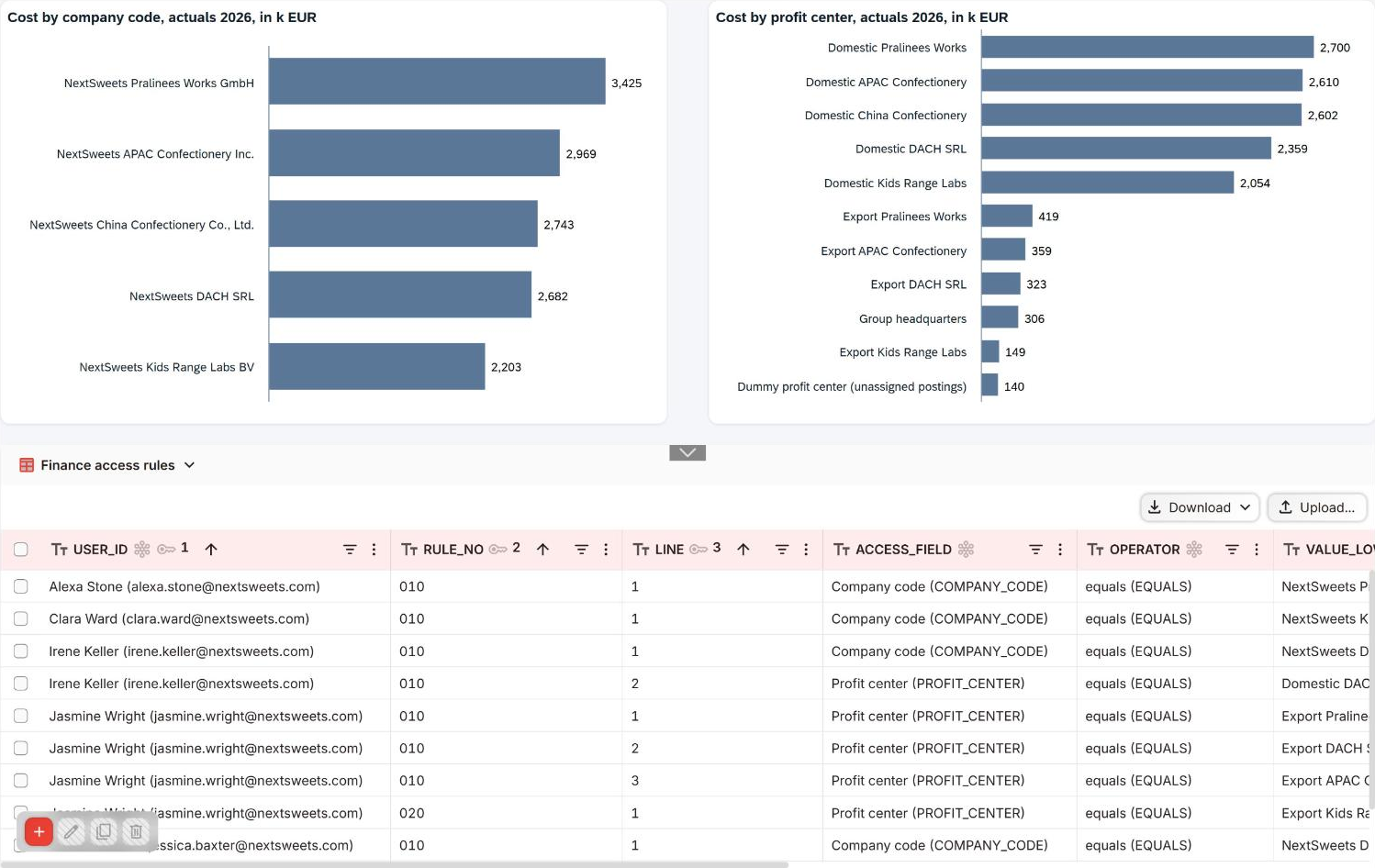
Sweets Co keeps one table for the whole group, keyed by the user, a three-digit rule number, and a line number inside the rule. The rule number groups the lines that belong together, and every rule a user carries adds to what that user sees. Each line names one field, an operator and a value. The field is the company code, the controlling area or the profit center, the three criteria of the data access control. Two dates bound the line, a company code names whose controller maintains it, and a note records what the rule is for.
Fields, operators and rule logic come from the reporting unit rules of act 2, and only an access line takes all values beside equals and a range. At the start the table holds fourteen lines, eleven rules for ten people, and six patterns cover every one of them.
| Pattern | Lines in the table | What the person sees |
|---|---|---|
| One company code | Alexa Stone, rule 010: company code 1000 | every profit center of Pralinees Works |
| A range | Amir Morgan, rule 010: company code 2000 to 2990 | all of Asia Pacific |
| Two fields in one rule, read as and | Irene Keller, rule 010: company code 1100 and profit center 110010 | DACH SRL, on the domestic profit center only |
| One field on several lines, read as or | Jasmine Wright, rule 010: profit centers 100020, 110020 and 200020 | the export profit centers of three company codes |
| A second rule with its own date | Jasmine Wright, rule 020 from Jul 1: profit center 120020 | the Kids Range Labs export team, added from July |
| All values, with an end date | Logan West, rule 010, Jun 1 to Aug 31: all company codes | the whole group, until the line ends |
A field a rule leaves out restricts nothing, which is why Alexa Stone sees every profit center of Pralinees Works. The export team that Kids Range Labs opened on July 1 gets a rule of its own, because a rule holds only while all of its lines hold: as a fourth line of rule 010, the July date would have switched off the whole rule until July.

One value help serves all three fields and follows the field chosen on the same line. Company code offers the five company codes and Profit center the profit centers of the group, each with its name beside its key. A controller who knows the company as Pralinees Works finds 1000 by typing Pralinees.
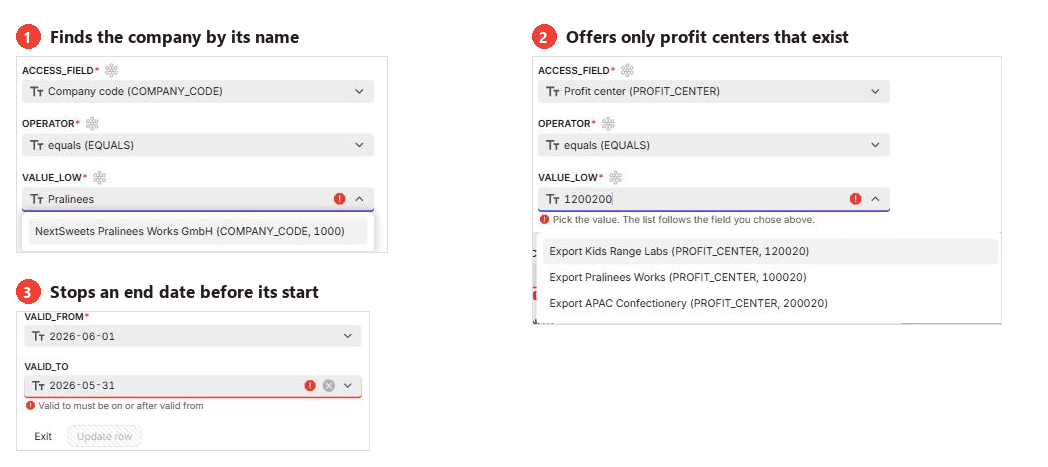
Three things the table refuses
A table that decides what people see has to be harder to get wrong than a spreadsheet, and three refusals do most of that work. The first catches a value that exists nowhere in the group, because the profit centers are a strict list. A line that reads 1200200, one digit too many, matches no profit center, and the dialog offers the listed values only, so the row goes in once a real one is picked. A mistyped profit center in an access table is worse than the same typo in a mapping table, because nothing about the result looks broken: the user simply sees fewer rows, assumes the report is complete, and reports the number. The strict list refuses it at entry, the last moment anyone is still looking at it, and the user column checks every email address the same way.
The second refusal is an end date that falls before the start date. The line of the interim auditor runs from June 1 to August 31, and moving that end date back to May 31 stops the update until the dates agree.
The third refusal keeps the operator all values with the parent company. A line with all values has to carry company code 1000 as the code that maintains it, so only group controlling and the controller of Pralinees Works can write one.
Two dates in September: a controller who started and an audit that closed itself
Two things happened at Sweets Co in September, and each of them took one row. Penelope Cooper started as a controller at Pralinees Works on Monday, September 21. Her line went into the table the week before, company code 1000, valid from that Monday, so it waited there and granted nothing until she started. She opened the dashboard on her first morning and saw her company code, without an email or an afternoon of somebody else's time.
The interim auditor is the same mechanism running the other way, and he is the person the August question was about. The line of Logan West ran from June 1 to August 31 and covered every company code in the group, the scope an audit needs and more than anyone should keep afterward. That single line carried the whole rule, so it stopped counting on the date it named, and the audit scope closed itself on September 1 while the data team was doing something else.
Access lines keep their end date, which the mapping of act 1 gave up. Lines add up, so an overlap only widens a scope, and an audit needs the day it ends. The permissions view reads the dates on every refresh, so a scope that starts or ends takes effect the next time somebody opens the dashboard.
Clara Ward opens SAP Analytics Cloud and sees company code 1200
Clara Ward, the controller of Kids Range Labs, carries one rule with one line, company code 1200, and her ERP role grants the same. Both finance stories then show her company code alone.
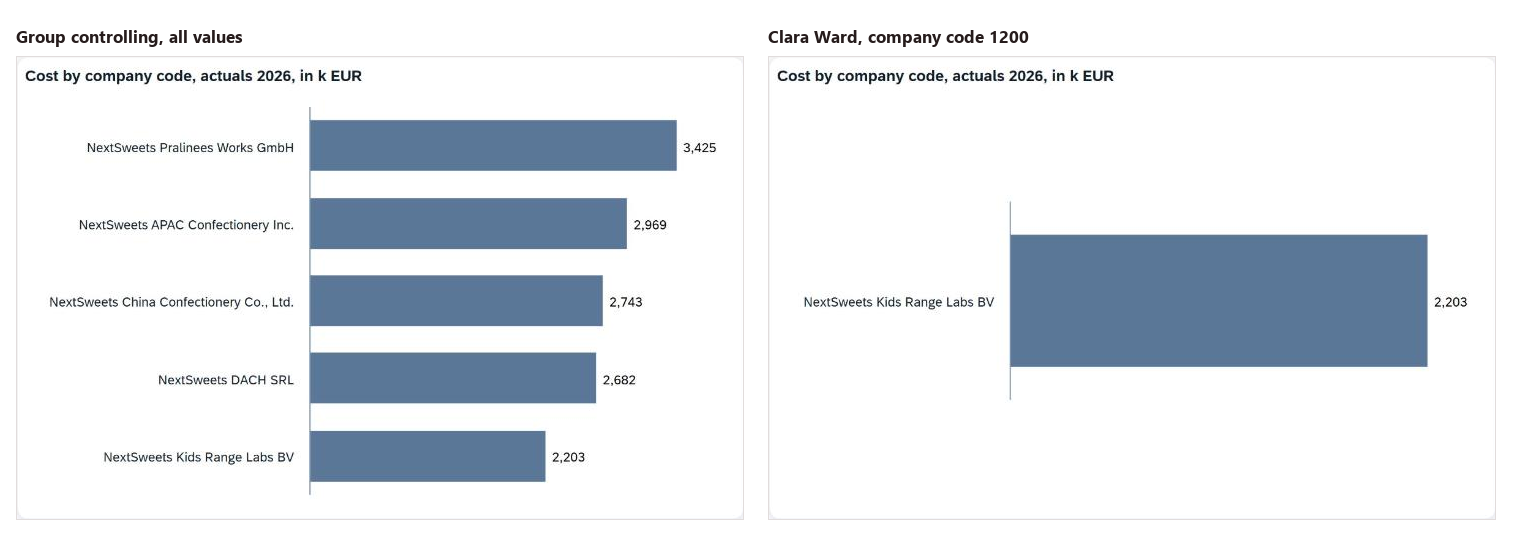
The red Unassigned bar of act 1 stands at its full 324,900 euros in her view, because both cost centers behind it belong to company code 1200 and the decision about them is hers. In the act 2 story her cost reports under Benelux, apart from 78,100 euros of group recharges that rule 050 sends to Group headquarters. Once rule 025 is in, the export team's 149,200 euros report under Export. The charts are the ones group controlling opens, and the restriction arrives with the data.
The data team builds the control once, finance writes the rows
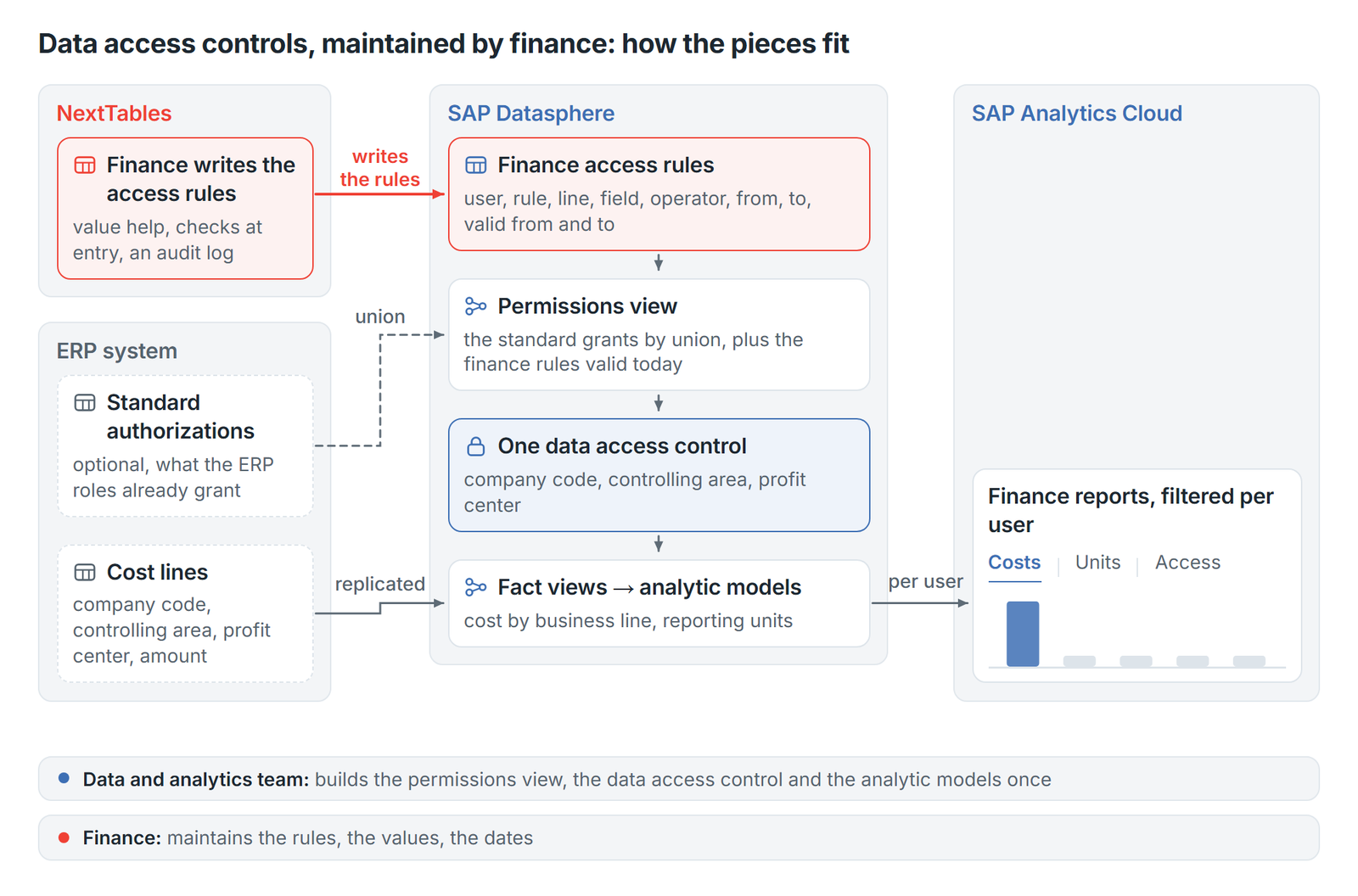
The grid and the dialogs in the figures above are NextTables, and every line they write goes into SAP Datasphere as a row of an ordinary local table. NextTables adds to that row a value help that follows the field chosen on the line, a check that runs before the row is saved, and an audit log.
Around the table the data team keeps four things, and each of them is built once. The first is the permissions view, which flattens the rules into the combinations they allow and filters to the lines that are valid today. That filter carries validity into a control that has no concept of it.
The second is the data access control, pointed at that view, with the column that holds the user and the three criteria. The third is the attachment, one control on both fact views, so the stories of act 1 and act 2 are restricted together. The fourth is the boundary itself, the decision about which fields may restrict anything at all.
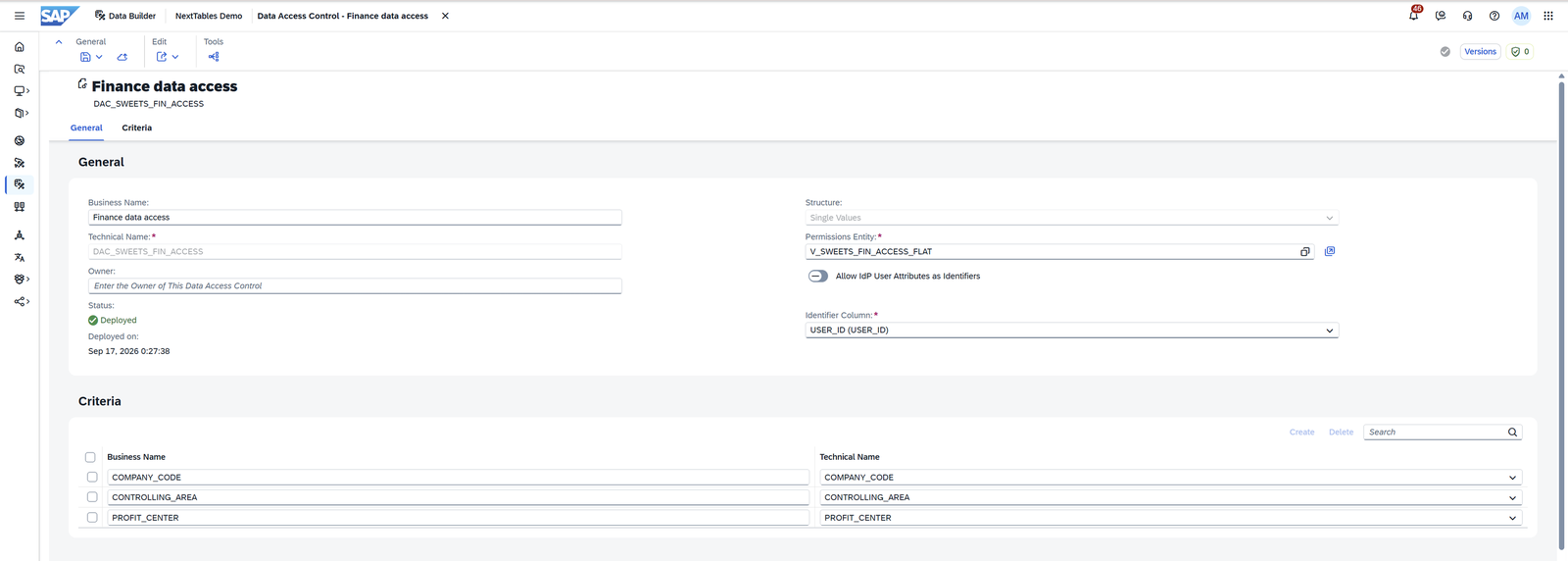
Where ERP roles already carry a company code per user, a union places that set under the finance lines, and finance maintains the exceptions and additions on top. At Sweets Co, Alexa Stone and Clara Ward hold their company code both ways, and the view returns each combination once.
The access table is data, so it carries an authorization of its own, and in NextTables that is row-level security. The mapping table of act 1 uses the same NextTables control. A small table names the company codes each person may maintain, and the company code on each access line decides who may read and edit it, and NextTables keeps an audit log for the access table as well. Two knowledge base articles cover the mechanics, an introduction to authorization and create and use row-level security.

Data access controls in SAP Datasphere: our conclusion
The platform half of this is solved, a permissions view with a control on top of it. The table underneath it decides whether next month's report is still right. That table is current only while the people who know that an auditor left in August can say so on the day they learn it.
An access table is a set of finance decisions written down: which company code a controller answers for, which profit centers belong to an export team, and how long a temporary scope lasts. Written down that way each of them can be read, dated and explained to an auditor.
The data team keeps the model, the permissions view, the control, and the boundary. Finance keeps the rows and the dates on them, the part that has to move at the speed of a reorganization. That division of labor turns a new controller into a row somebody writes the week before she starts.
FAQ: data access controls in SAP Datasphere
1. Does SAP Datasphere support row-level security for SAP Analytics Cloud?
Yes, through an object called a data access control. It reads a permissions view that names the values each user may see and sits on the view that holds the facts. Every analytic model and story above that view returns the scope of the person who opened it.
2. Who maintains a data access control in SAP Datasphere?
The object belongs to the data team, because it is a modeler object built in the Data Builder. The rows behind it decide who answers for which company code, so they belong to finance, which maintains them through NextTables or another maintenance screen.
3. Can finance change who sees which company code in SAP Analytics Cloud itself?
Yes, once the permissions table sits on a screen finance can use. A line written in NextTables lands in the table on SAP Datasphere, the permissions view reads it on the next refresh, and the dashboard shows the new scope on its next load.
4. Does the person maintaining the access table need an SAP Datasphere account?
Maintaining the table takes no account on SAP Datasphere, because business users write through NextTables and authenticate there. User management on the platform stays with the team that runs the space. The account that matters belongs to the person reading the report, whose SAP Analytics Cloud identity the control matches against.
5. What happens in SAP Datasphere when a controller leaves or moves to another company code?
Each line carries a valid from and a valid to, and the permissions view filters to the lines valid today, so access ends on the date the line carries. A move is two rows, the old one ending on its last true day and the new one starting the next morning. A line written in NextTables asks for a note whenever an end date is set.
6. Does NextTables keep an audit log for the SAP Datasphere access table?
Yes, NextTables keeps an audit log for the access table in SAP Datasphere.
7. Can a maintainer grant themselves access to every company code in SAP Datasphere?
A maintainer edits the lines whose company code lies inside their own scope. A line with all values has to carry the company code of the parent, so the controller of a subsidiary cannot write one. A company code line names the company code that maintains it; the lines export controlling needs across entities are granted at the parent. Changes go into the audit log, and group controlling reads the short table at every close.
8. Does maintaining the table in NextTables replace the authorization concept of SAP Datasphere?
No, it fills a table that the platform's own concept already reads. SAP Datasphere decides how a data access control is built, where it is attached and what it may restrict, and privileges on the space stay as they are. The rows move to the people who know which controller answers for which company code, working in NextTables.
Next step
Who decides today which company codes a controller sees in your reports, and where is that decision written down? Finance teams maintain access tables like this one on SAP Datasphere, inside the dashboards that read them. Tell us how your access list is kept today, and we look at it with you.