
📝 Availability: NextTables for SAP BW, Enterprise edition. This article documents a BAdI; BAdI support is an Enterprise feature.
You will learn
What the SET_META_EXIT method of the Table Maintenance BAdI can change, how editability and visibility are expressed, and what every table and field parameter carries. The method controls the shape of the table: which columns a user sees, which of them can be edited, how a column searches for its values, and whether the table may be edited at all.
This article is for ABAP developers. It is the parameter reference; the settings it overrides are the ones described in Table and column configuration in NextTables for SAP BW.
Prerequisites
- A Table Maintenance BAdI implementation for your table. How to implement the table maintenance BAdI covers the enhancement spot, the implementing class and the filter values.
- ABAP development access on the BW system.
The method
The Table Maintenance BAdI's interface is /NLY/IF_BADI_EDITOR. It includes the component interface /NLY/IF_EDITOR, which carries the three exits. Metadata logic therefore runs in /NLY/IF_EDITOR~SET_META_EXIT of your implementing class.
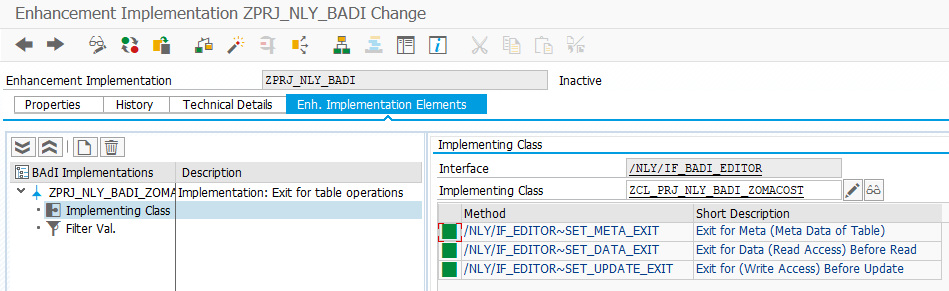
The method runs before the table is rendered, so whatever it sets is what the user gets. It overrides the front-end configuration, which makes it the right place for rules that depend on who is logged in, on the time of year, or on data the configuration screen cannot see.
Editability: the three states
Every field is in one of three states, expressed by the EDITABLE property:
1Locked. The user cannot change the value.2Editable and required. A value has to be entered; initial is refused.3Editable and not required. A value may be entered; initial is allowed.
Key fields behave differently on insert and on update. A key field may be filled when a row is created, but changing it later would not edit the row, it would create a different one. On an update event key fields are therefore always locked:
| Field | On insert | On update |
|---|---|---|
Key field (KEYFLAG = X) |
1 locked, 2 editable required, or 3 editable not required |
Always 1 locked. Key fields are not editable. |
| Non-key field | 1, 2 or 3 |
1, 2 or 3 |
Required fields
By default key fields are required and non-key fields are not. Both defaults can be changed. A non-key field can be made required, for example a customer category that the business wants filled on every row. A key field can be made not required, for example when a semantic key spans several fields and one of them is allowed to stay initial.
Non-editable fields
Setting a field to locked stops the user changing it on edit or insert. The clearest case is a field the system fills for you, such as Changed by or Changed on: the value is written before the database update and must not be typed over by hand. How to track changes in NextTables for SAP BW shows that pattern end to end.
⚠️ Not verified on a system: the field-level EDITABLE property also documents 1 as Locked (keep target value) and 4 as Locked (overwrite target value), which would mean value 1 preserves a value written by a BAdI through the save. That reading comes from the configuration documentation and has never been confirmed against a running system. Test it before relying on it.
Table parameters
Properties of the table as a whole, in CH_S_TABLE_INFO:
| Property | Type | Description | Possible values |
|---|---|---|---|
TBLLEN | CHAR 30 | Table length | Reserved for internal use |
TECHNAME | CHAR 30 | Technical name of the table | For example /BIC/AZOMACOST2 |
TABNAME | CHAR 30 | Table name | For example ZOMACOST |
DESCR | CHAR 30 | Table description | |
EDITABLE | CHAR 1 | What the user may do with the table | 1 Editable2 Insertable3 Editable and insertable4 Deletable5 Deletable and editable6 Deletable and insertable7 Deletable, editable and insertable |
IS_INLINE | CHAR 1 | Enable inline editing | 1 Yes, 2 No |
IS_LOC_FILTER | CHAR 1 | Enable the local filter | 1 Yes, 2 No |
IS_PRE_FILTER | CHAR 1 | Enable the global filter | 1 Yes, 2 No |
IS_DELETE_ALL | CHAR 1 | Delete ADSO content | 1 Delete action available |
SUPPRESS_EXPORT | CHAR 1 | Suppress export | X Suppress export |
JSFUNCTIONS | STRING | JavaScript functions | Reserved for internal use |
BUTTONS | Table | Custom button settings | See the button parameters below |
F1HELP | STRING | F1 help | Reserved for internal use |
CHECK_AUTH_INFOPROV | CHAR 1 | Check the analysis authorization for the InfoProvider | 1 Yes |
ACTIVATION | CHAR 1 | Activation behavior after a write | 1 Activate at once (default)2 No activationWith no entry, activation happens automatically. |
ALIAS_TTYPE | CHAR 10 | Alias table type | |
ALIAS_TABNAME | CHAR 10 | Alias table name | |
CONTENT_ADMIN | CHAR 1 | Content admin | X yes, blank no |
CONFIG_ADMIN | CHAR 1 | Configuration admin | X yes, blank no |
TABTYPE | CHAR 10 | Table type | |
TABDESC | STRING | Description | |
MAX_ROWS | NUMC | Maximum rows shown in the table | Normally 1000, changeable in the configuration. For a custom table type it is worth setting MAX_ROWS and C_TOTAL_ROWS in code. |
Field parameters
Properties of a single column, in CH_T_FIELDS_INFO:
| Property | Type | Description | Possible values |
|---|---|---|---|
FNAME | CHAR 30 | Field name | |
LEN | NUMC 6 | Length in characters | |
INTLEN | NUMC 6 | Internal length in characters | |
TYPE | CHAR 1 | ABAP data type | C character stringD date (YYYYMMDD)T time (HHMMSS)P packed numberg variable-length string (ABAP STRING)G long text (XXL)Y file (XXL)> timestampM HTML contentj static boxed componentsJ checkbox (1 yes, 2 no) |
INTTYPE | CHAR 1 | Internal ABAP data type | C character stringN digits onlyD date, T timeX byte sequence, also INT1/2/4 in DDIC metadataI 4-byte integerb 1-byte integer up to 254s 2-byte integerP packed number, F float |
DECIMALS | NUMC 6 | Number of decimal places | |
DECIMALS_DISP | CHAR 1 | Decimal places as displayed | |
DESCR | CHAR 60 | Short description | |
KEYFLAG | CHAR 1 | Marks a key field | X key field |
DISPLAY | CHAR 1 | Visibility | 1 Visible2 Not visible, but still usable in the global filter3 Only visible in table view4 Not visible and not transferred to the front endUse 2 to filter on the back end without showing the column; use 4 when the data must not reach the browser at all. |
EDITABLE | CHAR 1 | Editability | 1 Locked (keep target value)2 Editable, required3 Editable, not required4 Locked (overwrite target value) |
SUPPRESS_EXPORT | CHAR 1 | Suppress export | X |
SUPPRESS_LOC_FILTER | CHAR 1 | Suppress the local filter | X |
SUPPRESS_PRE_FILTER | CHAR 1 | Suppress the global filter | X |
SUPPRESS_GROUP_BY | CHAR 1 | Suppress group by | X |
CELLRENDERER | STRING | Cell renderer, as a JavaScript function | |
F4HELP | Table | Search settings | See the search parameters below |
F1HELP | STRING | F1 help | Reserved for internal use |
VARIABLES-NAME | CHAR 30 | Variable name | |
VARIABLES-DESCR | CHAR 60 | Variable description | |
INFOOBJECT | CHAR 30 | InfoObject | |
CONVEXIT | CHAR 5 | Conversion routine | For example ALPHA or PERI6. Changing this is rarely needed. |
IOBJTP | CHAR 3 | InfoObject type | CHA characteristicKYF key figureTIM time characteristicDPA data packet characteristicUNI unit of measurementXXL XXL InfoObject |
DDIC_POSITION | NUMC 4 | Position of the field in the DDIC | |
UI_POSITION | NUMC 4 | Position of the field in the user interface | |
CHECK_INFOOBJECT_INTEGRITY | CHAR 1 | Check InfoObject integrity | 1 yes, 2 no |
IOBJ_AUTH_REL_FLAG | CHAR 1 | InfoObject is authorization relevant | Reserved for internal use. Filled with X when the InfoObject is authorization relevant. |
DISPLAY_TEXT | Table | Characteristic display | 6 No display, 0 Key and text, 1 Text, 2 Key, 3 Text and key, 4 Long text, 5 Medium text, 7 Short text, B/C/D text and key as short, medium, long, E/F/G key and text as short, medium, long |
HIERARCHY_FOR_AUTH | CHAR 30 | Hierarchy authorization |
Search parameters
The F4HELP table of a field decides where its value help comes from and how it is presented:
| Property | Type | Description | Possible values |
|---|---|---|---|
SEARCHMODE | CHAR 6 | Search type | DDIC based on table and field in the Data DictionaryIOBJ InfoObjectCUSTOM custom search, implemented in the Search BAdI |
SEARCHNAME | CHAR 60 | Search name | For example the InfoObject name when SEARCHMODE is IOBJ |
SEARCHSTYLE | CHAR 30 | How the value help is presented | SEARCH show a search barDROPDOWN show a dropdown. Recommended only below about 50 values. |
MIN_CHAR | NUMC 3 | Characters the user must type before the search starts | |
STRICT | CHAR 1 | Whether values outside the result list are allowed | 1 adding values that are not in the result list is not allowed |
Which of the three search modes to pick, and why most requirements never need CUSTOM, is covered in How to give editors the right values in NextTables for SAP BW.
Button parameters
The BUTTONS table of the table info defines custom buttons:
| Property | Type | Description | Possible values |
|---|---|---|---|
NAME | CHAR 30 | Button name | |
DESCR | CHAR 60 | Description | |
ICON | CHAR 60 | Icon | Any Font Awesome icon, for example paper-plane |
PARENT | CHAR 30 | Parent button | The name of another button, which nests this one under it |
LOCATION | CHAR 10 | Where the button appears | TOP top menu, upper rightCONTEXT context menu only, on right clickQUICK quick action menu on the left |
SORT_ORDER | NUMC 6 | Sort order | Any number |
ACTION | CHAR 12 | Action to perform | See the custom buttons reference |
MESSAGE | STRING | Message that blocks the request | See the custom buttons reference |
TOOLTIP | CHAR 255 | Button tooltip |
Custom buttons in NextTables for SAP BW explains the actions and what each one expects.
Step-by-Step Instructions
1. Loop over the fields and change what you need
The method hands you the field list as a changing parameter. Loop it, match on FNAME, and set the properties:
FIELD-SYMBOLS:
  <l_s_fields_info> TYPE /nly/ts_fields_info,
  <l_s_f4help>      TYPE /nly/ts_search_info.

* Change properties as needed
LOOP AT ch_t_fields_info ASSIGNING <l_s_fields_info>.

  CASE <l_s_fields_info>-fname.

    WHEN 'FIELD_NAME_1'.
      <l_s_fields_info>-editable = '1'.

    WHEN 'FIELD_NAME_2'.
      LOOP AT <l_s_fields_info>-f4help ASSIGNING <l_s_f4help>.
        <l_s_f4help>-searchstyle = 'DROPDOWN'.
      ENDLOOP.

  ENDCASE.

ENDLOOP.
2. Decide per event where the rule applies
Metadata is set once per table load, so a rule that should only apply while inserting has to test the context itself rather than rely on the event parameters the other two exits receive.
3. Report problems to the user
The method also receives CT_MESSAGES. If your logic refuses to build the table, say so instead of returning an empty grid. Error handling in the table maintenance BAdI for SAP BW covers the message and visual types.
Troubleshooting / FAQs
1. My change is ignored and the configuration wins.
Check the field name in the CASE. FNAME carries the technical field name, which for an ADSO is usually the InfoObject name rather than the label shown in the grid. A WHEN that never matches fails silently.
2. A key field is still locked although I set it to editable.
On an update event key fields are always locked, whatever the exit sets. Changing a key value would address a different row. Set the value on insert instead, or model the field as a non-key attribute.
3. I hid a column but it still reaches the browser.
Visibility 1 through 3 control what is displayed, not what is transferred. Use DISPLAY = 4 when the data itself must not leave the back end.
4. Switching a search to a dropdown returns nothing.
The dropdown loads the full value list. It is recommended only below roughly 50 values; above that use SEARCHSTYLE = 'SEARCH' with MIN_CHAR so the search starts once the user has typed enough characters.