
📝 Availability: NextTables for SAP BW, Enterprise edition. Custom buttons are defined in a BAdI; BAdI support is an Enterprise feature.
You will learn
How to add your own buttons to the top menu, the context menu or the quick action menu of a table, what each action value does, how to group buttons into submenus, and how to react when one is pressed.
This article is for ABAP developers.
The two halves
A custom button lives in two methods of the table maintenance BAdI, and keeping them apart is most of understanding the feature:
- The Meta method defines the buttons. Name, description, action, location, icon, tooltip and menu nesting all go into
CH_S_TABLE_INFO-BUTTONS. See The SET_META_EXIT method in NextTables for SAP BW. - The Update method reacts to them. When a button is pressed, the exit runs with
I_BUTTONcarrying the button's name. See The Update BAdI (SET_UPDATE_EXIT) in NextTables for SAP BW.
Prerequisites
- A table maintenance BAdI implementation for the table. How to implement the table maintenance BAdI in SAP BW.
- ABAP development access on the BW system.
Parameters
NAME, DESCR, ACTION and LOCATION are required. The rest are optional.
| Parameter | What it does |
|---|---|
NAME | The button's ID. It is what I_BUTTON carries, and what a child entry points at with PARENT. |
DESCR | The description shown to the user. Optional if a tooltip is set. |
ACTION | What happens when the button is pressed. See below. |
LOCATION | Which menu the button appears in. See below. |
PARENT | The NAME of the entry this one nests under. |
SORT_ORDER | Any number, deciding the order of entries. |
ICON | A Font Awesome icon name, in the regular style, for example paper-plane. |
TOOLTIP | A tooltip. Setting it makes DESCR optional, which is how you get an icon-only button in the top menu. In the quick action menu the tooltip is shown instead of the description. |
Actions
| Value | Constant | What happens |
|---|---|---|
SEND_ALL | co_action_send_all |
Sends all data for update, as though the user had ticked Select all, so any local filter still applies. The values arrive in the Update exit. |
SEND_SEL | co_action_send_sel |
Sends the selected rows for update. |
BUTTON | co_action_button |
Sends the button's name in I_BUTTON without sending data. This is the one for triggering something, such as starting a process chain. |
NO_ACTION | co_action_no_action |
Nothing. Used for the parent node of a submenu. |
Locations
| Value | Constant | Where |
|---|---|---|
TOP | co_location_top | Top menu, upper right. |
CONTEXT | co_location_context | Context menu, on right click. |
QUICK | co_location_quick | Quick action menu on the left. |
Step-by-Step Instructions
1. Define the buttons in the Meta method
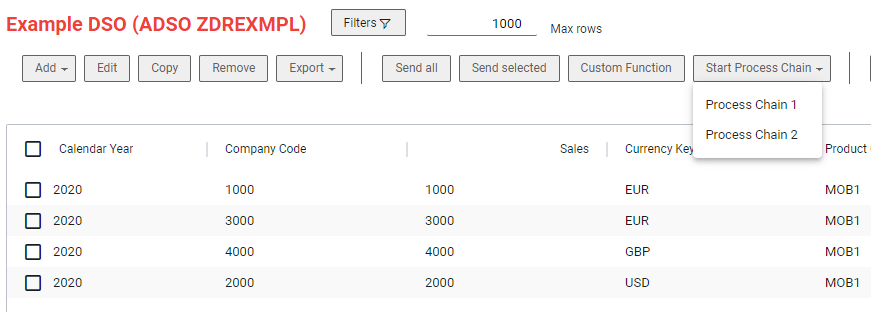
A reference set covering every action and both menus:
METHOD /nly/if_editor~set_meta_exit.

  ch_s_table_info-buttons = VALUE #( BASE ch_s_table_info-buttons

*   Top menu
    ( name = 'SEND_ALL_T'  descr = 'Send all'
      action   = /nly/cl_table_rest_v3=>co_action_send_all
      location = /nly/cl_table_rest_v3=>co_location_top )
    ( name = 'SEND_SEL_T'  descr = 'Send selected'
      action   = /nly/cl_table_rest_v3=>co_action_send_sel
      location = /nly/cl_table_rest_v3=>co_location_top )
    ( name = 'BUTTON_T'    descr = 'Custom Function'
      action   = /nly/cl_table_rest_v3=>co_action_button
      location = /nly/cl_table_rest_v3=>co_location_top )
    ( name = 'NO_ACTION_T' descr = 'Start Process Chain'
      action   = /nly/cl_table_rest_v3=>co_action_no_action
      location = /nly/cl_table_rest_v3=>co_location_top )

*   Top menu, nested under NO_ACTION_T
    ( name = 'BUTTON_URL_T_1' descr = 'Process Chain 1'
      action   = /nly/cl_table_rest_v3=>co_action_button
      location = /nly/cl_table_rest_v3=>co_location_top
      sort_order = '0' parent = 'NO_ACTION_T' )
    ( name = 'BUTTON_URL_T_2' descr = 'Process Chain 2'
      action   = /nly/cl_table_rest_v3=>co_action_button
      location = /nly/cl_table_rest_v3=>co_location_top
      sort_order = '1' parent = 'NO_ACTION_T' )

*   Context menu
    ( name = 'SEND_ALL_C'  descr = 'Send all'
      action   = /nly/cl_table_rest_v3=>co_action_send_all
      location = /nly/cl_table_rest_v3=>co_location_context )
    ( name = 'SEND_SEL_C'  descr = 'Send selected'
      action   = /nly/cl_table_rest_v3=>co_action_send_sel
      location = /nly/cl_table_rest_v3=>co_location_context )
    ( name = 'BUTTON_C'    descr = 'Custom Function'
      action   = /nly/cl_table_rest_v3=>co_action_button
      location = /nly/cl_table_rest_v3=>co_location_context )
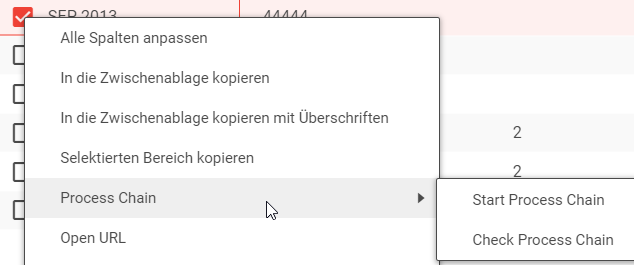
    ( name = 'NO_ACTION_C' descr = 'Start Process Chain'
      action   = /nly/cl_table_rest_v3=>co_action_no_action
      location = /nly/cl_table_rest_v3=>co_location_context )

*   Context menu, nested under NO_ACTION_C
    ( name = 'BUTTON_URL_C_1' descr = 'Process Chain 1'
      action   = /nly/cl_table_rest_v3=>co_action_button
      location = /nly/cl_table_rest_v3=>co_location_context
      sort_order = '0' parent = 'NO_ACTION_C' )
    ( name = 'BUTTON_URL_C_2' descr = 'Process Chain 2'
      action   = /nly/cl_table_rest_v3=>co_action_button
      location = /nly/cl_table_rest_v3=>co_location_context
      sort_order = '1' parent = 'NO_ACTION_C' ) ).

ENDMETHOD.
📝 Use VALUE #( BASE ch_s_table_info-buttons ... ), not a plain assignment. The table may already carry entries, and replacing it silently removes them.
2. Group buttons into a submenu
A submenu is a parent entry with ACTION = NO_ACTION and children pointing at it with PARENT. The parent does nothing when clicked; it opens.
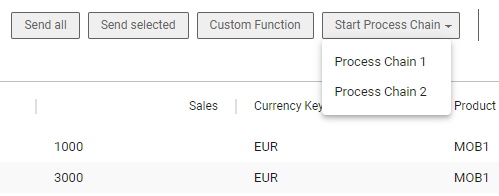
Context menu submenus work identically, with co_location_context.
3. React to the button in the Update method
With ACTION = BUTTON, the Update exit runs with the button's name in I_BUTTON. Branch on it:
METHOD /nly/if_editor~set_update_exit.

  IF i_button IS NOT INITIAL.

    CASE i_button.

      WHEN 'BUTTON_URL_T_1'.
        CALL FUNCTION 'RSPC_CHAIN_START'
          EXPORTING
            i_chain = 'ZDRS_PC_ZDREXMPL1'.

      WHEN 'BUTTON_URL_T_2'.
        CALL FUNCTION 'RSPC_CHAIN_START'
          EXPORTING
            i_chain = 'ZDRS_PC_ZDREXMPL2'.

    ENDCASE.

  ENDIF.

ENDMETHOD.
A worked end-to-end version, including checking the chain's status and reporting it back, is in How to start a BW process chain from a NextTables button.
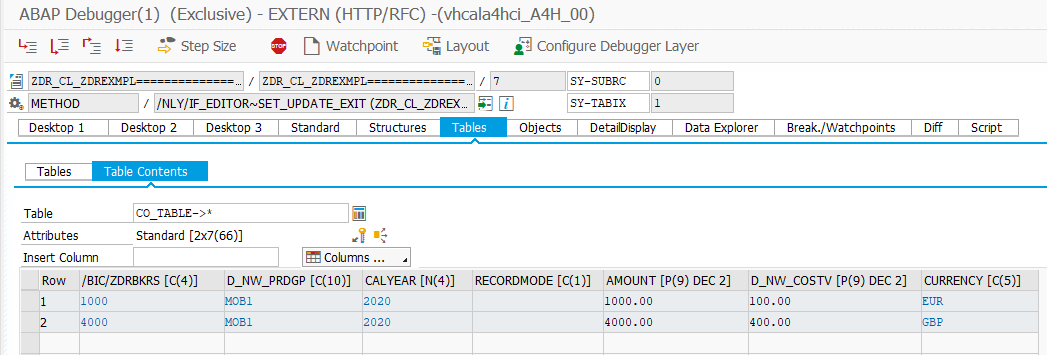
With SEND_ALL or SEND_SEL, the rows arrive in the Update exit as though they had been saved, so the same exit can set a status on the selection or run a check across everything the local filter left visible.
4. Localize the descriptions
The description is a string, so the logon language can decide it:
METHOD /nly/if_editor~set_meta_exit.

  DATA lv_send_all TYPE string.

  IF sy-langu = 'E'.
    lv_send_all = 'Send all data'.
  ELSE.
    lv_send_all = 'Alle Daten senden'.
  ENDIF.

  ch_s_table_info-buttons = VALUE #(
    ( name     = 'SEND_ALL_T'
      descr    = lv_send_all
      action   = /nly/cl_table_rest_v3=>co_action_send_all
      location = /nly/cl_table_rest_v3=>co_location_top ) ).

ENDMETHOD.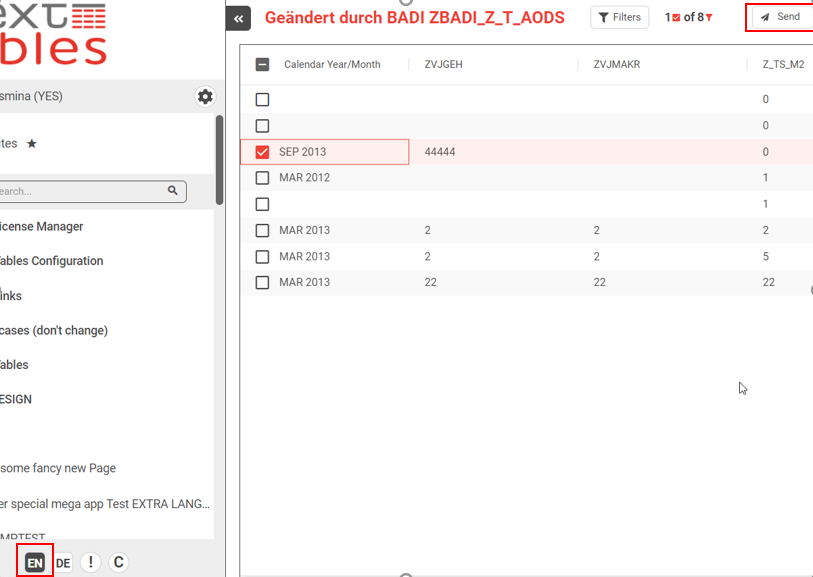
5. Tell the user what happened
A button that starts something in the back end gives no feedback by itself. Append to CT_MESSAGES so the user learns that the chain started, or did not. See Error handling in the table maintenance BAdI for SAP BW.
Troubleshooting / FAQs
1. My button does not appear.
Check that the Meta method actually ran, which means the BAdI filter matched and everything is activated, and that LOCATION is set. A button without a location has nowhere to be.
2. Other buttons disappeared when I added mine.
You assigned to CH_S_TABLE_INFO-BUTTONS instead of appending to it. Use VALUE #( BASE ch_s_table_info-buttons ... ).
3. My submenu parent does nothing when clicked.
Correct. A parent must carry NO_ACTION. Give the children the real actions.
4. I_BUTTON is empty in the Update exit.
The button's action is not BUTTON. SEND_ALL and SEND_SEL send data, not a button name.
5. Can I show an icon without a description?
Yes, in the top menu: set ICON and TOOLTIP, and leave DESCR empty. In the quick action menu the tooltip replaces the description anyway.
6. My icon does not render.
Only the Font Awesome regular style is supported, and the value is the plain icon name, for example paper-plane.