
📝 Availability: NextTables for SAP BW, Enterprise edition. This article documents a BAdI; BAdI support is an Enterprise feature.
You will learn
What the DO_SEARCH_EXIT method of the Search BAdI receives, what it has to return, how each field of the result table maps onto what the user sees, and a complete worked search that queries a view with a fuzzy match and formats the results.
This article is for ABAP developers. It is the parameter reference for the search itself; setting the BAdI up is How to implement a Search BAdI in NextTables for SAP BW.
📝 Check the configuration first. Most value help requirements are solved by the search settings on the column, without any code. Write a Search BAdI only when the values genuinely cannot come from a Data Dictionary table or an InfoObject. How to give editors the right values in NextTables for SAP BW covers the configuration routes.
Prerequisites
- A Search BAdI implementation. How to implement a Search BAdI in NextTables for SAP BW covers the definition, the filter and the Meta method.
- ABAP development access on the BW system.
The filter, and what it means for reuse
The Search BAdI filter carries the search type and the search name. When the search runs on an InfoObject, the search name is the InfoObject's name.
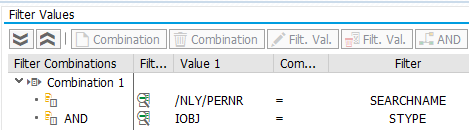
The table or DSO is deliberately not part of the filter. One implementation therefore serves every table that uses the same InfoObject, which is the point: a value help is a property of the characteristic, not of each table that happens to contain it. You implement it once.
When two tables sharing an InfoObject genuinely need different searches, there are two ways out:
- Create a referencing InfoObject, so the master data is still shared but the searches can differ.
- Override the search settings per table in the table maintenance BAdI's Meta method, which wins over the search configuration. See The SET_META_EXIT method in NextTables for SAP BW.
Parameters
The exit belongs to the BAdI definition /NLY/BADI_SEARCH. Implementing classes implement /NLY/IF_SEARCH~DO_SEARCH_EXIT.
| Parameter | Type | Description | Possible values |
|---|---|---|---|
I_STYPE | CHAR 6 | Search type originally used | DDIC based on a table and field in the Data DictionaryIOBJ InfoObjectCUSTOM custom |
I_SEARCHNAME | CHAR 60 | Search name originally used | For example the InfoObject name when the search type is IOBJ |
I_SEARCH_TERM | STRING | What the user typed | Can be empty; decide yourself what an empty term returns |
E_IS_IMPLEMENTED | BOOLEAN | Marks the customer exit as implemented, which skips the standard search | X true |
E_T_SEARCH_RESULT | Table | The results you return | See below |
⚠️ E_IS_IMPLEMENTED is not optional. Leave it unset and the standard search runs as well, so your results are replaced by the standard ones. Setting it is what tells NextTables to use what you returned.
The result table
E_T_SEARCH_RESULT is where a search result becomes something the user can read. Most of its fields date from an earlier result layout and are no longer used; the five that matter are marked below.
| Field | Type | Description | Status |
|---|---|---|---|
TITLE_KEY | CHAR 60 | The key. This is the value written into the cell when the user picks the result. | Used |
TITLE_DESC | CHAR 250 | The title line of the result. | Used |
SUB_TITLE | CHAR 250 | The second line, under the title. | Used |
CONTENT | STRING | The detail block. Accepts <br> to break lines. | Used |
SCORE | DEC 5,2 | The result's score, used for ordering. | Used |
CAT, CAT_URL, CAT_IMG | CHAR 60 / STRING | Category, category URL, category image | Obsolete |
TITLE_URL | STRING | Title URL | Obsolete |
ACTION_TITLE, ACTION_URL, ACTION_IMG, ACTION_ICON, ACTION_FUNC | CHAR 40 / STRING | Button description, URL, image, icon and function | Obsolete |
TITLE_KEY is the one field you cannot get wrong: whatever it holds is what ends up in the table. The other four are presentation, and they are what makes a result list usable rather than a column of keys.
Step-by-Step Instructions
1. Normalize the search term
The term arrives URL-encoded, so decode the encodings your users will actually produce before searching. Decide as well what an empty term should mean, because the user gets one on the first click:
DATA(lv_search_term) = i_search_term.

REPLACE ALL OCCURRENCES OF '%20' IN lv_search_term WITH ` `.
REPLACE ALL OCCURRENCES OF '%22' IN lv_search_term WITH `"`.

IF lv_search_term IS INITIAL.
  l_search_term = '*'.
ELSE.
  l_search_term = |{ lv_search_term }|.
ENDIF.
2. Run your query
Anything you can query is fair game. The worked example below searches a CDS view of employees with a HANA fuzzy match, weighting the name columns higher than the address and text columns so a name match sorts above an incidental one.
3. Format each row into a result
Fill the five used fields. Put the key in TITLE_KEY, the human-readable identity in TITLE_DESC, the context that tells two similar results apart in SUB_TITLE, and the rest in CONTENT.
4. Set E_IS_IMPLEMENTED
The last line of a working exit. Without it, nothing you did is used.
5. The complete example
METHOD /nly/if_search~do_search_exit.

  TYPES:
    BEGIN OF ts_changes,
      score            TYPE decfloat34,
      pernr            TYPE /b787/oipernr,
      nachn            TYPE c LENGTH 40,
      vorna            TYPE c LENGTH 40,
      pstlz            TYPE c LENGTH 10,
      stras            TYPE c LENGTH 60,
      ort01            TYPE c LENGTH 40,
      emplstatus_txtmd TYPE c LENGTH 40,
      bukrs            TYPE c LENGTH 10,
      bukrs_txtmd      TYPE c LENGTH 40,
      kostl            TYPE c LENGTH 10,
      kostl_txtmd      TYPE c LENGTH 40,
      orgeh            TYPE c LENGTH 10,
      orgid_txtmd      TYPE c LENGTH 40,
      plans            TYPE c LENGTH 10,
      plans_txtmd      TYPE c LENGTH 40,
    END OF ts_changes,
    tt_changes TYPE TABLE OF ts_changes.

  DATA: ls_search_result TYPE /nly/ts_search_result,
        lv_sql           TYPE string,
        lo_t_table       TYPE REF TO data,
        l_search_term    TYPE string.

  FIELD-SYMBOLS:
    <fs_s_table> TYPE ts_changes,
    <fs_t_table> TYPE tt_changes.

* Search term
  DATA(lv_search_term) = i_search_term.
  REPLACE ALL OCCURRENCES OF '%20' IN lv_search_term WITH ` `.
  REPLACE ALL OCCURRENCES OF '%22' IN lv_search_term WITH `"`.

  IF lv_search_term IS INITIAL.
    l_search_term = '*'.
  ELSE.
    l_search_term = |{ lv_search_term }|.
  ENDIF.

  CREATE DATA lo_t_table TYPE tt_changes.
  ASSIGN lo_t_table->* TO <fs_t_table>.

  lv_sql = |SELECT TOP 300 DISTINCT SCORE() AS SCORE, pernr, nachn, vorna, pstlz, |
        && |stras, ort01, emplstatus_txtmd, bukrs, bukrs_txtmd, kostl, kostl_txtmd, |
        && |orgeh, orgid_txtmd, plans, plans_txtmd |
        && |FROM "ZCDSPERSSEARCH" |
        && |WHERE CONTAINS(("NACHN", "VORNA", "PERNR", "STRAS", "ORT01", "BUKRS", |
        && |"KOSTL", "ORGEH", "PLANS", "PLANS_TXTMD", "ORGID_TXTMD", "BUKRS_TXTMD", |
        && |"KOSTL_TXTMD"), '{ l_search_term }', |
        && |FUZZY(0.7, 'similarCalculationMode=compare'), |
        && |weight(1, 0.8, 0.8, 0.6, 0.6, 0.6, 0.6, 0.6, 0.6, 0.3, 0.3, 0.3, 0.3)) |
        && |ORDER BY score() DESC|.

  TRY.
      DATA(lo_result) = cl_sql_connection=>get_connection(
                          )->create_statement(
                          )->execute_query( lv_sql ).

      lo_result->set_param_table( REF #( <fs_t_table> ) ).
      lo_result->next_package( ).
      lo_result->close( ).

    CATCH cx_sql_exception INTO DATA(err).
      DATA l_error(200) TYPE c.
      l_error = |{ err->get_text( ) }|.

      RAISE EXCEPTION TYPE /nly/cx_search_rest
        EXPORTING
          textid = /nly/cx_table_rest=>custom_message
          msgv1  = l_error(50)
          msgv2  = l_error+50(50)
          msgv3  = l_error+100(50)
          msgv4  = l_error+150(50).
  ENDTRY.

  LOOP AT <fs_t_table> ASSIGNING <fs_s_table>.

    CLEAR ls_search_result.

    ls_search_result-title_key  = |{ <fs_s_table>-pernr }|.
    ls_search_result-title_desc = |{ <fs_s_table>-nachn } { <fs_s_table>-vorna } | &&
                                  |({ <fs_s_table>-pernr ALPHA = out width = 1 })|.
    ls_search_result-sub_title  = |{ <fs_s_table>-plans_txtmd } in { <fs_s_table>-orgid_txtmd }|.
    ls_search_result-content    = |Address: { <fs_s_table>-stras } { <fs_s_table>-ort01 }| &&
                                  |<br>Company code: { <fs_s_table>-bukrs } { <fs_s_table>-bukrs_txtmd }| &&
                                  |<br>Cost center: { <fs_s_table>-kostl } { <fs_s_table>-kostl_txtmd }| &&
                                  |<br>Score: { <fs_s_table>-score }|.
    ls_search_result-score      = <fs_s_table>-score * 100.

    APPEND ls_search_result TO e_t_search_result.

  ENDLOOP.

* Set as customer exit implemented
  e_is_implemented = abap_true.

ENDMETHOD.
📝 Adapt the names. ZCDSPERSSEARCH and /B787/OIPERNR belong to one demo system. The fuzzy threshold of 0.7 and the column weights are a starting point: raise the threshold if the list matches too eagerly, and weight the columns a user would actually type into above the ones they would not.
Troubleshooting / FAQs
1. My results are replaced by the standard ones.
E_IS_IMPLEMENTED was not set. Set it to abap_true at the end of the method.
2. The user picks a result and the wrong value lands in the cell.
TITLE_KEY is the value that is written, not TITLE_DESC. Put the technical key there, and put the readable text in TITLE_DESC.
3. The result list is empty on the first click.
I_SEARCH_TERM is empty before the user types. Decide what that should return: the example searches for *, but returning the most recent or most common entries is often more useful than everything.
4. My exit applies to a table it should not.
Expected. The filter carries the search type and search name, not the table, so every table using that InfoObject gets this search. Use a referencing InfoObject, or override the search settings for that one table in the table maintenance Meta method.
5. The search term arrives with %20 in it.
The term is URL-encoded. Decode the sequences your users produce, at least %20 for a space and %22 for a quotation mark, before you build the query.