
📝 Availability: NextTables for SAP BW, Enterprise edition. This article documents a BAdI; BAdI support is an Enterprise feature.
You will learn
How to implement a Search BAdI: the definition and its two methods, what the filter matches on and what that means for reuse, every parameter of the Meta method, and how to point one column at a different search than its InfoObject would give it.
This article is for ABAP developers. It covers the setup and the Meta method; the search itself is The Search BAdI DO_SEARCH method in NextTables for SAP BW.
📝 Most value help needs no BAdI. A column can take its values from a Data Dictionary table or an InfoObject through configuration alone, and that covers the large majority of requirements. Reach for this BAdI when the values cannot come from either. How to give editors the right values in NextTables for SAP BW works through the configuration routes first.
Prerequisites
- Knowing how to create a BAdI implementation. How to implement a BAdI for NextTables in SAP BW covers the enhancement spot, SE19 and activation.
- ABAP development access on the BW system.
The definition and its two methods
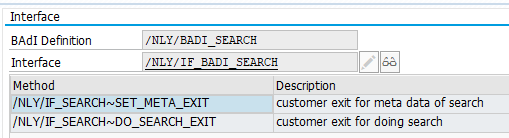
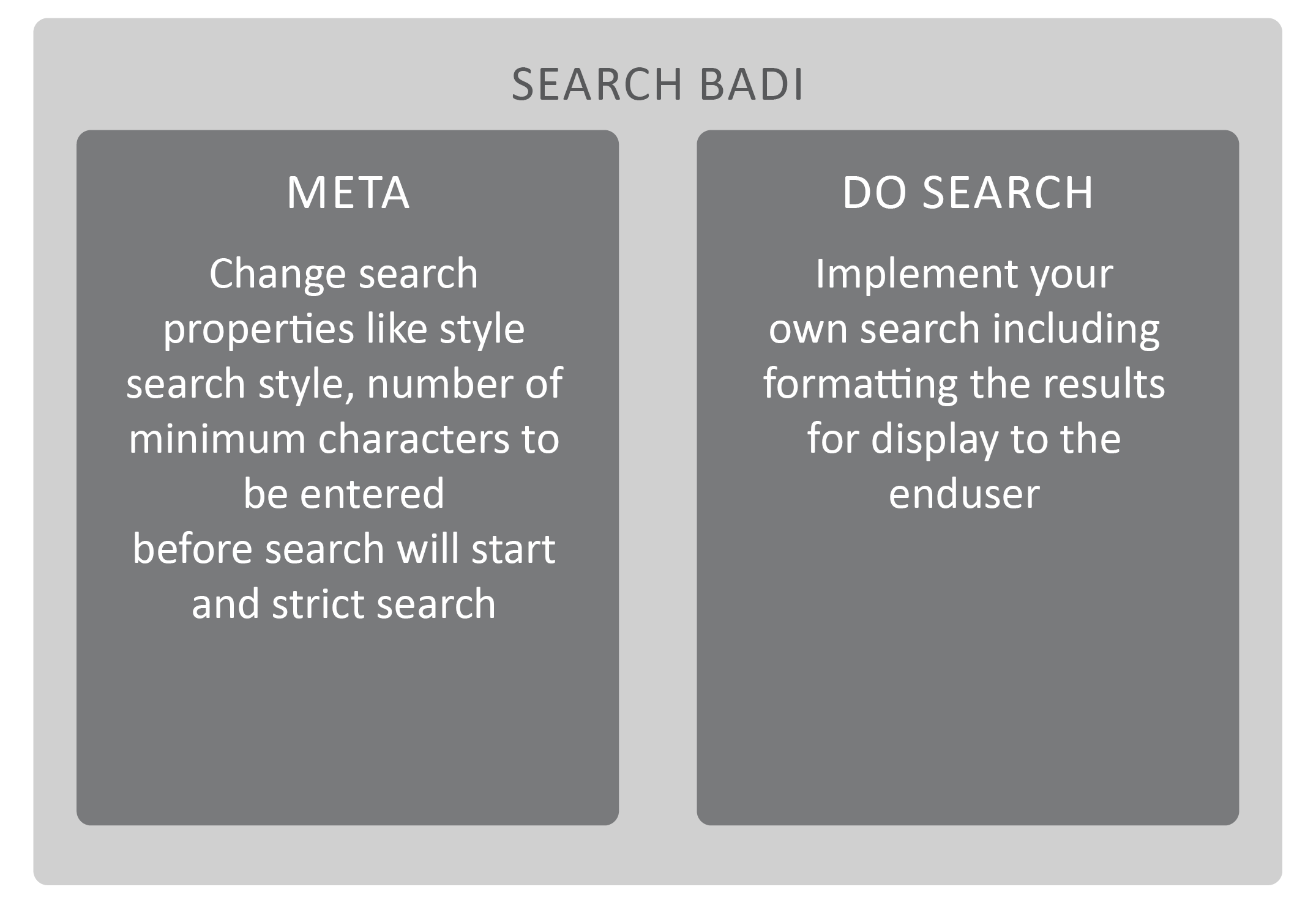
The enhancement spot /NLY/EDITOR contains the BAdI definition /NLY/BADI_SEARCH, which covers every search operation. With it you can change the search style, set how many characters a user types before the search starts, and replace the search logic outright.
Your logic goes into methods of the implementing class, whose signatures come from the definition:
| Method | Use it to |
|---|---|
/NLY/IF_SEARCH~SET_META_EXIT |
Change the metadata of the search: search style, minimum characters, strict mode. |
/NLY/IF_SEARCH~DO_SEARCH_EXIT |
Implement the search itself and format the results. See the DO_SEARCH reference. |
The filter, and what it means for reuse
The filter carries the search type and the search name. When the search runs on an InfoObject, the search name is that InfoObject's name.
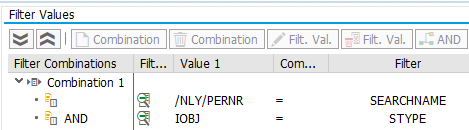
The table or DSO is not part of the filter, on purpose. One implementation therefore serves every table containing that InfoObject, so a value help is written once rather than once per table.
When two tables sharing an InfoObject need different searches, there are three ways out, from cheapest to most involved:
- Set the search properties for that one column in the table's own configuration. See Table and column configuration in NextTables for SAP BW.
- Override them in the table maintenance BAdI's Meta method, which wins over the search configuration.
- Create a referencing InfoObject, so the master data stays shared but the searches can differ.
The Meta method
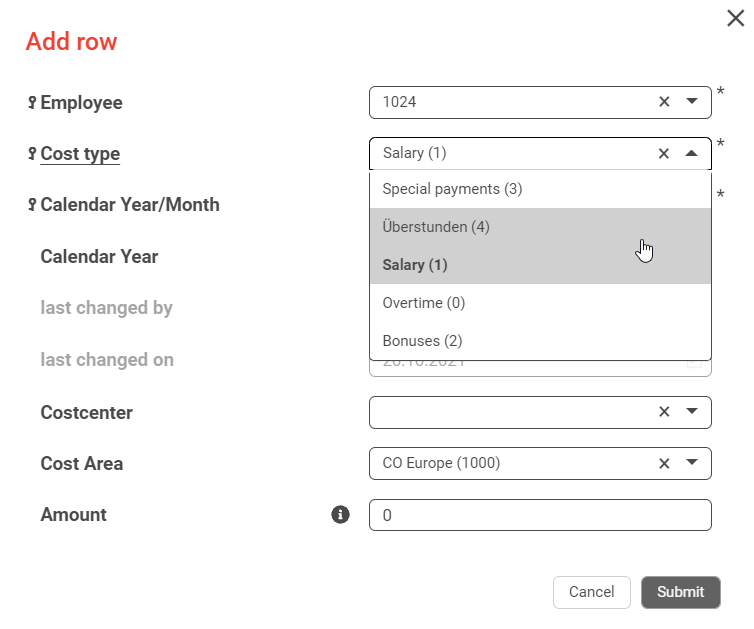
The Meta method adjusts how the search presents itself. The choice that matters most is the search style, because the two styles work in genuinely different ways:
DROPDOWNloads all values first and then searches locally. Fast and forgiving on a short list, and unusable on a long one.SEARCHruns the search for the entered term only, and may run several times as the user types. This is the right choice for characteristics with large master data.
The practical line is around 50 values.
Parameters
| Parameter | Type | Description | Possible values |
|---|---|---|---|
I_STYPE | CHAR 6 | Search type originally used | DDIC, IOBJ, CUSTOM |
I_SEARCHNAME | CHAR 60 | Search name originally used | For example the InfoObject name when the type is IOBJ |
CH_S_SEARCH_INFO-SEARCHMODE | CHAR 6 | Search type. Should not be adjusted here. | DDIC, IOBJ, CUSTOM |
CH_S_SEARCH_INFO-SEARCHNAME | CHAR 60 | Search name. Should not be adjusted here. | |
CH_S_SEARCH_INFO-SEARCHSTYLE | CHAR 30 | How the value help is presented | SEARCH search barDROPDOWN dropdown, recommended below about 50 values |
CH_S_SEARCH_INFO-MIN_CHAR | NUMC 3 | Characters the user types before the search starts | |
CH_S_SEARCH_INFO-STRICT | CHAR 1 | Strict search | X the user may only enter values the search returned |
📝 Why not change SEARCHMODE here: the filter already selected this implementation by search type and name. Changing them inside the method does not redirect the search, it only desynchronizes the metadata from the implementation that is running. To point a column at a different search, do it from the table maintenance Meta method, as shown below.
Step-by-Step Instructions
1. Create the implementation and set the filter
Create a BAdI implementation for /NLY/BADI_SEARCH inside your project's enhancement implementation, and set the search type and search name in the filter.
2. Set the search metadata
A complete Meta method is usually a handful of assignments:
METHOD /nly/if_search~set_meta_exit.

  ch_s_search_info-min_char    = '3'.
  ch_s_search_info-searchmode  = i_stype.
  ch_s_search_info-searchname  = i_searchname.
  ch_s_search_info-strict      = 'X'.
  ch_s_search_info-searchstyle = 'SEARCH'.

ENDMETHOD.
This one waits for three characters, shows a search bar, and refuses values the search did not return.
3. Implement the search
Fill /NLY/IF_SEARCH~DO_SEARCH_EXIT and remember E_IS_IMPLEMENTED. Details and a full example: The Search BAdI DO_SEARCH method in NextTables for SAP BW.
4. Point one column at a different search
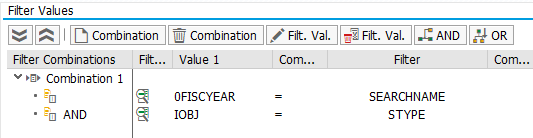
To give a column the search of a different InfoObject, change SEARCHMODE and SEARCHNAME for that field in the table maintenance Meta method. Here the column CALYEAR is given the search of 0FISCYEAR:
METHOD /nly/if_editor~set_meta_exit.

  FIELD-SYMBOLS:
    <l_s_fields_info> TYPE /nly/ts_fields_info,
    <l_s_f4help>      TYPE /nly/ts_search_info.

  LOOP AT ch_t_fields_info ASSIGNING <l_s_fields_info>.

    CASE <l_s_fields_info>-fname.
      WHEN 'CALYEAR'.
        LOOP AT <l_s_fields_info>-f4help ASSIGNING <l_s_f4help>.
          <l_s_f4help>-searchmode = 'IOBJ'.
          <l_s_f4help>-searchname = '0FISCYEAR'.
        ENDLOOP.
    ENDCASE.

  ENDLOOP.

ENDMETHOD.
The Search BAdI you want to trigger has to carry the matching filter.
5. Replace the search independently of any InfoObject
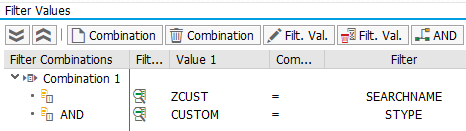
Search type CUSTOM decouples the search from master data entirely. Name the logic yourself and use that name in both places:
METHOD /nly/if_editor~set_meta_exit.

  FIELD-SYMBOLS:
    <l_s_fields_info> TYPE /nly/ts_fields_info,
    <l_s_f4help>      TYPE /nly/ts_search_info.

  LOOP AT ch_t_fields_info ASSIGNING <l_s_fields_info>.

    CASE <l_s_fields_info>-fname.
      WHEN 'CALYEAR'.
        LOOP AT <l_s_fields_info>-f4help ASSIGNING <l_s_f4help>.
          <l_s_f4help>-searchmode = 'CUSTOM'.
          <l_s_f4help>-searchname = 'ZCUST'.
        ENDLOOP.
    ENDCASE.

  ENDLOOP.

ENDMETHOD.
Then set the Do Search BAdI's filter to search type CUSTOM and search name ZCUST.
6. Activate everything
The implementing class with its methods, the BAdI implementation and the enhancement implementation. Missing one is the usual reason a search behaves as though the BAdI were not there.
Troubleshooting / FAQs
1. My search runs on a table it should not.
Expected. The filter matches the search type and name, not the table, so every table using that InfoObject gets it. Set the column's search properties in that table's configuration, or override them in the table maintenance Meta method.
2. I changed SEARCHMODE in the search Meta method and nothing happened.
That is not where a redirect belongs. The filter has already chosen this implementation. Change SEARCHMODE and SEARCHNAME per field in the table maintenance Meta method instead, and give the target Search BAdI a matching filter.
3. The dropdown is slow or incomplete.
A dropdown loads every value before it searches. Above roughly 50 values, switch SEARCHSTYLE to SEARCH and set MIN_CHAR so the query only runs once the user has typed something selective.
4. Users enter values that do not exist.
Set STRICT = 'X'. The user can then only pick from what the search returned. Leave it unset when free text is genuinely allowed.
5. Nothing happens at all.
Check the three activations, then the filter values. In the custom case, check that the search name in the table maintenance Meta method and the one in the Search BAdI filter are spelled identically.