
📝 Availability: NextTables for SAP BW, Enterprise edition. This article documents a BAdI; BAdI support is an Enterprise feature.
You will learn
How to create a Table Maintenance BAdI implementation for one of your tables: which enhancement spot and BAdI definition to use, how the filter decides when your class runs, which of the three methods to put your logic in, and which setting wins when the same property is set in more than one place.
This article is for ABAP developers. It is the entry point for the table maintenance BAdI; each method has its own reference, linked where it is introduced.
Prerequisites
- A table that is already configured in NextTables. Table and column configuration in NextTables for SAP BW covers the settings this BAdI can override.
- ABAP development access on the BW system, and a package and transport to hold the implementation.
The enhancement spot and the BAdI definition
The enhancement spot /NLY/EDITOR contains the BAdI definition /NLY/BADI_EDITOR, which covers every table operation NextTables performs. Its interface is /NLY/IF_BADI_EDITOR, which includes the component interface /NLY/IF_EDITOR. That component interface carries the three exits, so your implementing class implements methods named /NLY/IF_EDITOR~....
Your business logic goes into methods of the implementing class. The method signatures are inherited from the BAdI definition, so they are fixed.
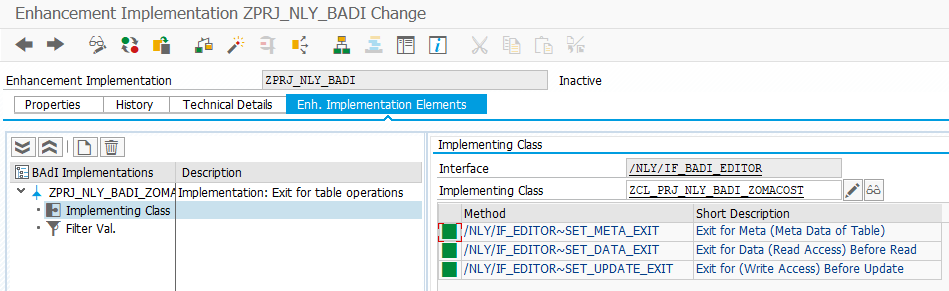
The filter decides when your class runs
The BAdI is designed for multiple implementations. Nothing in an implementation runs until its filter matches, so the filter is what binds your class to one table rather than to every table in the system. Set the table name and the table type in the Filter Values section of the implementation.
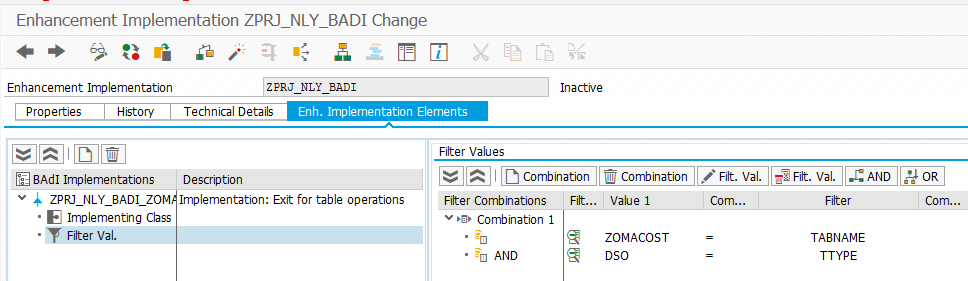
⚠️ Filters have to be unique. If two implementations carry the same filter combination, only the first one runs. The second is not reported as an error and not called at all, which is a hard problem to spot later. Check the existing implementations of /NLY/BADI_EDITOR before you add a filter.
The three methods
/NLY/BADI_EDITOR defines three exits. Which one you need follows from what you want to change:
| Method | Runs | Use it to |
|---|---|---|
/NLY/IF_EDITOR~SET_META_EXIT |
Before the table is rendered | Change the shape of the table: which columns are visible, which are editable or required, how a column searches for values, whether the table may be edited at all. It also runs authorization checks at table level. |
/NLY/IF_EDITOR~SET_DATA_EXIT |
Around the database read | Change the selection before the read, adjust values after it, or replace the standard read with your own logic. |
/NLY/IF_EDITOR~SET_UPDATE_EXIT |
Around the database write | Derive or correct values before they are stored, validate what the user entered, and react after the write. |
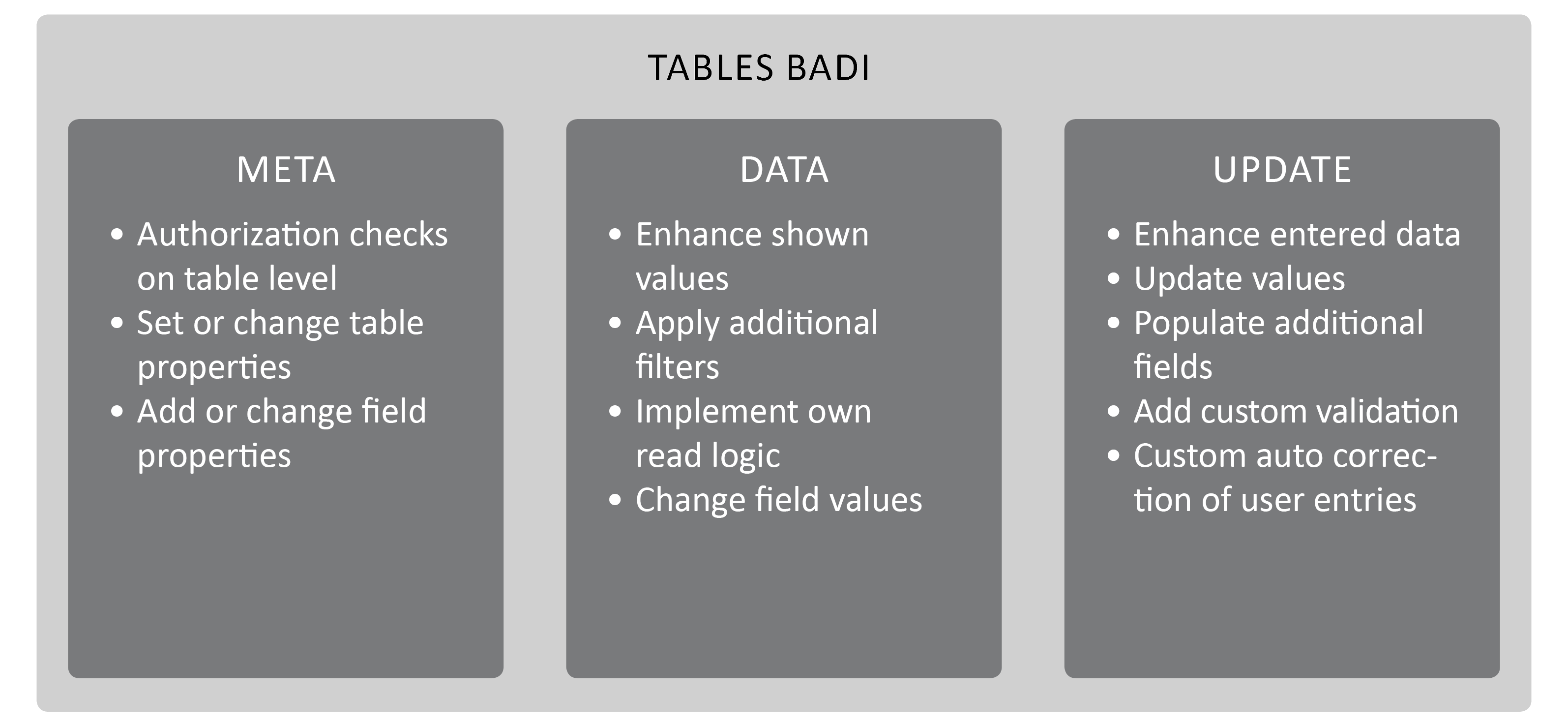
The Meta method
Controls properties of the table and of its individual fields, and overrides what the configuration screen set. Typical uses are locking a field the system fills itself, hiding a column, switching a value help between a dropdown and a search bar, and checking an authorization before the table is built. Full parameter reference: The SET_META_EXIT method in NextTables for SAP BW.
The Data method
Customizes the selection executed for the table, so it changes the values the user sees. Add a filter, check the filters the user chose, change values on the way out of the database, or skip the standard read and implement your own. Full parameter reference: The SET_DATA_EXIT method in NextTables for SAP BW.
The Update method
Enhances what the user entered and fills fields the user does not maintain. The common case is deriving Changed by and Changed on so changes are tracked without anyone typing them. Full parameter reference: The Update BAdI (SET_UPDATE_EXIT) in NextTables for SAP BW, and How to track changes in NextTables for SAP BW shows the Meta and Update methods working together.
Which setting wins
A property can be set in three places. They override each other in one direction only:
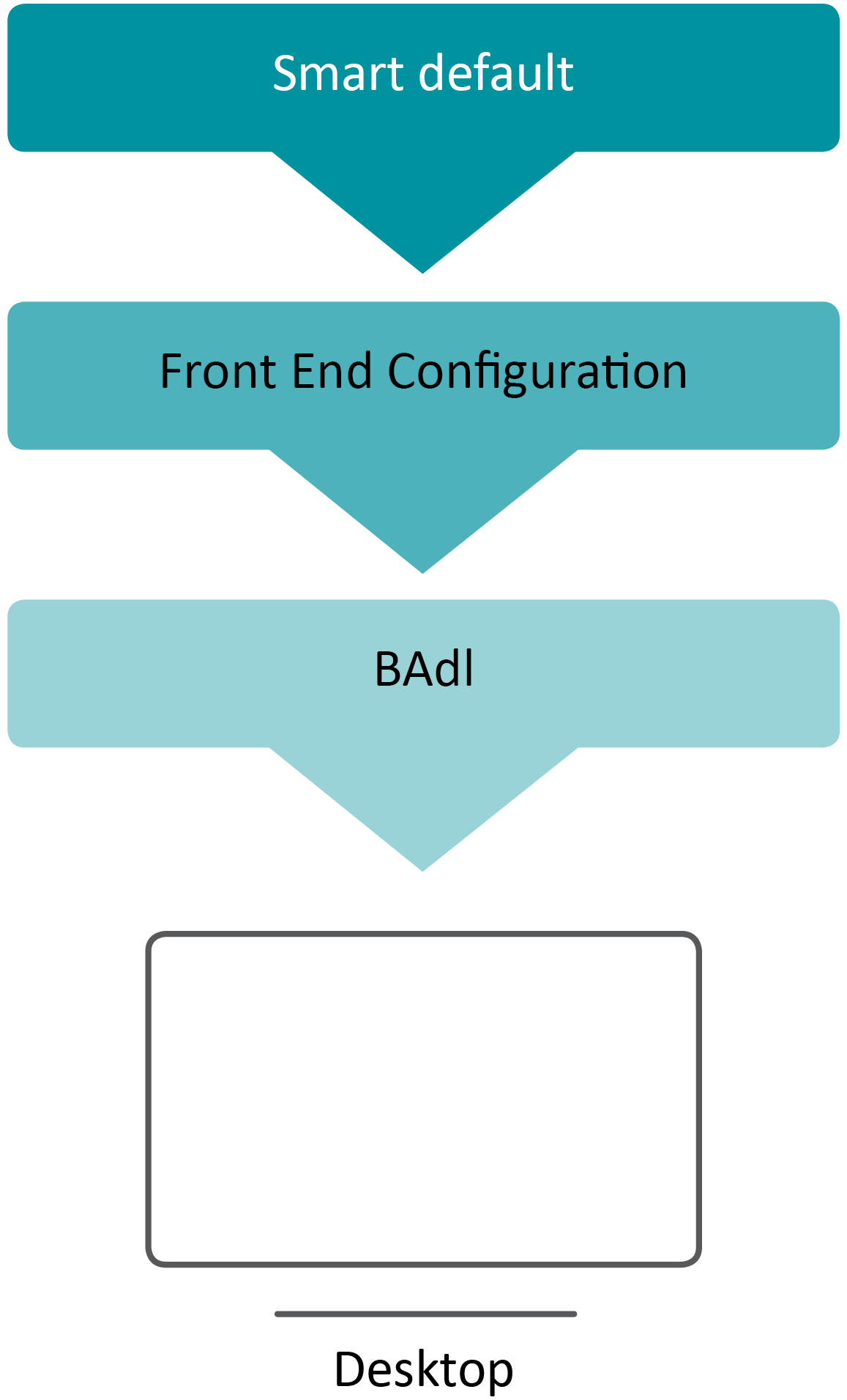
- Default. Used when neither the configuration nor a BAdI sets the property.
- Configuration. What a user set in the front end. It replaces the default.
- BAdI. What your exit sets. It replaces the configuration.
The practical consequence: a value your BAdI sets cannot be corrected by a user in the configuration screen. Set in the exit only what genuinely has to be decided in code.
Step-by-Step Instructions
1. Create the implementation
In SE18, open the enhancement spot /NLY/EDITOR and create a new BAdI implementation for the definition /NLY/BADI_EDITOR. Give it an implementing class and assign it to a package and transport.
2. Set the filter values
Open the Filter Values section and enter the table name and table type your implementation is for. Check that no existing implementation already uses that combination.
3. Implement only the methods you need
All three methods exist in the class whether you use them or not. Leave the ones you do not need empty. An empty method costs nothing; logic in the wrong method costs a debugging session.
4. Activate, then test in the front end
Activate the class and the enhancement implementation, then open the table in NextTables. An exit that appears to do nothing is far more often an unactivated implementation or a filter that does not match than a bug in the code.
5. Add messages so the behavior is visible
Every method receives CT_MESSAGES. When your logic changes or refuses something, tell the user. Error handling in the table maintenance BAdI for SAP BW covers the message and visual types.
Troubleshooting / FAQs
1. My implementation never runs.
Almost always the filter or the activation. Check that the filter values match the table name and table type exactly, and that both the class and the enhancement implementation are active. If another implementation carries the same filter combination, yours will not be called.
2. Two implementations exist for one table. Which runs?
The first one. Duplicate filter combinations are not rejected, so the second implementation is simply skipped. Keep filters unique.
3. A user changed a setting in the configuration and nothing happened.
The BAdI overrides the configuration. If the exit sets that property, the configuration screen can no longer influence it. Remove the property from the exit if it should stay user-maintainable.
4. Which method should hold an authorization check?
The Meta method for a check at table level, because it runs before the table is built and can refuse it. For restricting which rows a user sees, use the Data method and add to the selection instead. Row-level restrictions that follow BW authorizations are better solved without a BAdI at all: see Row-level security with analysis authorizations in SAP BW.