
📝 Availability: NextTables for SAP BW, Professional and Enterprise editions. Options 1 and 2 work in the Professional edition. Option 3 uses a BAdI and requires the Enterprise edition.
You will learn
How to record who changed a row and when, starting with the option that needs no code at all, and moving to a BAdI only for the one thing configuration cannot do. By the end you will know which of the three mechanisms to reach for, and you will have a working Changed by / Changed on stamp plus a field that records the capacity a user was acting in when they made the change.
Why it matters
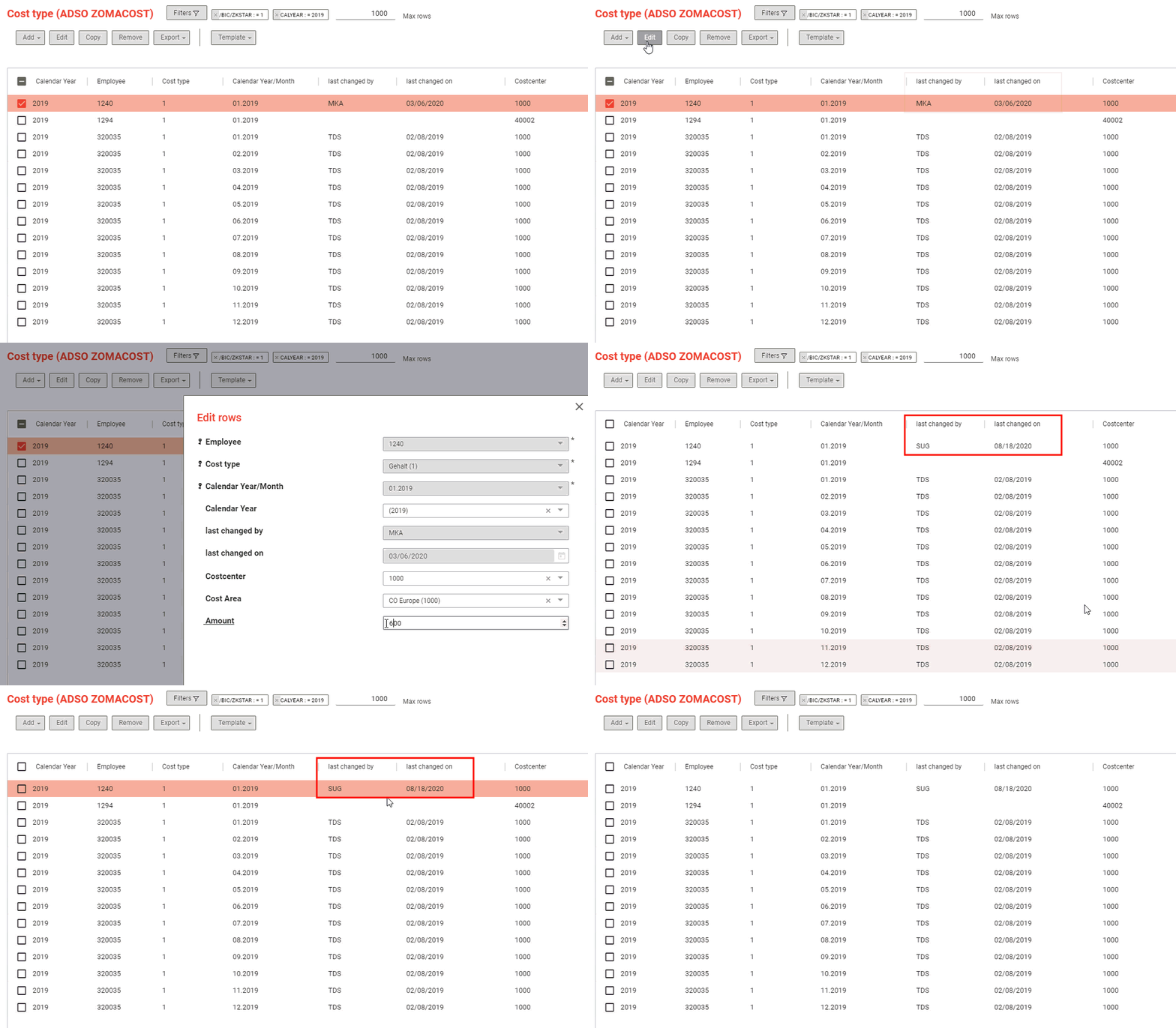
Wherever data is maintained by hand, someone eventually has to answer who put a number there, and when. For a planning figure it is a question of accountability; for master data feeding a regulated report it is an audit requirement. An automatic stamp is valuable precisely because it is automatic: a field the user fills in themselves records whatever the user chose to type, and is worthless as evidence.
Three ways to track changes, and which one you need
SAP BW and NextTables give you three mechanisms. They are layers rather than alternatives, and most systems end up using more than one.
| Mechanism | What you get | Effort | Reach for it when |
|---|---|---|---|
| ADSO change log | Full row history in BW, including the ability to recover deleted data | A modeling decision, no NextTables configuration | Always. This is the baseline recommendation for any editable ADSO. |
| Stamp columns via configuration | Changed by and Changed on visible on the row itself | Two settings per column. No code. | Users need to see who last touched a record, in the table they are working in. |
| Update BAdI | Anything you can derive in ABAP at the moment of the write | An enhancement implementation and a few lines of code | The value to record depends on something configuration cannot express. |
📝 Note: These answer different questions. The ADSO change log answers "what did this row look like before?". It is history, and it lives in BW. The stamp columns answer "who touched this row last?", and they are visible to the user in the table. If you need both, configure both; they do not conflict.
Prerequisites
- An ADSO that NextTables writes to, already configured as a table. See How to configure a table in NextTables for SAP BW.
- Access to Settings → Configurations for that table.
- For option 3 only: the Enterprise edition, and a developer who can create an enhancement implementation.
Option 1: The ADSO change log
Before configuring anything in NextTables, check how the ADSO itself is modeled. An ADSO with a change log keeps the before-image of every activated record, which means you can reconstruct what a row looked like at any point and recover data that was deleted by accident.
This is the general recommendation for any ADSO that NextTables writes to, and it costs you nothing in NextTables. It is a property of the object, set in the BW Modeling Tools. The Data Warehouse Layer - delta calculation template and the classic Standard DataStore Object both give you one. Extended ADSO support with NextTables covers which templates behave how.
⚠️ Caution: The Delete All function clears the change log for an ADSO along with the data. If you rely on the change log for auditability, leave Delete All switched off in the table properties.
Option 2: Changed by and Changed on, with configuration alone
This is the one most people actually want, and it needs no ABAP. NextTables can fill a column from a system field on every save, and hide it from the input mask so the user never sees an empty box they are tempted to type into.
1) Add the columns to the ADSO
Add two fields to your ADSO. In this example they are ZCUSER (character, length 12) for the user and ZCDATE (date) for the date. Activate the ADSO and refresh the table configuration in NextTables so the new fields appear.
2) Configure the default scenario
Go to Settings → Configurations, open your table and scroll to the Column Configuration. The two fields you need are in expert mode, so switch that on using the toggle at the top right. Every setting used here is documented in Table and column configuration in NextTables for SAP BW.
For each of the two columns, set:
| Column | Default Scenario | Default Scenario Values |
|---|---|---|
ZCUSER |
Changelog (CHANGELOG) | sy-uname |
ZCDATE |
Changelog (CHANGELOG) | sy-datum |
The Changelog default scenario does two things at once: the field does not appear in the input mask, and its value is written while the data is being saved. Default Scenario Values takes the system field to write. Any sy- field works, so sy-uname gives you the user and sy-datum the date.
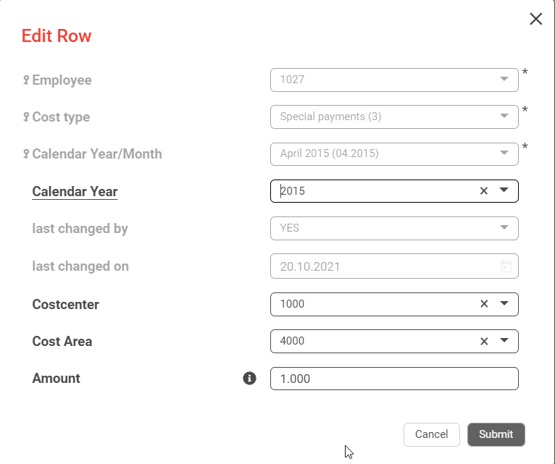
💡 Tip: If your users work with inline editing in the grid, also set Edit options to Locked for both columns. The Changelog scenario keeps the fields out of the input mask, and the lock keeps them out of the grid as well, so there is no route by which a hand-typed value can reach the database.
3) Check the result
The stamp columns are not editable in the front end:
And they update by themselves whenever a row is saved:

That is the whole feature. It works in the Professional edition as well as Enterprise, it survives an upgrade because there is no custom code in it, and anyone who opens the table configuration can see how it works.
Option 3: When configuration is not enough
Configuration can write a constant, a system field, or a value from a number range. That covers "who" and "when" completely. What it cannot do is write a value that has to be worked out at the moment of the save. This option uses a BAdI and requires the Enterprise edition.
The scenario
Take a budget planning table that two groups maintain: the owning department, and a central Controlling team who may override departmental figures during consolidation. Both write to the same ADSO.
ZCUSER tells you that Miller changed the row. What the next planning round actually needs to know is different: was this figure entered by the department, or was it a central override? A departmental number can be revised by the department. A central override must not be silently replaced.
The user's name does not answer that, because the same person can hold both roles. The answer depends on the authorization the user is acting under, which is a runtime decision, and therefore not something Default Scenario Values can express. This is the point at which you write code.
So we add one more field, ZCSOURCE, and derive it in the Update BAdI. The ZCUSER and ZCDATE columns stay exactly as they are: configuration keeps doing the part it is good at, and the BAdI adds only the part it cannot.
1) Add and lock the field
Add ZCSOURCE (character, length 10) to the ADSO. In the column configuration set Edit options to Locked, so the front end cannot supply a value. Do not give it a default scenario. The BAdI writes this one.
2) Create the BAdI implementation and set the filter
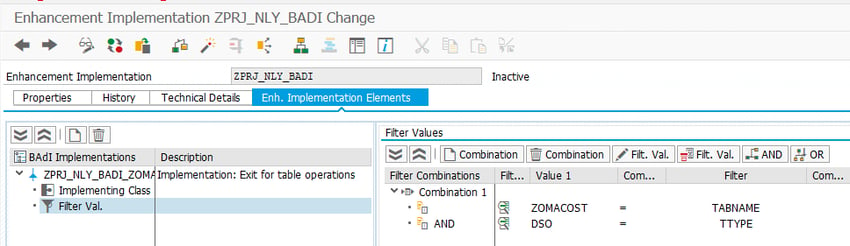
If you have not created a BAdI implementation before, How to implement a BAdI for NextTables walks through the enhancement spot and the implementing class. In the Filter Values, enter the table name and table type of your ADSO so the implementation runs for this table only:
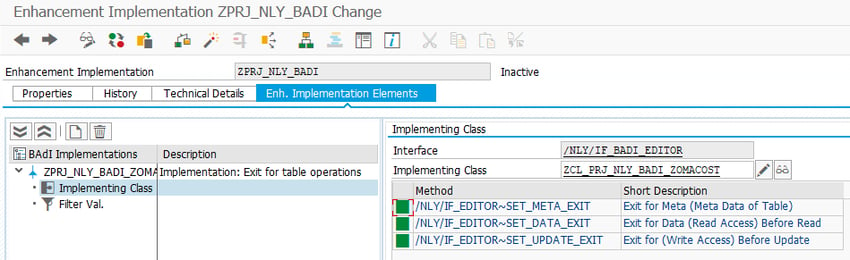
Then double-click /NLY/IF_EDITOR~SET_UPDATE_EXIT to create the implementation:
3) Derive the value
METHOD /nly/if_editor~set_update_exit.

  FIELD-SYMBOLS:
    <lt_data> TYPE ANY TABLE,
    <ls_row>  TYPE /bic/azcobudget2.   " active table of the ADSO

  DATA lv_source TYPE c LENGTH 10.

  CHECK co_table IS BOUND.
  ASSIGN co_table->* TO <lt_data>.

  " Only on the way in, and only once, just before the database write
  CHECK i_type = /nly/cl_table_rest_v3=>co_type_update
     OR i_type = /nly/cl_table_rest_v3=>co_type_insert.
  CHECK i_step = /nly/cl_table_rest_v3=>co_step_before_update.

  " In what capacity is this user editing? Central Controlling holds write
  " authorization on the central application; the department does not.
  AUTHORITY-CHECK OBJECT '/NLY/TBLS'
    ID '/NLY/APP'   FIELD 'APP_CO_CENTRAL'
    ID '/NLY/TTYPE' DUMMY
    ID '/NLY/TNAME' DUMMY
    ID '/NLY/ACTVT' FIELD 'W'.

  IF sy-subrc = 0.
    lv_source = 'CENTRAL'.
  ELSE.
    lv_source = 'DEPARTMENT'.
  ENDIF.

  LOOP AT <lt_data> ASSIGNING <ls_row>.
    <ls_row>-/bic/zcsource = lv_source.
  ENDLOOP.

ENDMETHOD.
Three details matter in this code:
- The authorization check sits outside the loop. The answer is the same for every row in the payload, and
AUTHORITY-CHECKis not free. Checking once and assigning inside the loop is the difference between one check and one per row on a large paste. /NLY/TBLSis the NextTables authorization object, created when NextTables is installed. Using it here means the answer follows the same role assignments that already control who may open which application; there is no second, parallel definition of "central" to keep in sync. How object authorizations work in NextTables describes the object and its fields.co_tableholds only the rows being written. You are stamping exactly what the user just changed, so no comparison against the database is needed. When the exit runs and what every parameter carries is documented in The Update BAdI (SET_UPDATE_EXIT) in NextTables for SAP BW.
4) Activate everything
Activating the implementing class alone is not enough. Activate all three:
- the implementing class together with its methods
- the BAdI implementation
- the enhancement implementation
The same pattern, other problems
The shape above, check something about the system or the user and then write a derived value, covers most of the cases where configuration runs out:
- Stamp the fiscal period the change belongs to rather than the calendar date, by deriving it from
sy-datumagainst your fiscal year variant. - Store the user's full name from the user master instead of the SAP user ID, so the column is readable by people who do not know the ID conventions.
- Stamp only when a specific field actually moved: read the current row inside the exit and compare, so a comment edit does not look like a budget revision.
Best practices
- Start with configuration and stop there if it is enough. The configured stamp has no transport dependency, no activation to forget, and no code to review at upgrade. Most requirements never need more.
- Do not reimplement in the BAdI what configuration already does. Leaving
ZCUSERandZCDATEto the default scenario keeps the code down to the one field that needs it, which is also the only field a reviewer has to think about. - Lock every stamp column. A stamp a user can edit is not evidence of anything.
- Keep the ADSO change log on. The stamp tells you who touched the row last; only the change log tells you what it said before, and only the change log lets you get it back.
- Do not use the stamp columns as a key. They change on every save, and a changing key produces a new record rather than an updated one.
Troubleshooting / FAQs
1. The columns stay empty after a save.
Check that Default Scenario is set to Changelog and not left on Default, and that Default Scenario Values contains the system field. Both settings are in expert mode, so they are easy to miss if the toggle is off.
2. The user can still type into the stamp column in the grid.
The Changelog scenario removes the field from the input mask only. Inline editing in the grid stays open until you also set Edit options to Locked.
3. ZCSOURCE is always DEPARTMENT, including for central users.
The authorization check is not matching. Confirm that the central users really do hold /NLY/TBLS with /NLY/APP = your central application and /NLY/ACTVT = W, and that the application name in the code matches the one in the role exactly.
4. The BAdI does not run at all.
Almost always one of two things: the filter values do not match the table name and table type, or the enhancement implementation was never activated. Check both before debugging the code.
5. Everything works, but every save writes a new record instead of updating the existing one.
One of the stamp fields is part of the ADSO key. Changing a key value creates a new record by definition. Take the stamp fields out of the key.