

Validated, authorized, and auditable write-back to SAP Business Data Cloud
On this page
Maintain the data behind your reports inside SAP BDC
Keep business-maintained data inside SAP BDC
Every dataset maintained outside the platform is a second version of the truth, a manual load in someone's calendar, and a reason a business team keeps its own copy. Bringing maintenance inside turns a reporting platform into the system of record people use.
Auditors ask where the number came from
ESG, the EU Taxonomy and financial controls all trace back to reference data someone maintains by hand. In a spreadsheet, the answer is a folder and a memory. In the platform, the value was validated at entry and it is on the record, with the person who entered it.
AI needs the data only your business teams know
Models and agents run on the mappings, classifications and parameters that live in people's heads today. Maintained in the platform, that context arrives validated against your master data and authorized by your access model, whether a person types it or their AI assistant writes it. How NextTables powers AI.
How a business change reaches SAP Datasphere
A business user edits
They work in a grid they already know, on their own or inside an SAP Analytics Cloud story, signed in with your identity provider.
The entry is checked first
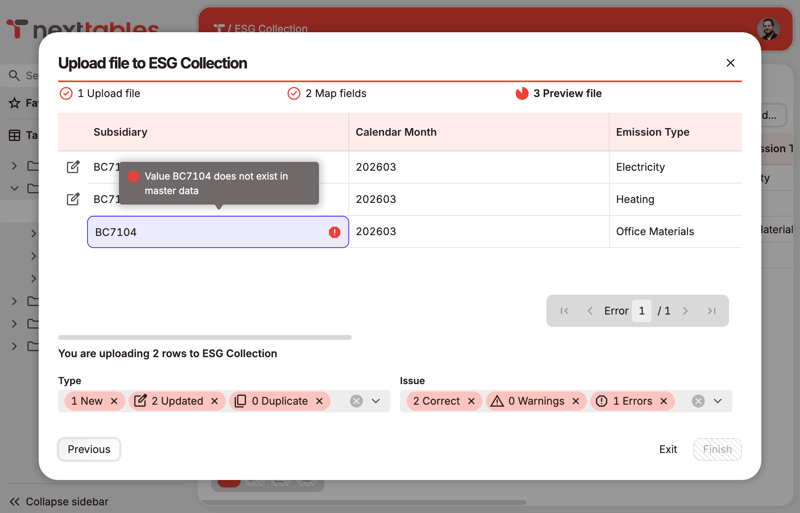
Values are validated against your master data and your rules while the person is still in the field, so what reaches the platform is already correct.
It is written into SAP Datasphere
It goes into the Open SQL schema of the space your administrator created, through one database user, under the roles you defined.
Reporting has it immediately
A view in the space exposes it to your models, and SAP Analytics Cloud shows the new value at once, straight from the space.
Embedded in your SAP Analytics Cloud stories
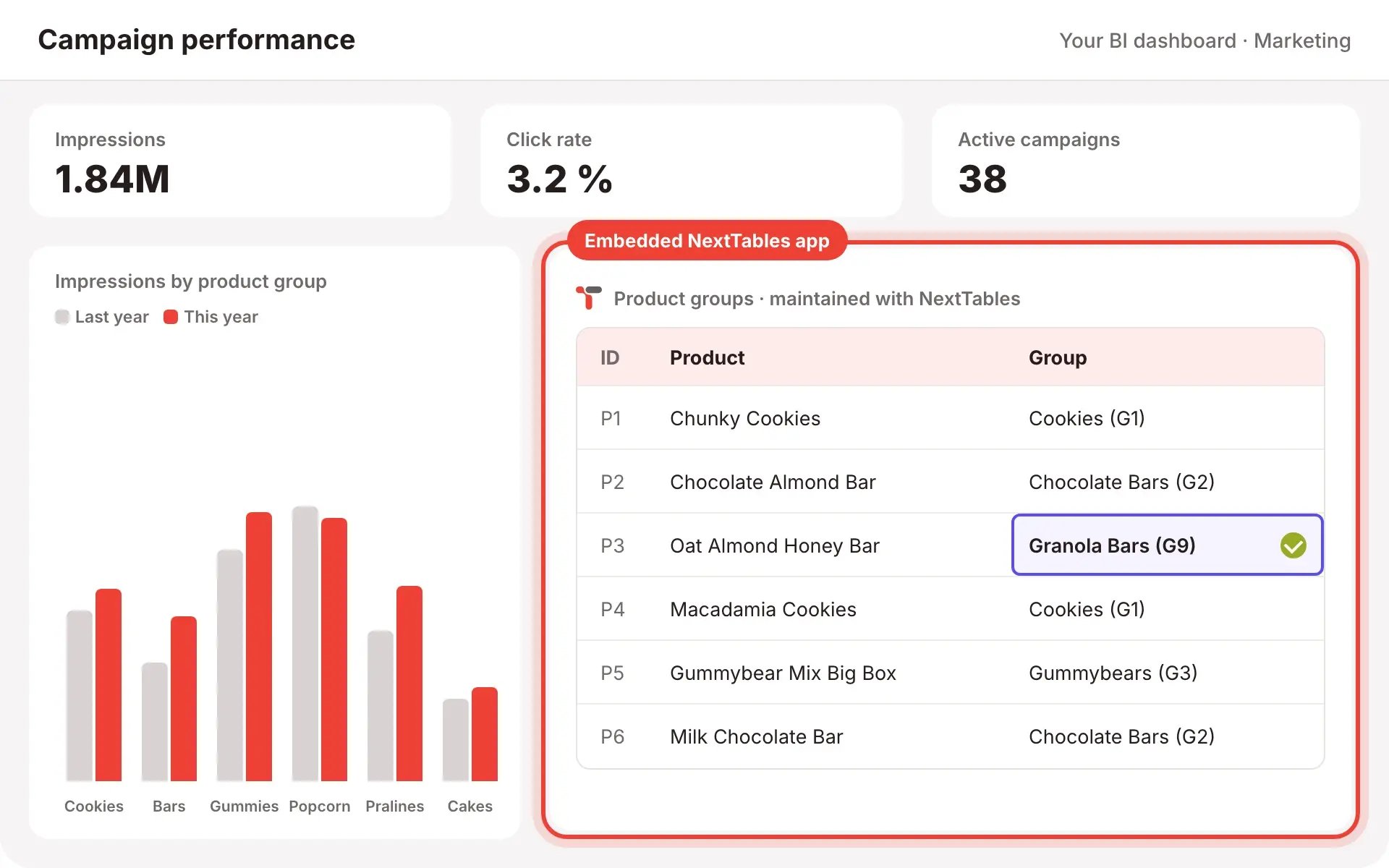
A NextTables application embeds in SAP Analytics Cloud as a web object, in a dedicated embedded mode that shows the grid alone. URL parameters carry the story's context, so a user looking at one cost center's report edits that cost center's rows, and only those. The same application embeds in Power BI, Tableau or any tool that supports web objects.
The embedded mode is available today. A native SAP Analytics Cloud widget is on the way. Coming Soon
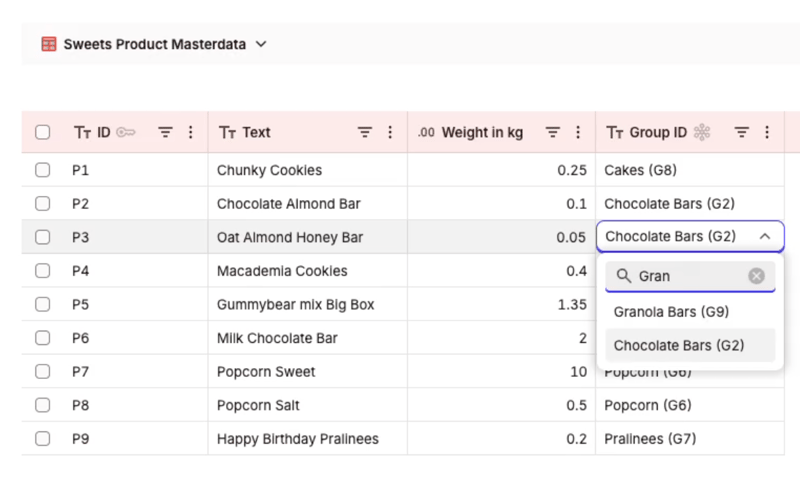
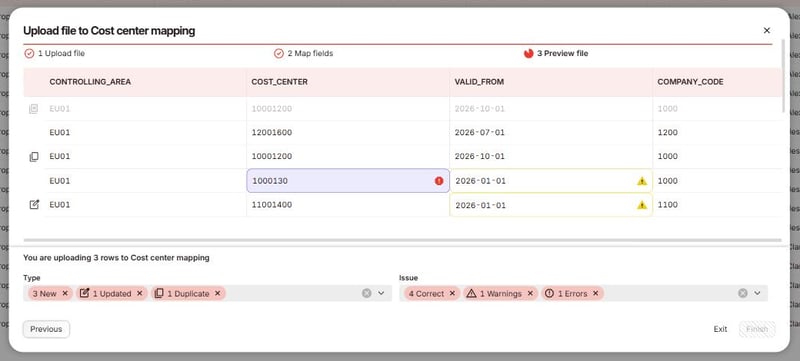
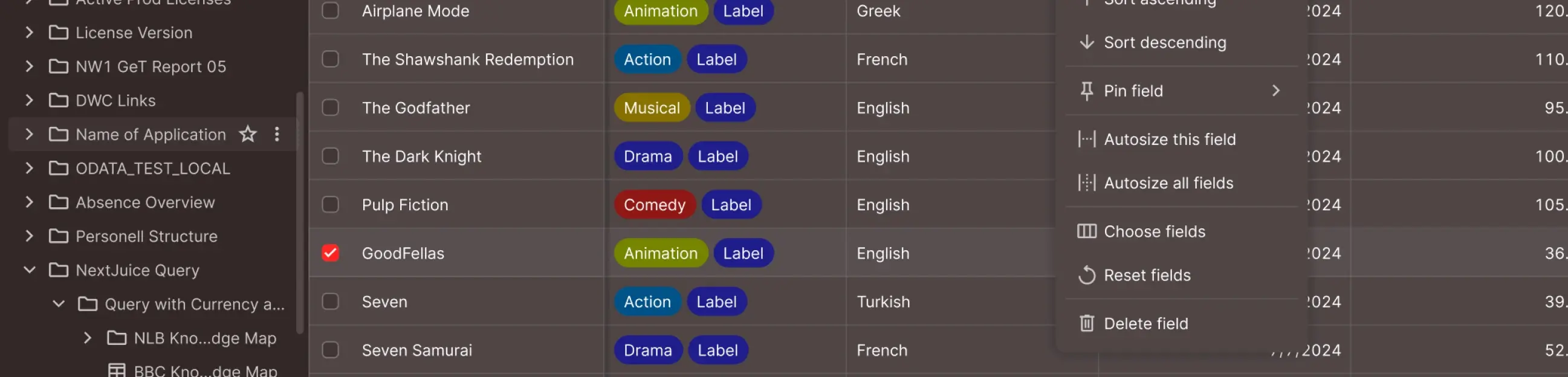
What the grid, the value help and the forms look like for the people who use them: Built for business teams.
What platform owners keep and business teams gain
Platform owners keep
- The boundary: the space, the Open SQL schema and the database user are yours. You decide which connection is available in which folder.
- One storage location: business data lives in SAP Datasphere and only there. NextTables holds configuration metadata: applications, rules, roles, connection parameters.
- The access model: rights are granted per folder and per table, down to the row, so a person maintains one table without holding rights on the whole space. Row-level rules can read the control tables you already maintain in the platform.
- A clean exit: switch the connection off and the schema, the tables, the views and the data are exactly as they were.
Business teams gain
- Their own pace: a correction takes a minute instead of a request, a file and a load window.
- The right value, first time: search against your master data by text, so a person finds the cost center by its name rather than its number. The master data can live in this platform or in another one NextTables is connected to.
- Their data where the report is: the same grid runs standalone or inside an SAP Analytics Cloud story, filtered by the dashboard they came from.
- Confidence: invalid values stop at the field, so the person entering the data finds the problem instead of the person consuming it.
Where NextTables fits, and where something else fits better
A good fit for
- Reference and mapping tables that business teams own and change often.
- Corrections to data already in the platform, made by the people accountable for it.
- Collections gathered from many contributors, for example ESG figures from subsidiaries.
- Row-level entitlements maintained by the domains they apply to.
- Business rule tables that transformations and models read.
- The context data that AI and analytics depend on, still waiting for an owner end to end.
Better served by something else
- Replacing an active master data management program. Where one already covers a domain, this sits outside it.
- Moving or transforming data at volume. Your replication flows and pipelines keep that job.
- Analysis and visualization. Reporting stays in SAP Analytics Cloud or your BI tool of choice, reading what is maintained here.
- High-frequency transactional writes from an operational application.
How NextTables connects to your SAP BDC tenant
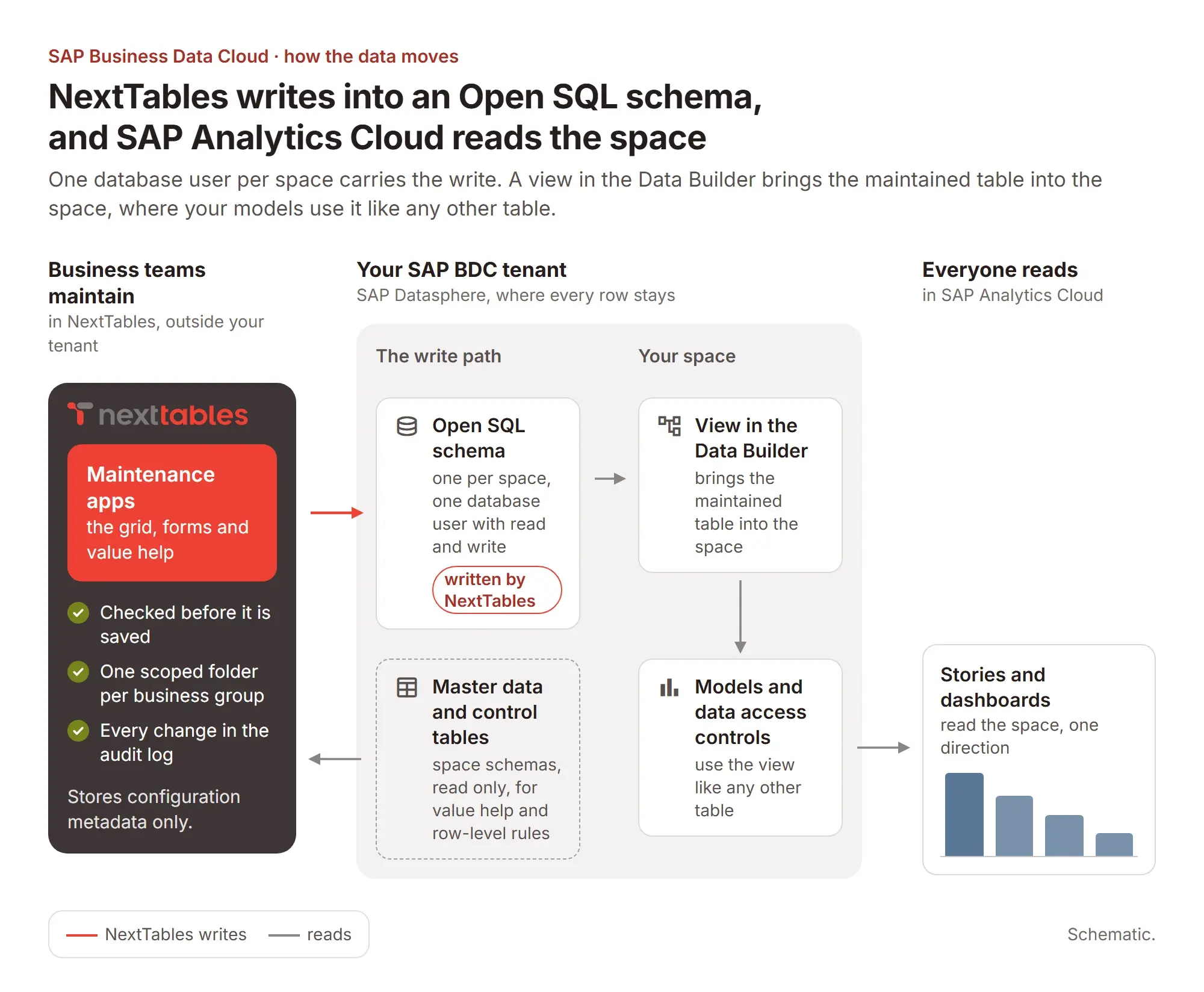
NextTables writes through one database user per space into its Open SQL schema and reads master data read only, while SAP Analytics Cloud reads the space in one direction.
The questions an architecture board asks
Which of these landscapes is yours?
Central IT owns the models
One space, one Open SQL schema, one folder per business group: the central team keeps the space and the models. NextTables adds one Open SQL schema on that space and a scoped folder per group, so each group maintains its own tables through its own role.
Data product teams own their domain
One space, one schema and one folder per team: the team that owns a business area gets its own Open SQL schema on its space and its own folder. They create the table, map it in their space and join it to their models.
Access control maintained like any other table
One security space, one schema per domain: the permission tables behind your data access controls live in a dedicated security space, which is SAP's own recommendation. NextTables adds an Open SQL schema there, so each domain maintains its own entitlements, validated at entry and on the record.
The setup behind each shape, click by click: creating the database connection and scoping a connection to folders in our knowledge base.
What your SAP BDC administrator does, once per space
Allow one IP
Add one trusted IP entry on the SAP Datasphere tenant. It is set once per tenant and reused by every later connection.
Create the database user
Create it in space management, with read and write on the Open SQL schema. HDI consumption stays off.
Hand over five values
Host, port, schema, user and password go into the connection, mapped to the folders that may use it.
Expose the result
A view in the Data Builder brings the maintained table back into the space for your models and for SAP Analytics Cloud.
Step by step, including how to rotate the password and what to do when a connection stops validating: the SAP Datasphere connection guide in our knowledge base. Who may then maintain what is decided by folders, connection scoping, roles and row-level rules: Governed.
What you run, and what we run
| Concern | Your side | Our side |
|---|---|---|
| Connectivity | One trusted IP entry per SAP Datasphere tenant, and a database user per space. Both are changes your team already knows how to make. | We show the IP address in the connection dialog. Rotating the database password means replacing one value in one field. |
| Environments | Top-level folders for development, test and production, with each environment's connection scoped to its own folder. Business users typically hold roles on production only. | Available today, and the recommended structure from the first day rather than a later migration. |
| Promotion | You decide what is ready to move and who may move it. | Export a folder or a table with everything it depends on and import it into another folder or another tenant, folder to folder in one tenant or development to QA to production across tenants. Coming Soon |
| Structural change | Whoever may change a table should also own the view that exposes it, because a view in the Data Builder is a live pointer and a structural change flows through to it. | This is why the key user role exists as a separate, smaller grant. Align it with the people who hold modeling rights in the space and the two stay in step. |
| Concurrent edits | Today, when two people edit the same row, the last write wins. Plan for that before rollout. | Concurrency checks that warn a second editor before they overwrite are on the way. Scoped folders and row-level rules keep most teams in their own rows in the first place. Coming Soon |
| When you stop using NextTables | Your tables, views, schema and data are in SAP Datasphere throughout, so they stay. | Your configuration travels with the same export used for promotion, so the application definitions leave with you too. Coming Soon |
Frequently asked questions
Hours to days once the connection exists. Setup is configuration rather than development, which is also why a trial against a sandbox space is a realistic way to evaluate it.
They sign in to NextTables through your identity provider. The platform connection runs on one database user on the Open SQL schema, so maintenance-only users stay outside your platform user lifecycle and your platform licensing.
SAP Business Data Cloud, Databricks and PostgreSQL are generally available. Snowflake and Microsoft Fabric are on the roadmap.
Yes. An application can validate against master data in SAP Business Data Cloud and write to Databricks, with validation, authorization and traceability applied across the boundary.
NextTables is licensed as a subscription, sized by users and tables. The details are on the pricing page.
An enterprise support model with one named path for your team, and a monthly release cycle, 30-plus releases and counting, so changes arrive on a predictable rhythm.
It stays where it has been the whole time: in SAP Datasphere. Switch off the connection and the schema, the tables, the views and every row remain as they are.
Bring your own landscape
Take the deck to your architecture board first, or spend half an hour with us against your spaces, your schemas and the access model you already run.