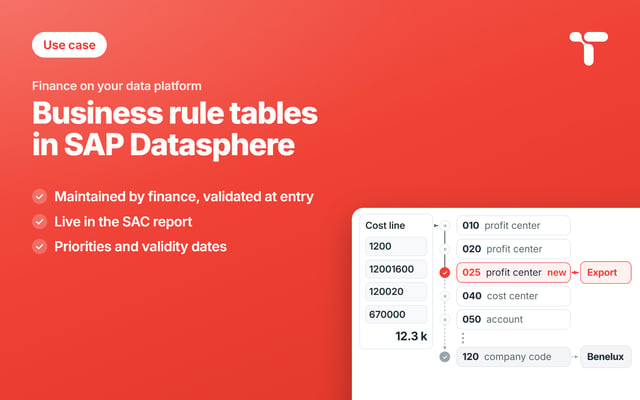
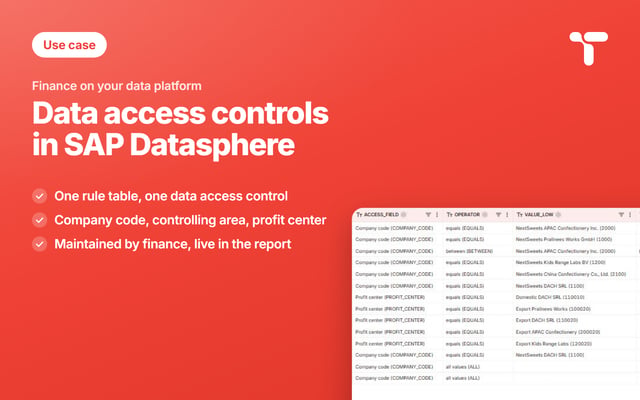
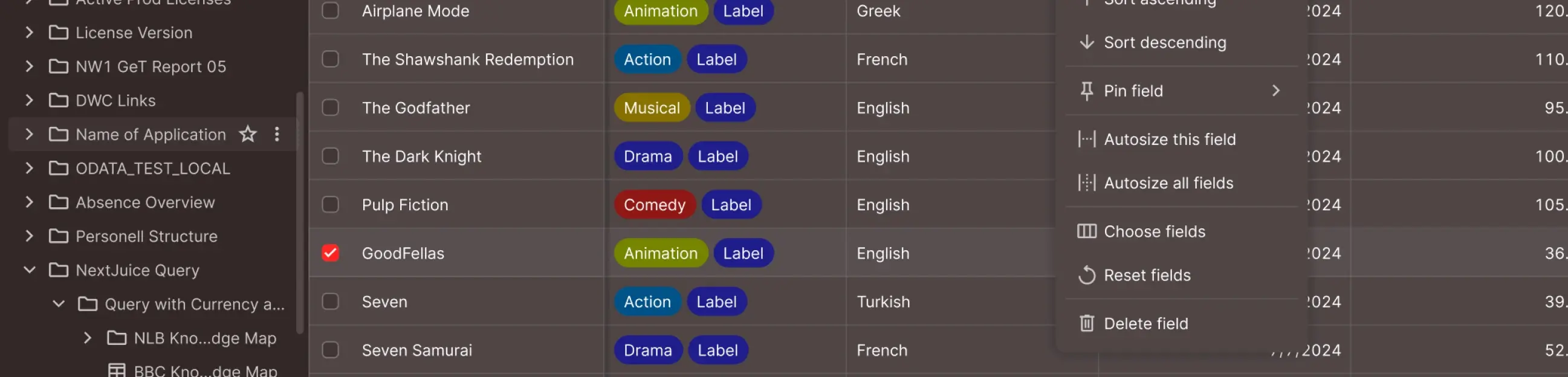
A management report is only as good as the table that says which cost center reports where. Finance maintains that table itself, on the platform the report already reads.

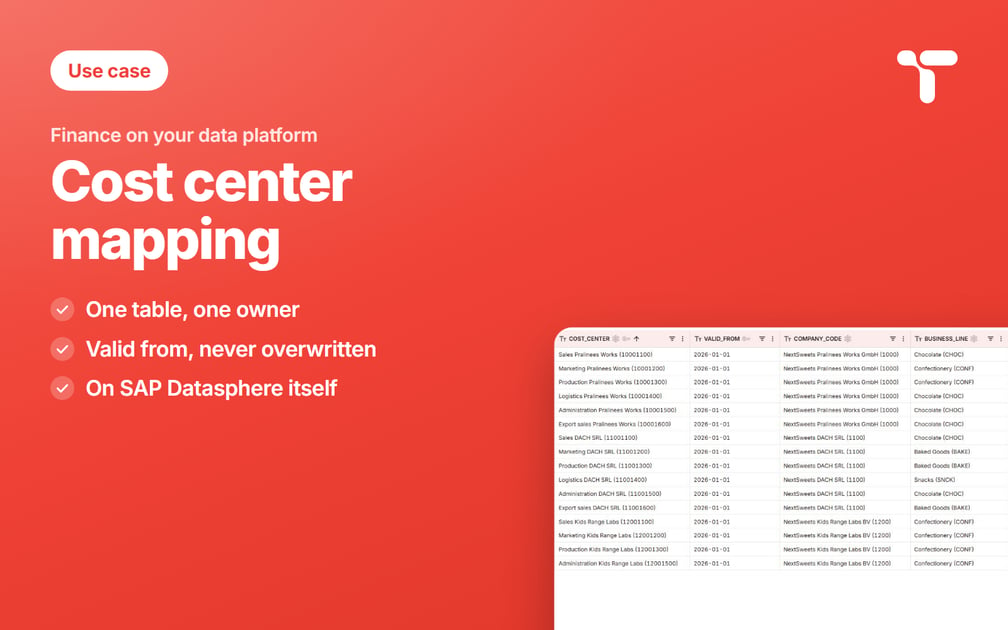
Your management report in SAP Analytics Cloud is finished and the numbers add up, but one red bar carries 324,900 euros under the label Unassigned, and nobody in the room can say which business line those costs belong to. The table that answers the question sits on SAP Datasphere, and the same table moves about 29,000 euros a month between business lines when a department changes hands, while a single row dated January can restate months that were already signed off.
Sweets Co, our demo group, stands behind every example in this series, and every company, person, and amount in it is generated for the demo. Its confectionery division is the first part of the group to run its cost reporting on SAP Datasphere, with five company codes in two controlling areas. EU01 covers the three European companies, and AP01 the Asia Pacific group acquired in 2024, which kept its own cost center numbers. Costs report under four business lines taken from the product hierarchy, Chocolate, Confectionery, Baked Goods, and Snacks, and every amount is in euros.
Act 1 of 3 is the cost center mapping, the table that gives every cost center its business line from a given date. Act 2 derives reporting units by rule, and act 3 sets the data access controls that decide who sees the numbers of both. All three tables belong to the reference data finance maintains for its management reports.
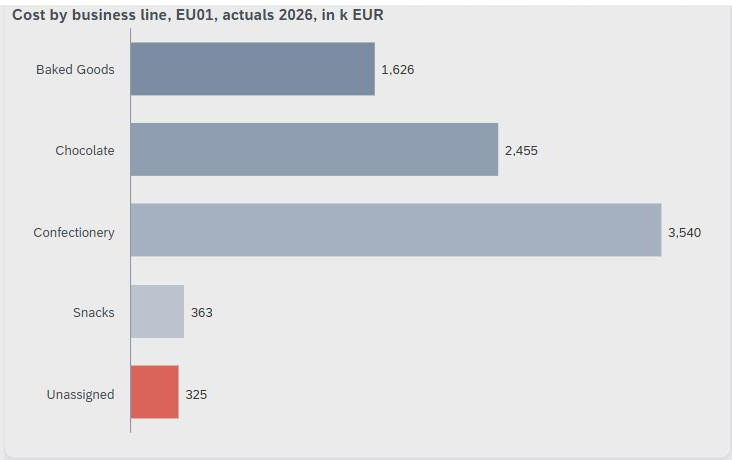
The red bar holds actual cost booked by Kids Range Labs, company code 1200: 175,700 euros from a logistics cost center that closed on June 30, and 149,200 euros from an export team that opened on July 1. Whoever owns the table behind the chart can answer for both amounts on the day they appear.
Your report reads the business line from a mapping table
A management report reads the business line from a mapping table, because the ERP carries the cost center, its company code, its profit center and its responsible person, and stops there. The standard hierarchy and its cost center groups stay in the ERP, in S/4HANA for many readers, and carry the responsibility for the cost. The business line is the management's own view of the same cost centers, and it changes with the organization. It needs a date, an owner, and a place where the report reads it.
The mapping reads the cost center alone, so a cost center whose profit center assignment is still open keeps reporting under its business line while its postings wait on the dummy profit center.
The mapping table holds one row per cost center and start date, keyed by controlling area, cost center, and valid from. Each row also carries the company code, the business line, the owner, and a note. That compound key exists for a reason every SAP shop runs into after an acquisition. A cost center number is unique inside its controlling area and nowhere else, and the Asia Pacific group kept its numbering when it joined. So 10001200 names the marketing cost center of Pralinees Works in EU01, and the same number names marketing at APAC Confectionery in AP01.

12001400, and Export sales, 12001600, still wait for their row, and they are the two behind the red bar.SAP Datasphere models that table and leaves the maintaining to you
SAP Datasphere models this kind of data comfortably, and it covers the reporting half of the problem on its own. A local table holds the mapping, a view joins that table to the cost facts, and an analytic model exposes the result to SAP Analytics Cloud.
Two things are left for you to arrange, and the second one decides how current the table stays. SAP Datasphere can make a dimension time-dependent, and the analytic model then reads it at one reference date, today by default, for the whole report. A report that books each month to the business line valid in that month needs that date logic in the view, and you write it yourself. Maintained rows reach the table through the Data Builder, a data flow, or an API. All three are built for the team that models the space rather than for the controller who knows where a cost center reports.
Finance is left with a spreadsheet that travels by email, a ticket for every correction, or a hardcoded list inside the view. Each of them carries the same cost: the table is right on the day somebody touches it, and drifts from that day on.
Six requirements for a screen finance can own
The screen in this article's figures is NextTables, and it writes every saved row straight into SAP Datasphere. Six requirements have to hold before a finance team can own a table that a management report reads.
It offers each cost center with its company code
The form asks for the controlling area first, and the cost center list follows it. Type 120 and the list offers the six cost centers of Kids Range Labs from the cost center master, each with its company code. The controller sees which company a cost center belongs to before picking it. A number typed by hand has to carry eight digits and exist in that master before the row can be saved.
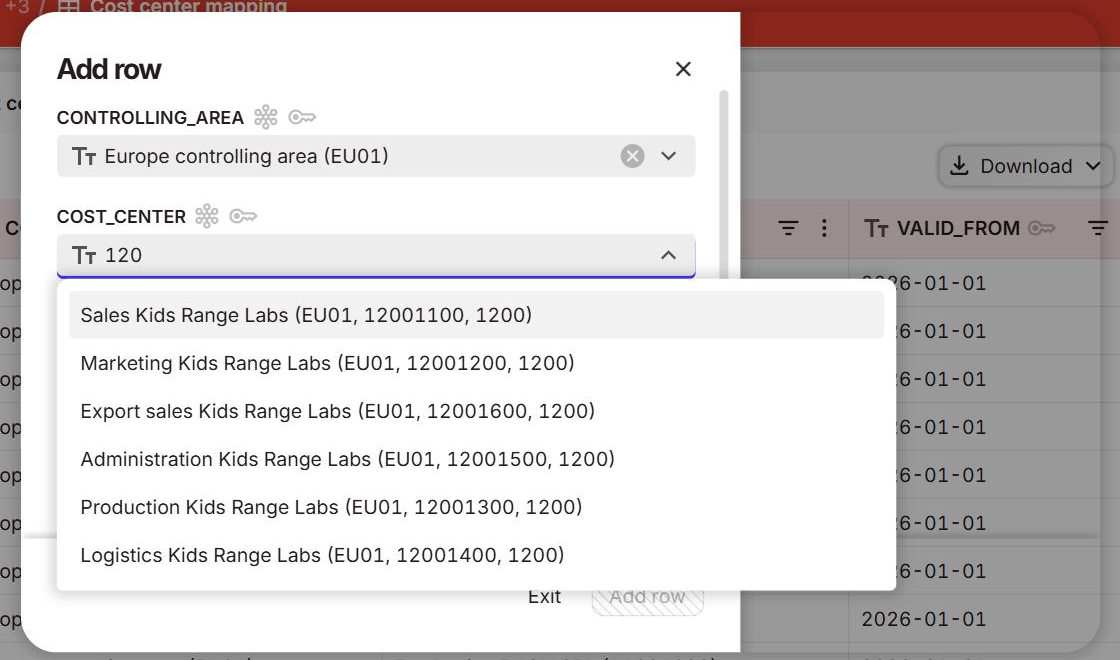
12001400, and Export sales, 12001600, are the two behind the red bar.It warns before a file row restates a closed month
A row whose valid from lies in a closed period changes numbers that were already reported. The upload preview lets such a row through with a warning in plain words: the report restates every month from that date. The closed period is a date in the rule, June 30 in the demo, so any row in a file dated before July 1 draws the warning. A second rule asks for a note whenever a row starts on any day other than January 1, because the next controller reads that note before touching the row.
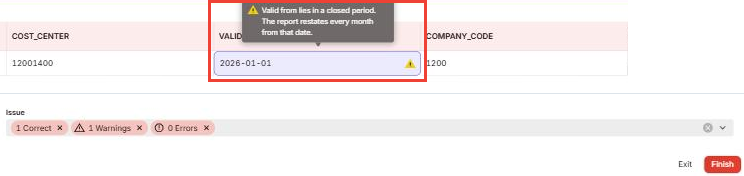
12001400 with valid from January 1, 2026, in the upload preview. The yellow mark on valid from opens the rule's answer: valid from lies in a closed period, and the report restates every month from that date. Below the line, the foot of the same preview counts 1 Warnings and 0 Errors and keeps Finish enabled, because a warning flags the row and lets it through.It records a change as one new row with its own date
On October 1 the marketing cost center of Pralinees Works, 10001200 in EU01, moves from Confectionery to Chocolate. One row valid from October 1 with a short note records the move, typed into the form or carried in the October file. The January row of the same cost center stays exactly as it was. The view takes, for each month, the row with the latest valid from on or before that month. September therefore takes the January row and October the new one, so every month reads exactly one row per cost center. SAP keeps a time-dependent assignment the same way: you enter the start of the new interval, and the previous one ends on the day before. The cost center master carries the date each cost center opened and closed, so the mapping works with start dates alone.
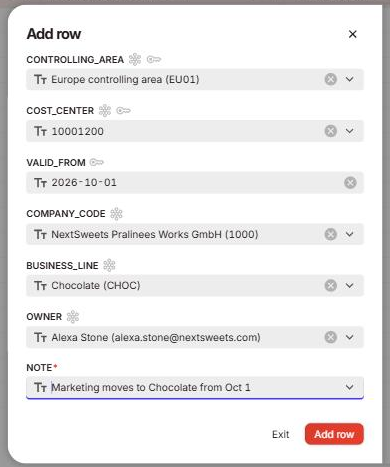
EU01 / 10001200, valid from October 1, 2026, business line Chocolate, with the note that explains the move, marked required because the row starts after January 1. The form asks for a start date only, because the next row of the same cost center ends this one.
It takes the file finance already has
The first fill starts from a file, and so does every bulk change, because the answers already live in a file today. Finance uploads the workbook it has been keeping, and the screen updates the rows whose key already exists and adds the rest. Every row passes the form's checks before anything reaches the platform.
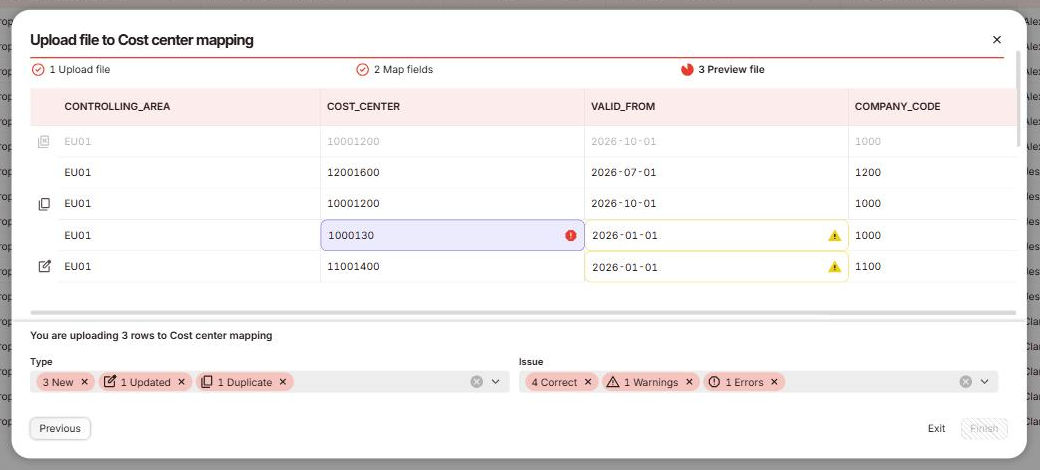
10001200. Both rows dated 2026-01-01 carry a yellow warning on their valid from, the update of 11001400 and the seven-digit 1000130, whose red error mark keeps Finish disabled.In this file the warned row moves DACH SRL's logistics from Snacks to Baked Goods for the whole year, an unusual but real change that a warning flags and lets through. A rule with severity Error holds the whole file until the row that failed has been corrected.
Each controller works on the rows of their own company code
Authorization runs at row level and follows the company code, the scope every SAP controller already works in. Clara Ward, the controller of Kids Range Labs, sees and edits the rows of company code 1200. Amir Morgan, the regional lead for Asia Pacific, covers a range of company codes, and Michael Wilson in group controlling covers all five. A small access table holds those scopes with one line per person, and in this setup the rows a user can see are the rows that user can create.
Who may see which rows the report itself returns is the same question one table further on. Act 3 answers it with data access controls in SAP Datasphere, read from a rule table that finance maintains as well.
An audit log stands behind the table
NextTables keeps an audit log for the mapping table, so a restated number stays traceable.
The data team builds the model once, and finance stops waiting for it
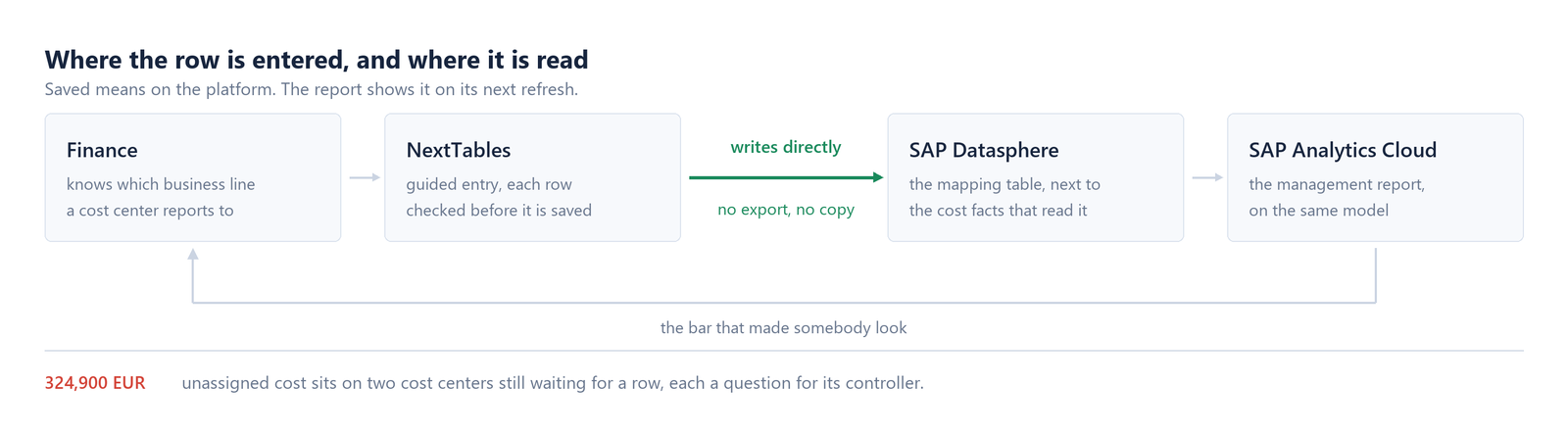
The view picks, for every cost center and month, the mapping row that applied in that month. Cost without a matching row reads Unassigned, which keeps the gap in the report as a bar of its own.
The table, the view and the analytic model are built once and then left alone. Everything after them is a row, and a row belongs to the person who already knows the answer.
Back in the report, each change moves the months its date covers
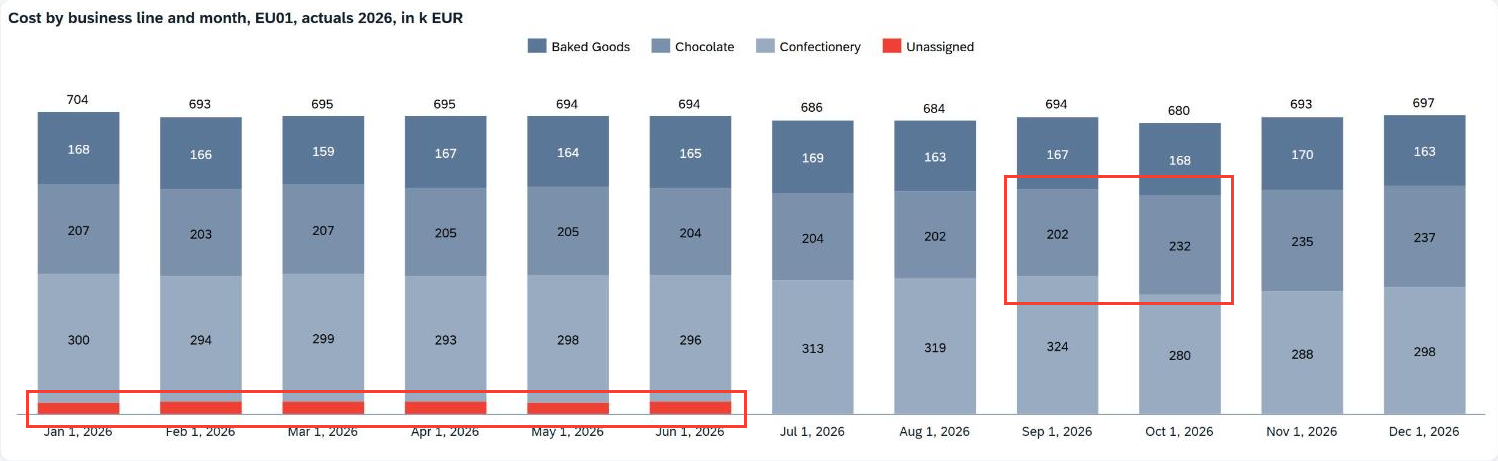
About 29,000 euros a month changed hands on October 1, enough to make a business line look like it is trending when the cause was a reorganization.
The row dated January in the same file leaves a very different footprint. The logistics cost center of DACH SRL now reports under Baked Goods for the whole year, so 363,200 euros changed business line across all twelve months, and Snacks is gone from EU01 back to January. The preview warned about exactly that, and the file went in once the seven-digit row was taken out, so the restatement happened on purpose. The total stays at 8,309,000 euros throughout, because a mapping moves cost between business lines and leaves the sum alone.
Correct a mapping inside the SAC story
The dashboard can hold the table as well, so the distance between noticing a gap and closing it shrinks to one screen. A web page widget puts the maintenance screen next to the chart, and it opens on the controlling area the story is about. The link itself sets which columns the widget shows and how it is filtered, and the knowledge base article on URL parameters walks through that.
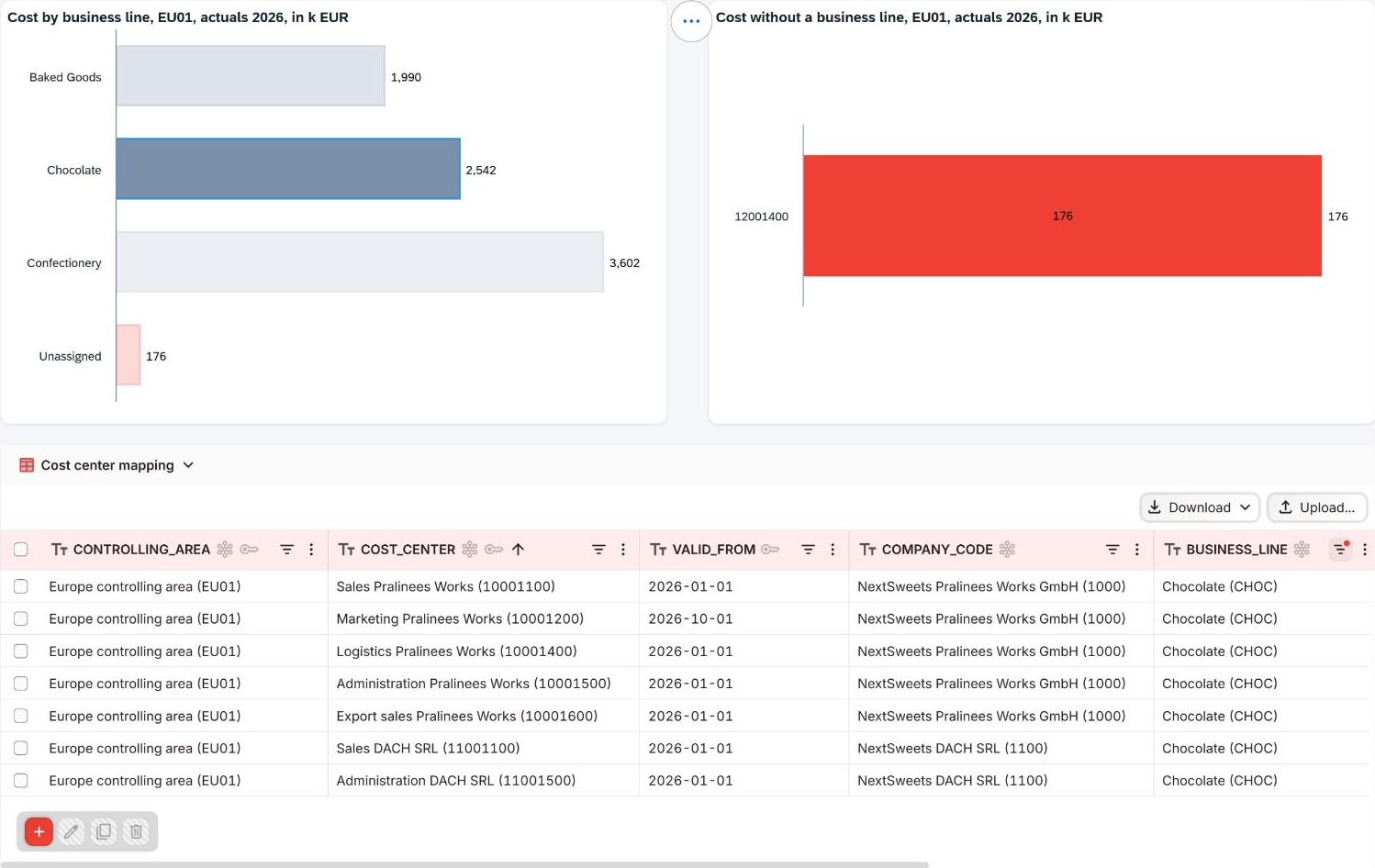
12001400, at 176 thousand euros.Clicking a business line filters the table below to the rows behind that bar, with a few lines of story script. A controller then corrects a mapping right next to the number that made them look. The chart above picks the correction up on its next refresh. The same row-level authorization decides what the widget returns, so Clara Ward, scoped to company code 1200, sees only the Kids Range Labs rows behind the bar she clicks.
The 175,700 euros that stay red: a question finance answers
After the October file, the red bar holds a single cost center: Logistics at Kids Range Labs, 12001400, which posted 175,700 euros from January to June and closed on June 30. The export team that opened on July 1 has its row now, so the second half of the year reports entirely under named business lines.
Mapping the closed cost center takes one row valid from January 1, and the cost center master already bounds it at June 30. The upload accepts that row with the closed-period warning shown earlier, because it restates six months that were already reported. Leaving it unassigned keeps those six months visible as cost of a unit that has since closed.
Both answers are defensible, and the cost center behind the bar belongs to company code 1200, so the call is Clara Ward's while the data team keeps the model underneath. The screen makes the question visible as soon as it arises, holds the answer with a date, and keeps it in the audit log.
Cost center mapping in SAP Datasphere: our conclusion
SAP Datasphere solves the reporting half of this problem with three objects: the table, the view and the analytic model. The other half, keeping the report right over time, rests with the people who know where a cost center reports. It holds for as long as they can put that knowledge into the table when they learn it. The checks that keep a wrong row off the platform belong on that same screen, and so does the warning that names a restatement before it happens.
A row saved on that screen reaches the platform the moment the save completes, and the report shows it on its next refresh. What used to be a round trip of email, ticket and reload now takes one refresh. The data team owns the model, the value help and the space, while finance maintains the rows and the date of every change. That division of labor turns a red bar into a question somebody answers, on the day it appears.
FAQ: cost center mapping in SAP Datasphere
1. How do you maintain a cost center mapping table in SAP Datasphere?
The table itself is a local table on SAP Datasphere, and the reporting view joins it to the cost facts by the valid from date. The built-in maintenance paths lead through the Data Builder, a data flow, or an API, and they belong to the team that models the data. A controller entering a single row needs a screen on top of that table, with value help and validation on it.
2. Does a mapping table in SAP Datasphere replace the cost center master in your ERP?
The cost center, its company code, its profit center, and its responsible person stay in the ERP or in your master data management, unchanged. The mapping table holds the reporting attributes beside them: the business line, the owner for management reporting, and the date from which that assignment applies.
3. What happens in SAP when the same cost center number exists in two controlling areas?
That is the normal case after an acquisition, and it is the reason the key is compounded from controlling area, cost center, and valid from. Both rows live side by side in the same table, they can be maintained by different owners, and each one reports under its own business line.
4. How do you report a cost center that changed business line mid-year in SAP Datasphere?
You add one row from the first day the new assignment applies and leave the old row as it is. The view takes, for each month, the row with the latest valid from on or before that month, so months that were already reported keep their numbers, and every month reads exactly one row per cost center.
5. Who sets up a maintained table in SAP Datasphere, finance or IT?
That depends on your operating model, and the table works the same way in both. When the finance data team has its own space in SAP Datasphere and the rules allow it, that team creates the table, the checks, and the value lists itself, on a platform IT set up once. When modeling stays with IT, IT hands finance the finished screen and the dashboard, and finance owns the rows and the value lists from then on.
6. Does a cost center mapping table work the same way on Databricks?
Yes, with the same table, the same rules and the same authorization writing to Lakebase, and the table federated into Unity Catalog from there and joined like any other. Either way the table lives on the platform that the reporting already reads, so the same division of labor holds.
7. Does NextTables keep an audit log for a cost center mapping in SAP Datasphere?
Yes, NextTables keeps an audit log for the cost center mapping table on SAP Datasphere.
Next step
Which table decides where your cost centers report, and who keeps it current today? Finance teams maintain mapping tables like this one on SAP Datasphere, inside the reports that read them. Tell us how your cost centers find their business line today, and we look at it with you.