
Skip to content
logomark_hero_background

Maintain platform data like a spreadsheet

NextTables is a business-first hub, enabling teams and AI agents to maintain the data they own. Validated, authorized, auditable and directly on your enterprise data & analytics platforms.

See NextTables in action

Connects natively to your data platform

Purpose-built for data maintenance, across your entire stack.
NextTables reads from and writes directly to your enterprise data platform.
Your business data stays on it.


sap-bdc-logo
Databricks_Logo
sap-bw-logo
snowflake-logo-comingsoon
ms-fabric-logo-comingsoon
SAP-HANA-Logo
postgresql-logo

Built for multi-platform data architectures

Every team maintains its own data, on one platform

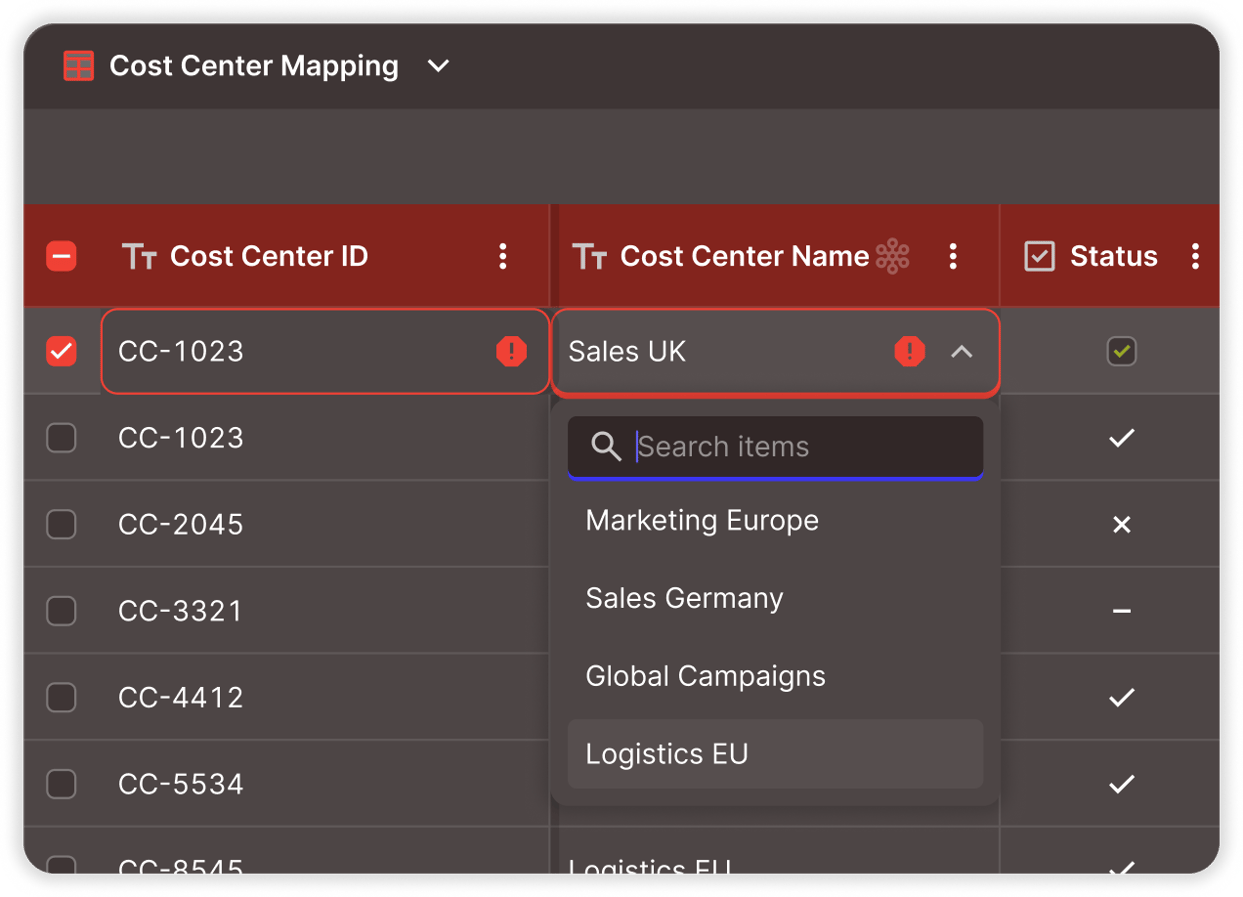
A cost center mapping changes. Your controller searches, selects the right value from master data, and submits. It's validated before it's written and live in every report instantly.
finance-team

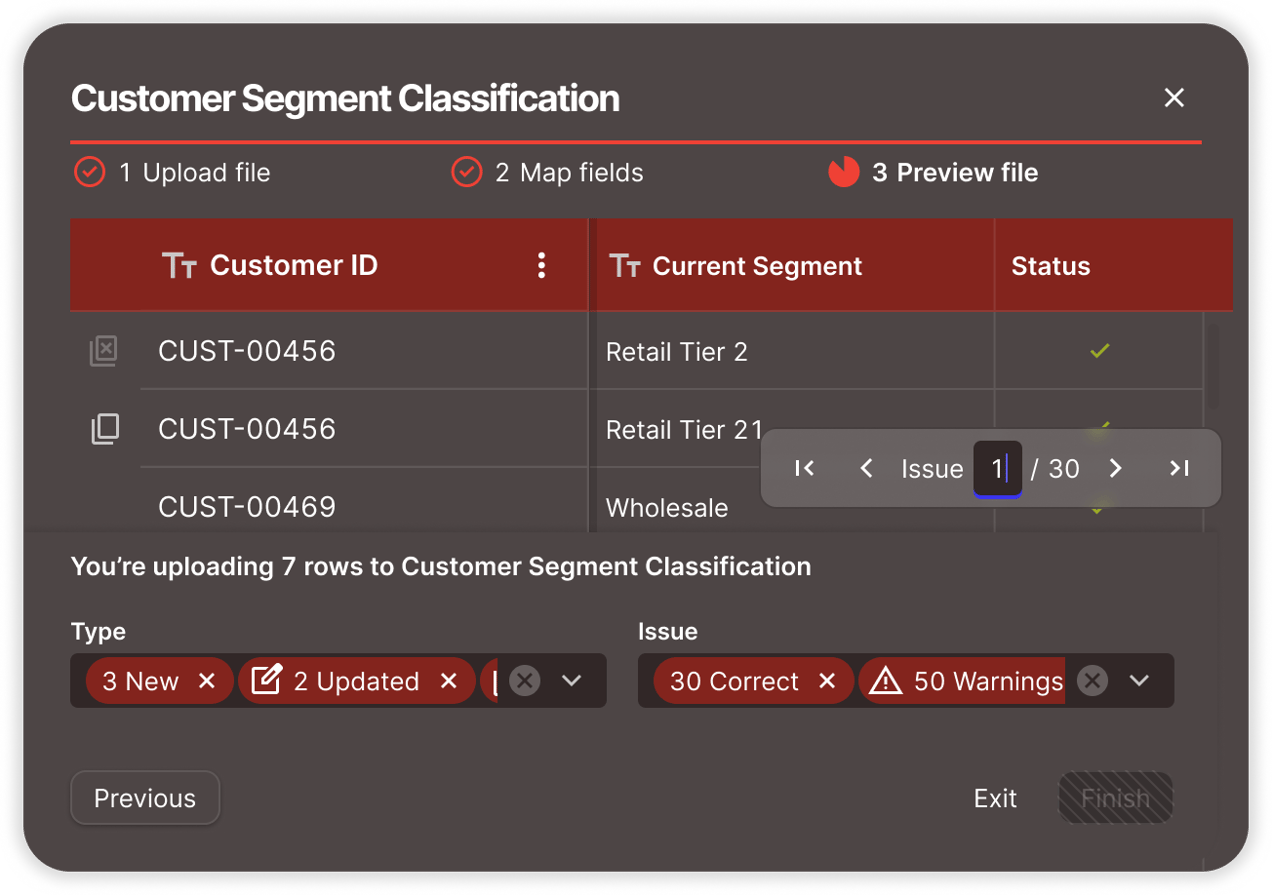
Your campaign groupings need updating before quarter-end. The marketing analyst opens the grid, bulk-updates segment classifications in one place, and they're live in every dashboard.
marketing-team


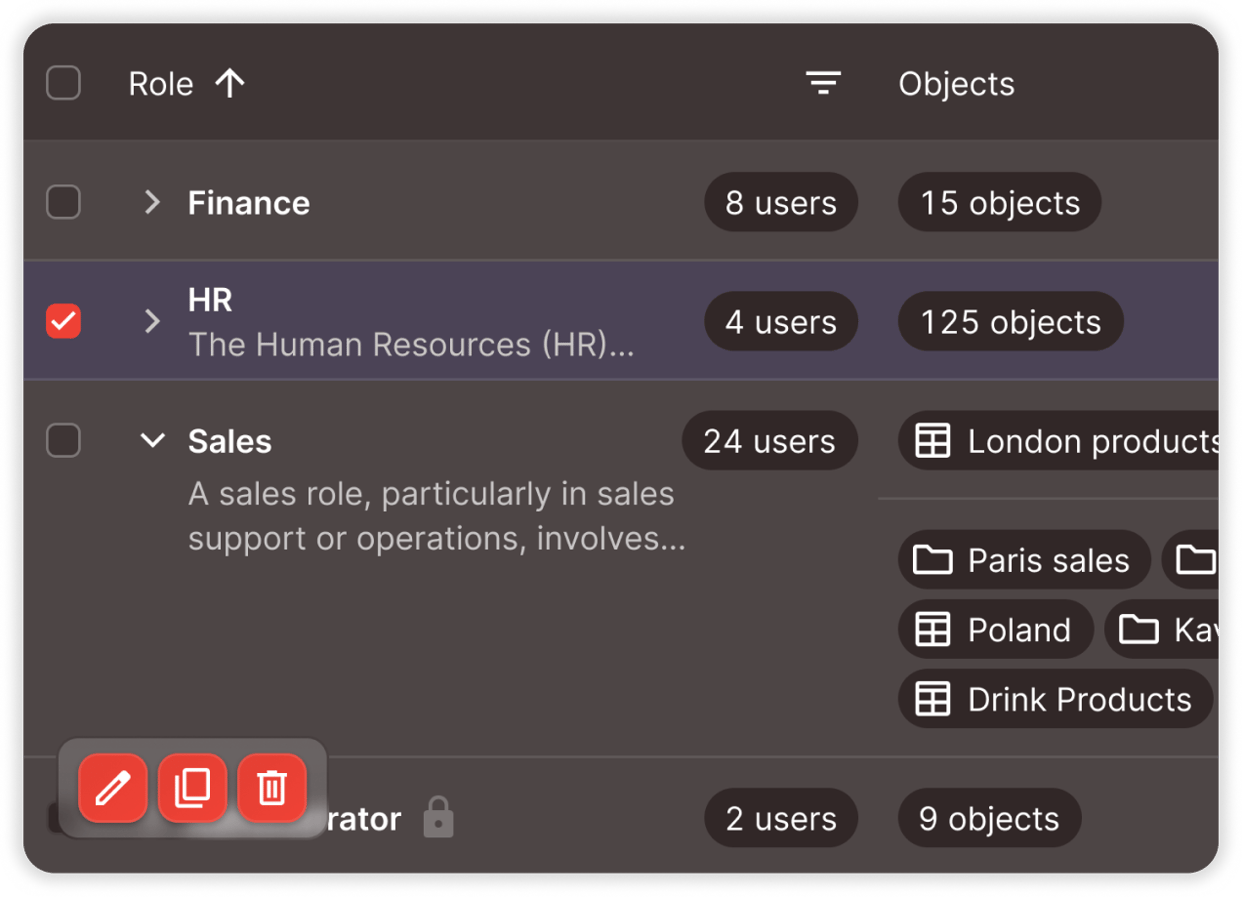
The org structure just changed. Your HR lead restructures reporting hierarchies and role mappings in one interface, checked and traceable. The change is live where it matters.
finance


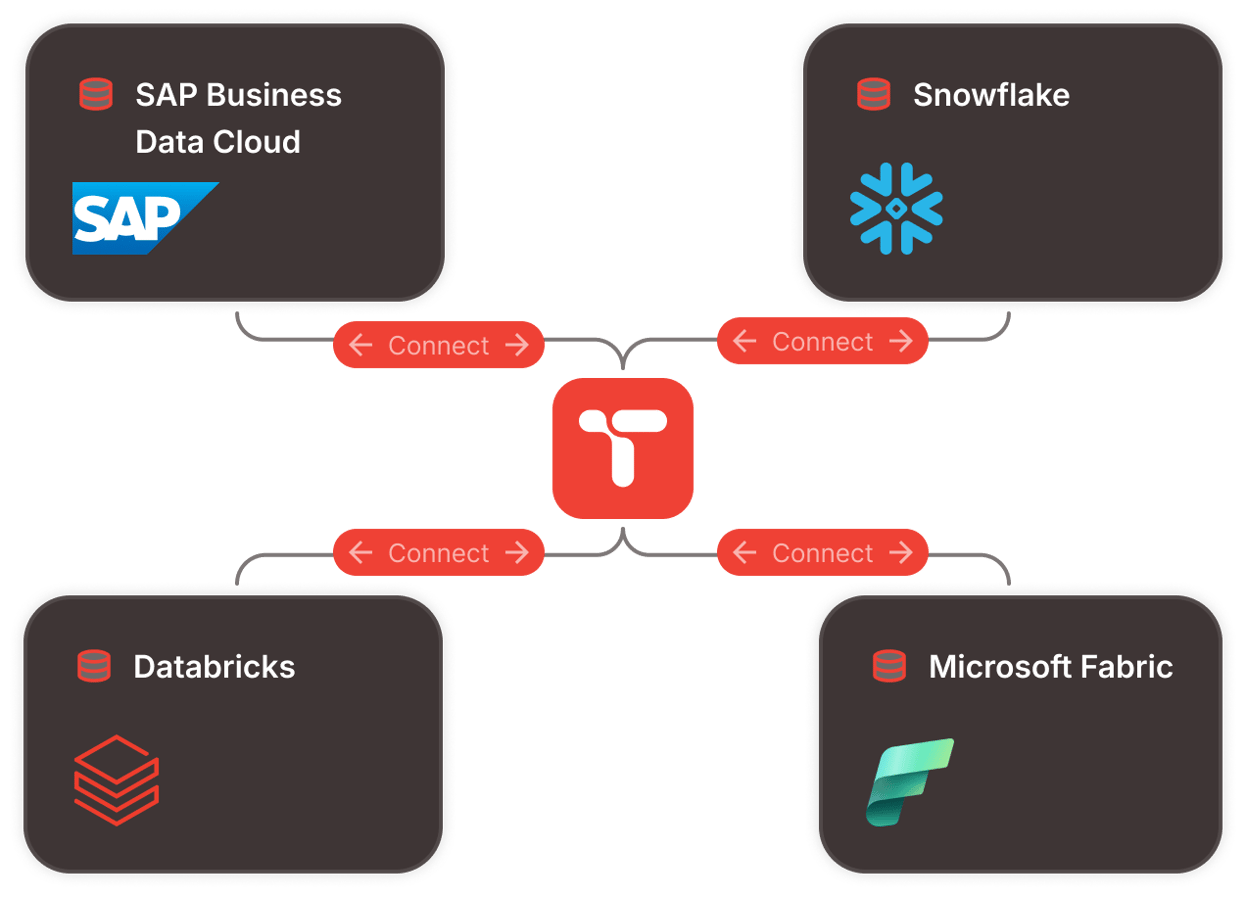
A new classification has to land on two platforms at once. Your data team builds the app once, points it at the master data already there, and hands it to the business. NextTables connects to SAP Business Data Cloud and Databricks and writes straight to your tables, with Snowflake and Microsoft Fabric on the roadmap.
dataanalytics-team


Built for business teams, validated at entry, ready for AI

business-teams

Built for business teams

Familiar, guided, ready to use

  • A familiar grid: filter, sort, copy/paste, bulk update. Works the way your team already thinks.
  • Smart search: select from validated master data values instead of guessing codes.
  • Embeddable in any BI dashboard: SAC, Power BI, Tableau, or standalone.
  • Enterprise SSO: one login, instant access, centrally managed.
validated

Governed

Checked at entry, scoped by role, recorded in your platform

  • Checked before it's written: only valid data reaches your platform.
  • Controlled by role: row-level access rules enforced structurally, at the platform boundary.
  • Your data stays put: one security perimeter, one source of truth.
  • Walk away any time: remove NextTables and every record stays where it is.
ai-ready

Powering AI

Trusted data, intelligent assistance, agent-ready

  • Business-maintained context for AI: reference data and classifications maintained where AI operates.
  • AI-assisted app creation: evolving to generate validation logic and data apps faster. Coming Soon
  • Governed gateway for AI agents: designed to extend the same validated, authorized interaction model to machine-driven updates. Coming Soon

Enterprise data teams we have worked with

dhl
vaillant
lanxess
Conti
gasag
dräger
roche
deutschepost
gstoyota
daimler-truck
schäfershop
vibracoustic
infineon
badenova
vitesco
infraserv
amdocs
kostal
essity
fraport

Enterprise-ready by design


key

Enterprise authorizations
Role-based access control, SSO, and access down to the row

verified_user

Governed write-back
Every write respects your platform's rules

fact_check

Auditable by design
Who changed, what and when

location_on

Security & data residency
Dedicated tenant deployed in your region

door_open

No vendor lock-in
Your data stays in your platform, always
Frequently asked questions

1. What is NextTables?

NextTables is a business-first hub for data maintenance apps, enabling business teams to maintain the data that drives analytics and AI, validated, authorized, and auditable, directly on enterprise data platforms like SAP Business Data Cloud, Databricks, and more.

Business users work in a familiar grid with guided entry that leads them to the right value. Apps embed into any BI dashboard so teams maintain data where they already make decisions. Every entry is validated before it's written, access is controlled down to the row, and changes appear instantly across every report. Business data stays exclusively in the customer's data platform. The result is validated, traceable data that AI models and decision agents can trust from day one.

2. How much does NextTables cost? You pay for the people who maintain data and the tables they maintain, so your cost matches your real use. See pricing to work out your own figure, or ask for a written quote on the same page. The trial is free for 60 days, with no credit card required.
3. Which data platforms does NextTables connect to?

NextTables connects natively to:

  • SAP Business Data Cloud (Datasphere)
  • Databricks
  • PostgreSQL
  • Snowflake · Coming Soon
  • Microsoft Fabric · Coming Soon

NextTables reads from and writes directly to the enterprise data platform, so your data stays where it already lives.

For organizations running multiple platforms, NextTables supports cross-platform data maintenance.

4. Who uses NextTables?

NextTables is used by any team that maintains data on an enterprise data platform:

  • Finance: cost center mappings, chart of accounts corrections, allocation rules
  • Marketing & Sales: customer segment classifications, campaign groupings
  • HR & Operations: org hierarchies, role mappings, employee classifications
  • Data & Analytics: reference data maintenance, cross-platform configurations, data app creation

Business teams work through a familiar grid interface with smart search and validation built in. Data and IT teams set up data apps, define validation rules, and assign access, all by configuration.

Cross-platform data maintenance covers the case where the answer lives on one platform and the data on another: an app can validate against master data in SAP Business Data Cloud and write the result to Databricks.

5. How is NextTables different from spreadsheets, PowerApps, or BI write-back tools?

vs. Spreadsheets:

Excel stays a supported way in: business users can prepare data in a spreadsheet and upload it through NextTables, where every row is validated before it is written. What changes is the return path. Instead of an offline file that gets versioned by email and loaded days later, every entry is checked against your master data at the point of entry, scoped by role, and live in every report the moment it is saved.

vs. PowerApps, SAP Build, Retool, Mendix:

General-purpose app builders target any kind of application. NextTables is purpose-built for one: data maintenance apps for enterprise data platforms. So the parts you would hand-build into every app are already there: validation against your master data, row-level rules that can reuse the access tables you already keep, an audit log inside your data platform, and business users who sign in with SSO and need no account on the data platform or a license for the app platform.

vs. BI write-back tools:

BI write-back extensions work well for quick edits inside one tool. They are built into that tool, though, and often write to a sidecar database, so an organization running SAC and Power BI and Tableau needs a different one for each. NextTables embeds into any of them, writes directly to the enterprise data platform, and applies the same validation, authorization, and audit log wherever it runs.

6. How does NextTables handle security and data residency?
  • Enterprise SSO: users sign in with the company credentials they already have, so business users need an account on NextTables only.
  • Row-level authorization: access rules enforced structurally, driven by control tables that define which user may access which rows.
  • Validation at entry: only valid data reaches the platform.
  • Dedicated tenant isolation: each customer runs in an isolated environment on Microsoft Azure in Western Europe, with encryption at rest and in transit.
  • No vendor lock-in: remove NextTables at any time and every record stays in your platform.
7. Does NextTables store my data?

No. NextTables stores only configuration metadata: the definitions of your data apps, validation rules, and access roles. All business data remains exclusively in your enterprise data platform.

Your platform remains the single source of truth for business data. If you remove NextTables, your data stays exactly where it is.

8. Can I use NextTables inside my BI dashboard?

Yes. NextTables data apps embed directly into any BI dashboard that supports web objects, including SAP Analytics Cloud, Power BI, and Tableau.

Business teams maintain data in the same context where they consume reports. Validation, authorization, and the audit log work the same way in every BI environment.

See what it looks like on your stack

Book a personalized demo, or start with the deck.