
📝 Availability: NextTables for SAP BW, Enterprise edition. This article documents BAdIs; BAdI support is an Enterprise feature.
You will learn
Which BAdIs NextTables delivers, which one to reach for, and how to create an implementation in SE19 from the enhancement implementation down to the filter values. This is the entry point for every BAdI article in this knowledge base.
This article is for ABAP developers. If you already know which BAdI you need, the map below links straight to its reference.
The map: which BAdI, and where its article lives
NextTables delivers three BAdI definitions in one enhancement spot. They are documented across five places in this knowledge base, filed by what you are trying to do rather than by which definition you end up using, so start here:
| You want to | BAdI definition | Where it is documented |
|---|---|---|
| Change what a table looks like, what it reads, or what happens on save | /NLY/BADI_EDITOR |
How to implement the table maintenance BAdI in SAP BW, with a reference per method |
| Record who changed a row and when | /NLY/BADI_EDITOR |
How to track changes in NextTables for SAP BW, a worked example of the Meta and Update methods |
| Map a value that the target data type would refuse, during an import | /NLY/BADI_IMPORT |
The Import BAdI in NextTables for SAP BW |
| Offer your own value help, or change how search results are shown | /NLY/BADI_SEARCH |
How to implement a Search BAdI in NextTables for SAP BW |
| Run something of your own from a button, for example a process chain | /NLY/BADI_EDITOR |
How to start a BW process chain from a NextTables button |
📝 Before you write a BAdI: a good share of requirements that look like BAdI work are settings. Value help usually needs configuration rather than a Search BAdI, and row-level restrictions usually need analysis authorizations rather than code. How to give editors the right values in NextTables for SAP BW and Row-level security with analysis authorizations in SAP BW cover the configuration routes.
Prerequisites
- ABAP development access on the BW system, with a package and a transport for the objects.
- A table that is already configured in NextTables, if you are implementing the table maintenance BAdI.
Why a BAdI and not a modification
Business Add-Ins let you change how a function behaves without touching the delivered source code. Your enhancement and the original development stay separate objects, and they are integrated at runtime rather than merged. That separation is what lets you upgrade NextTables without losing your custom development.
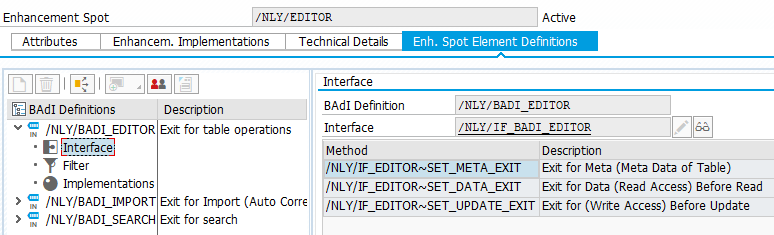
The BAdIs NextTables delivers are new-generation BAdIs, organized in enhancement spots. An enhancement spot contains BAdI definitions; each definition provides an interface and its ABAP methods, which you implement in your own class.
The three definitions
The enhancement spot /NLY/EDITOR contains:
/NLY/BADI_EDITORcovers every table operation. Show or hide columns, lock fields, change read and write access, implement your own authorization checks, validate input, and derive fields automatically./NLY/BADI_IMPORTruns during an import. It is the only place where field contents can be reached before data type compliance is enforced, which is what makes it useful: it can turnYesinto1for a field of type NUMC1 that would otherwise reject the value./NLY/BADI_SEARCHruns in the search. Implement your own value help for requirements the standard search modes do not cover, and change how results are displayed.
How the pieces fit together
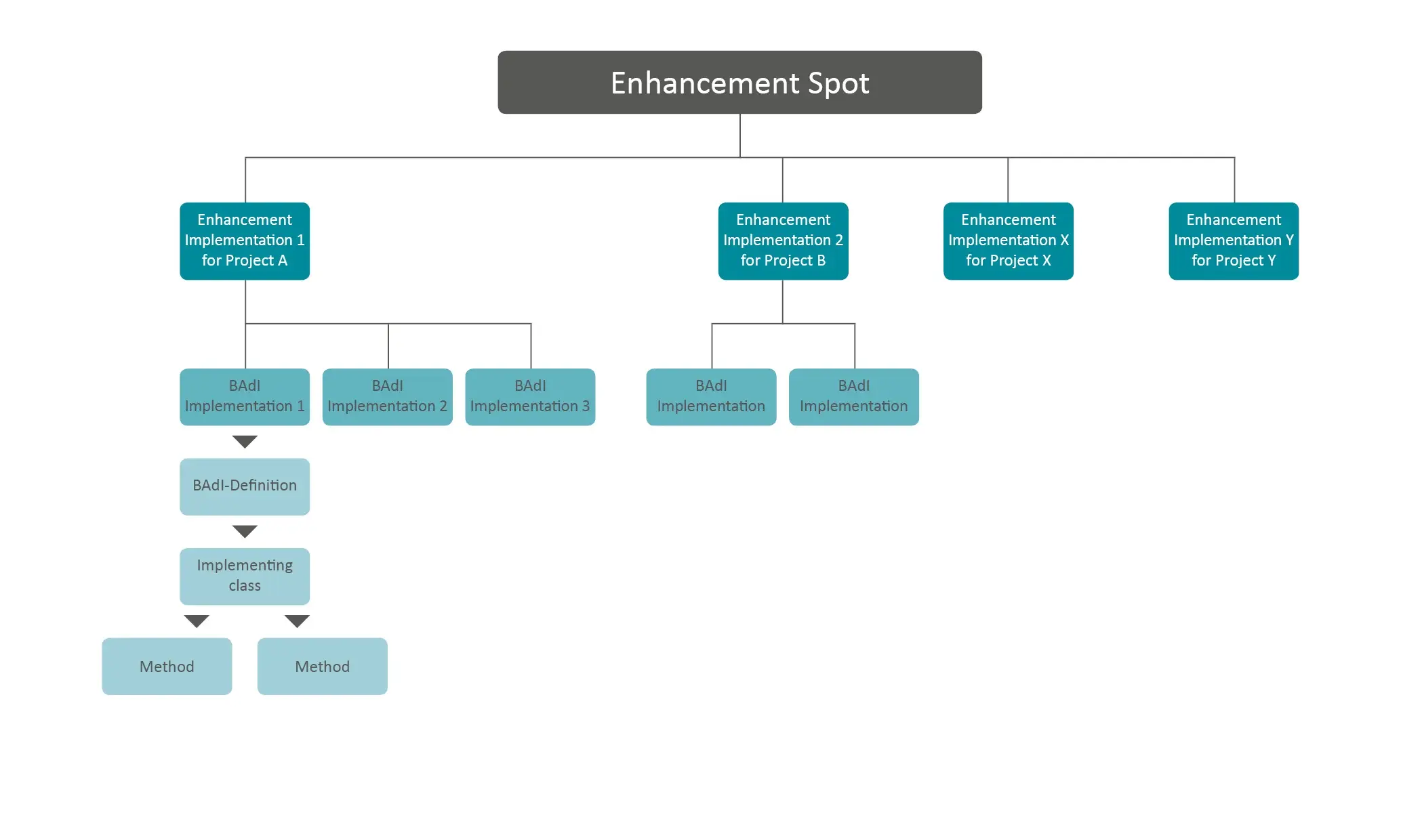
An enhancement spot holds enhancement implementations. An enhancement implementation holds several BAdI implementations, each based on one BAdI definition. Your logic runs in an implementing class whose methods come from that definition.
How to organize implementations
The BAdIs are designed for multiple use and are selected by a filter. Two habits keep that manageable:
- Create one enhancement implementation per project or per department that uses NextTables. Everything that project uses is then in one place, table BAdIs and search BAdIs alike.
- Create one BAdI implementation per table or per search function, and name it after that table or function. A month later, the name is how anyone finds it.
Step-by-Step Instructions
An implementation can be created from ABAP Development Tools, from the BAdI definition (SE18), from the BAdI implementations (SE19) or from the ABAP Workbench (SE80). This walkthrough uses SE19.
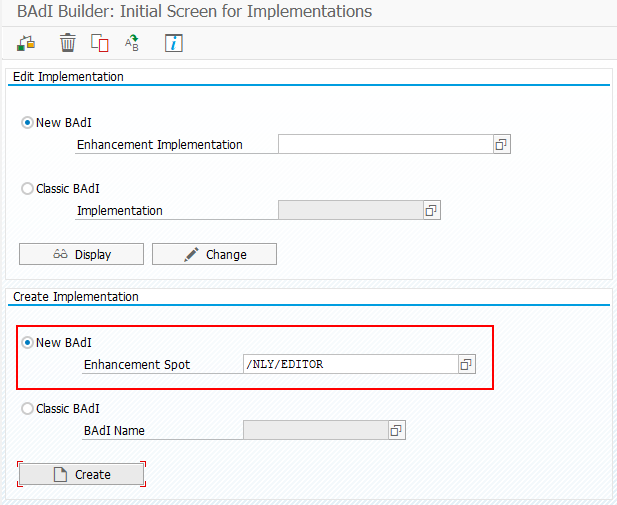
1. Start from the enhancement spot
On the SE19 initial screen, select the enhancement spot /NLY/EDITOR and choose Create.
2. Create the enhancement implementation
You are prompted for an enhancement implementation first. This is the container for every BAdI implementation in the project. Enter a name and a short description, then confirm.

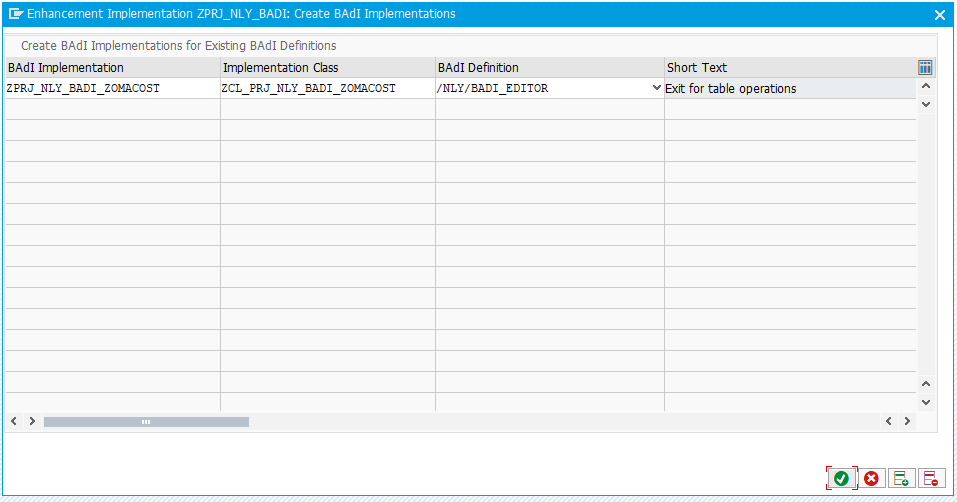
3. Create the BAdI implementation and its class
Inside that container, create the BAdI implementation. Enter its name and the name of the class that will carry the logic, and pick the BAdI definition that matches what you are doing. The example uses /NLY/BADI_EDITOR for table operations.
4. Implement the methods
Your logic goes into the methods of the class. Their signatures are inherited from the BAdI definition, so they are fixed.
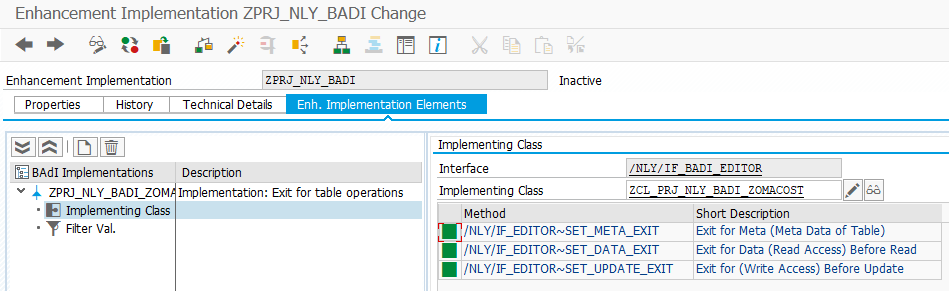
5. Set the filter values
Nothing runs until the filter matches. In the Filter Values section, set the criteria that bind the class to one table name and table type.
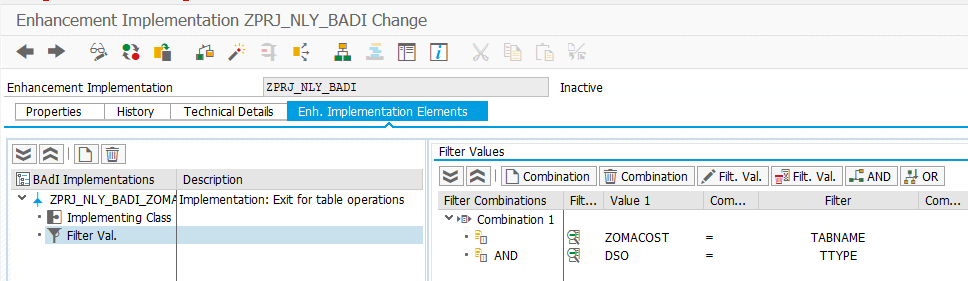
6. Activate everything, not just the class
Three objects have to be active, and forgetting one is the most common reason an exit appears to do nothing:
- the implementing class, together with its methods
- the BAdI implementation
- the enhancement implementation
Troubleshooting / FAQs
1. My implementation is never called.
Work through the three activations first, then the filter. An unactivated enhancement implementation fails silently, and so does a filter that does not match the table name and type exactly.
2. Two implementations exist for the same table. Which one runs?
The first. Duplicate filter combinations are not rejected, so the second implementation is simply never called. Keep filter combinations unique across all implementations of the definition.
3. Which BAdI do I need for a validation?
The table maintenance BAdI, in the Update method's validate step. The Import BAdI is not the place for validation: it runs only for file and clipboard imports, and its job is mapping values before type conversion. How import validation works in NextTables for SAP BW shows which hook a given requirement needs.
4. Will my implementation survive an upgrade?
That is the point of a BAdI. Your class and the delivered code are separate objects, so an upgrade replaces the delivered code without touching yours. Method signatures come from the definition, so check the release notes if a definition changes.