
📝 Availability: NextTables for SAP BW, Professional and Enterprise editions. The built-in checks are Professional. The two extension points are BAdIs and require the Enterprise edition.
You will learn
What happens to a value between the moment it arrives and the moment it is stored, which of the four stages your requirement belongs in, and why the answer is almost never the one people reach for first.
This article is the map. It says when each hook runs and which one a given requirement needs. The parameters and the code live in the reference articles it links to.
This article is for whoever is deciding where to put a check, whether or not they will write it themselves.
Prerequisites
- A configured table. Table and column configuration in NextTables for SAP BW.
- Nothing else to read this. Implementing stages 2 and 4 needs ABAP development access.
The pipeline
A value passes four stages. Two are built in and two are yours.
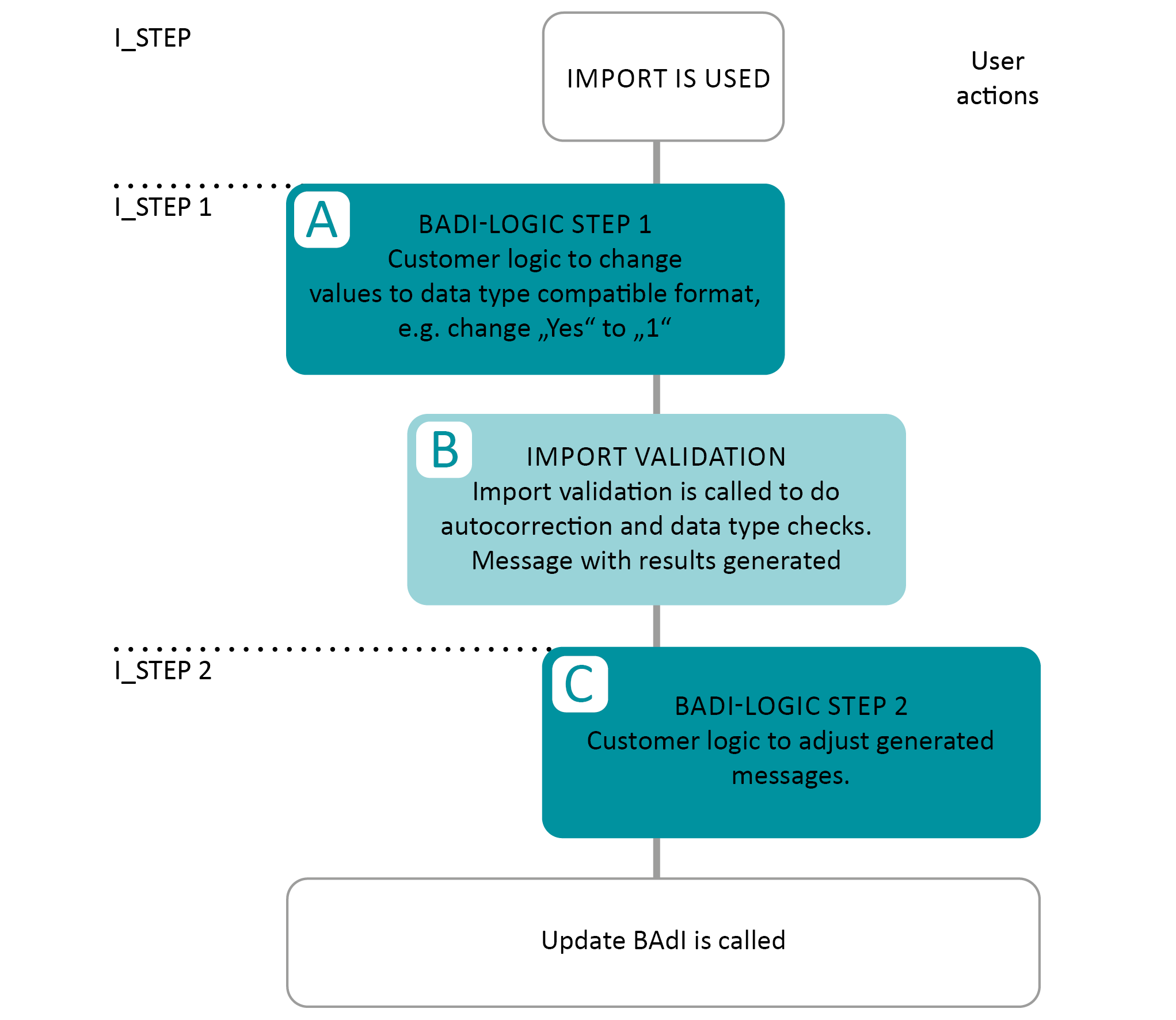
| Stage | What runs | Sees | Yours? |
|---|---|---|---|
| 1. The raw value arrives | Nothing yet. The value is still exactly as the file or the clipboard delivered it, with no expectation that it fits the target type. | Import only | No |
| 2. The Import BAdI | Your chance to change a value before anything requires it to be type compatible. Mapping only. | Import only, from a file or the clipboard | Yes, Enterprise |
| 3. Type check and auto-correction | The built-in validation: the data type check, auto-corrections such as adding a currency to a key figure, and the validation report the user sees. | Import | No |
| 4. The Update BAdI | The Validate step checks; the write step derives and corrects. Then the row is stored. | Both the grid and the import | Yes, Enterprise |
The Import BAdI also runs a second time after stage 3, where it can read and adjust the validation messages that were produced. That is its only other job.
Which stage does your requirement belong in?
💡 The short answer is stage 4, the Update BAdI's Validate step. It is the only stage that covers both ways data enters a table. A check implemented anywhere else is a check that a user editing in the grid can walk straight past.
| You want to | Stage | Why |
|---|---|---|
| Refuse a value that breaks a business rule | 4, Validate step | Applies to grid editing and imports alike. |
| Derive a value the user does not enter, such as Changed by | 4, write step | Same reason. The grid needs it too. |
Accept Yes into a NUMC1 field |
2, Import BAdI | The only stage that sees the value before it has to be type compatible. Stage 4 never gets it, because stage 3 rejected it. |
| Turn a description in a file into its technical key | 2, Import BAdI | Same reason: the description is not a valid key yet. |
| Reword a validation message | 2, second run | The messages exist only after stage 3. |
| Restrict which rows a user may see or change at all | None of them | That is authorization, not validation. See Row-level security with analysis authorizations in SAP BW. |
| Stop a value being entered that is not in a list | None of them | Configure a value help with strict mode. See How to give editors the right values in NextTables for SAP BW. |
⚠️ The Import BAdI is the exception, not the main road. Its name suggests it is where import handling belongs, and that reading has cost people real time. It runs only for imports from a file or the clipboard, and it exists for one narrow job: mapping a value before the type check can reject it. Few customers implement one. The BAdI on the import path that most do implement is the Update BAdI, because that is the one that also covers the grid.
The two extension points in detail
Stage 2: the Import BAdI
Definition /NLY/BADI_IMPORT, method SET_IMPORT_EXIT. Filtered by table, table type and field. Reads I_VALUE, returns E_VALUE, and reports what it changed through CT_VALIDATION so the change appears in the import report rather than happening invisibly.
Full reference and a worked implementation: The Import BAdI in NextTables for SAP BW.
Stage 4: the Update BAdI
Definition /NLY/BADI_EDITOR, method SET_UPDATE_EXIT. Runs for every write, whoever caused it. The validate event is where checks belong; the insert, update and delete events are where derivations belong.
Full reference: The Update BAdI (SET_UPDATE_EXIT) in NextTables for SAP BW. Both are created the same way: How to implement a BAdI for NextTables in SAP BW.
Step-by-Step Instructions
1. Ask whether it needs code at all
Value lists, required fields, locked fields and data types are configuration. Work through the configuration reference before designing a BAdI.
2. Ask which entry paths the rule has to cover
If the answer includes people editing in the grid, the rule belongs in stage 4. This one question settles most cases.
3. Ask whether the value can survive the type check
If the incoming value would be rejected at stage 3, no later stage can help, because the value never reaches them. That is the one situation the Import BAdI exists for.
4. Implement it, and report it
Whichever stage you land in, tell the user. Stage 2 uses CT_VALIDATION, which surfaces in the import report; stage 4 uses CT_VALIDATION for refusals and CT_MESSAGES for messages. See Error handling in the table maintenance BAdI for SAP BW. A value changed silently is a value nobody can account for later.
Troubleshooting / FAQs
1. My check works on import but not when someone edits a cell.
It is in the Import BAdI, which never runs for grid editing. Move it to the Update BAdI's Validate step.
2. My Import BAdI never sees the value I want to fix.
Check the field name in the filter. It filters on the field as well as the table, and a filter that does not match means the exit is not called for that column.
3. The value is rejected before my code runs.
The rejection is stage 3, the built-in type check. Only stage 2 runs earlier, so the mapping has to happen there.
4. Where do auto-corrections such as adding a currency happen?
Stage 3, built in. You do not implement them and you cannot skip them.
5. Can I change the validation messages the user sees?
Yes, in the Import BAdI's second run, which happens after the messages have been produced.
6. Which BAdI should a new project implement first?
The Update BAdI, in nearly every case. Add an Import BAdI only when a specific column arrives in a form the target type cannot accept.