Skip to content
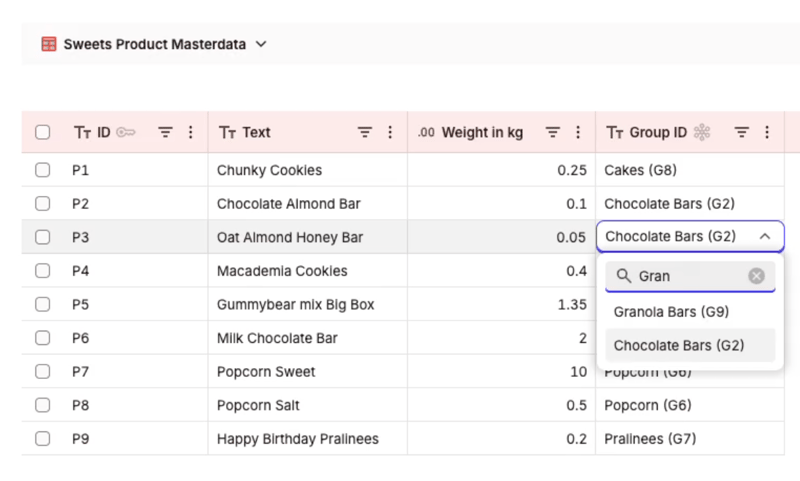
Product master data grid in NextTables: a group ID picked from the value helpMarketing data, current and trusted, on your enterprise data platform

See the Marketing solution

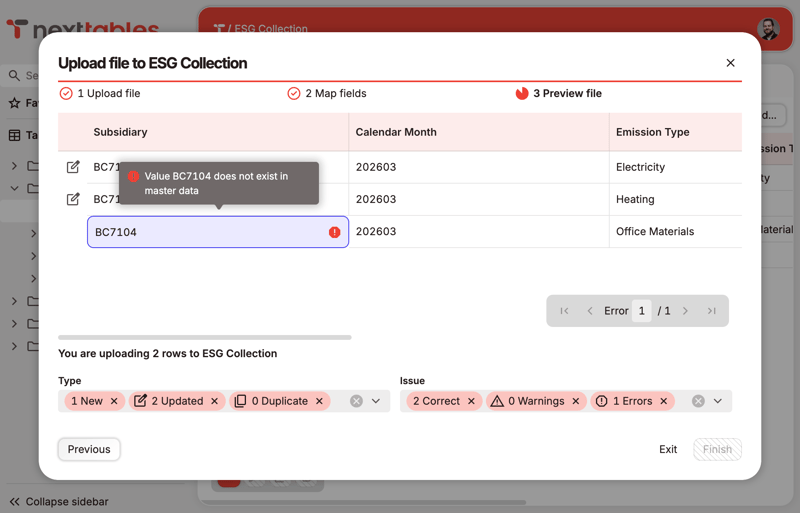
ESG upload preview in NextTables: an unknown subsidiary ID marked as an errorCollect, maintain, and monitor ESG data on the platform you already run

See the ESG solution

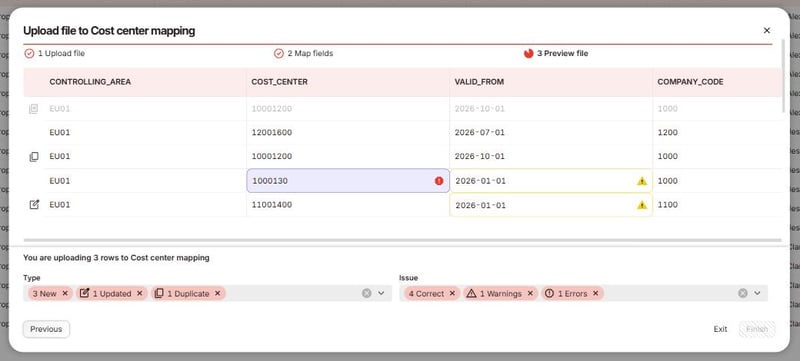
Upload preview of a cost center mapping in NextTables, with one error and one warningNextTables lets finance maintain the reference data its management reports run on

See the Finance solution

The NextTables deck

The deck covers use cases, architecture and pricing in one file.

Maintain data that drives analytics and AI, directly on your enterprise data platform

Build data maintenance apps, guided for business teams, trusted by IT. Business teams update their own data, with validation at entry, role-based authorization down to the row, and an audit log of every change stored inside your data platform.

Works with your stack

Native read and write, direct to your tables
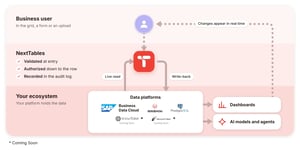
Diagram: a business user maintains data through NextTables, validated, authorized and recorded, which reads from and writes back to the data platforms and feeds dashboards and AI; Snowflake and Microsoft Fabric are marked Coming Soon

Built for business teams

Familiar, guided, ready to use

Familiar, business-friendly interface

Grid-based editing, filtering, sorting and import, in business terms, teams already know. Productive from day one.


Guided data entry

Built-in value help and instant validation feedback, so users find the right value and know immediately whether their entry is accepted.


Embeddable in any BI dashboard

Embed data maintenance apps into any BI dashboard. Every update is validated at entry, written straight to your data platform, and visible in the dashboard, so maintenance happens where decisions are made.


End-to-end self-service data maintenance apps

The same team that owns the data owns the app, from idea to live. Validation, authorization, and auditability are built in.
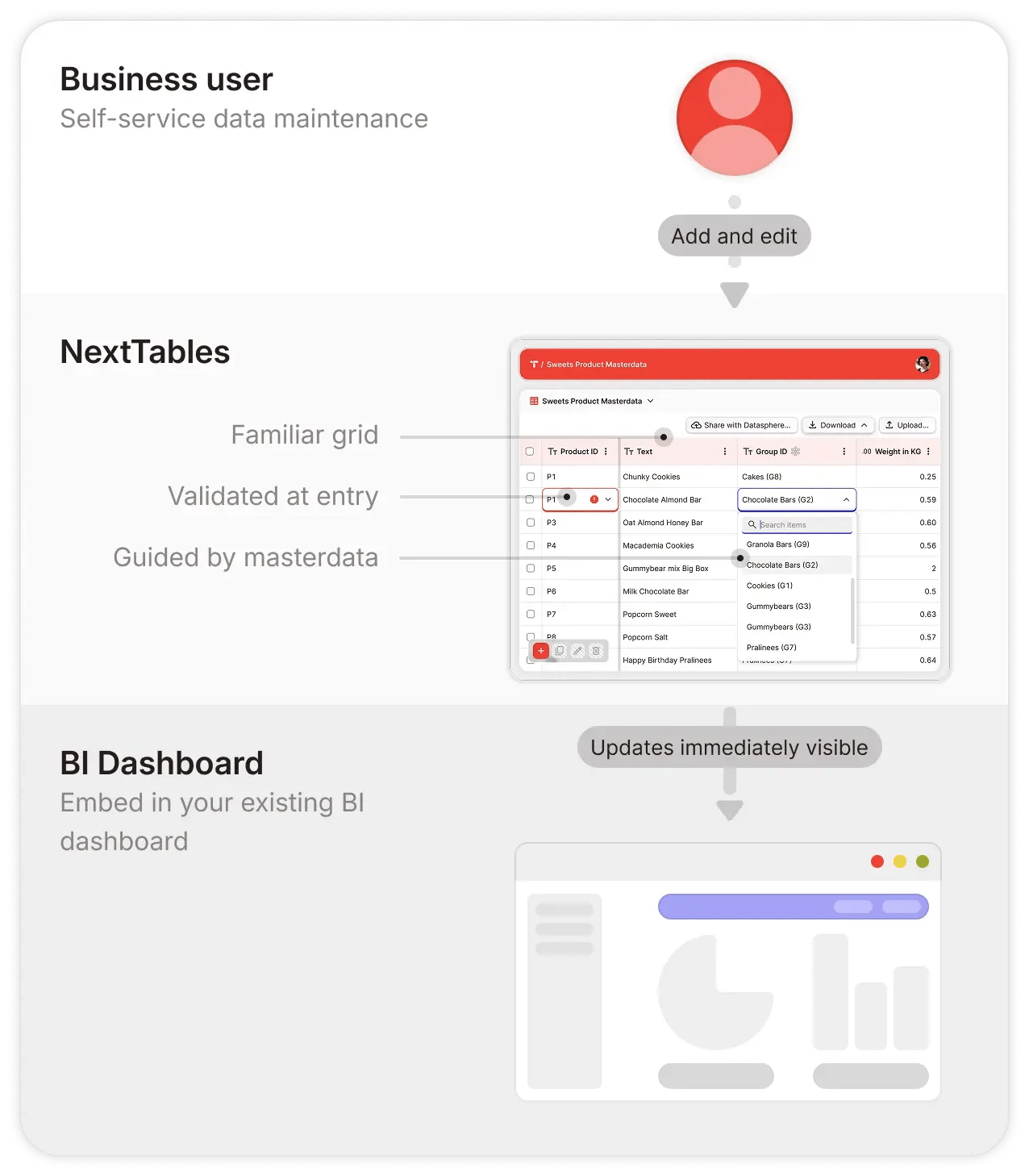
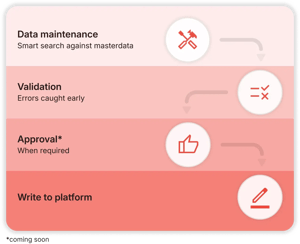
Diagram: a business user adds and edits in the NextTables grid, a familiar grid that is validated at entry and guided by master data, and the update is immediately visible in the BI dashboard


Governed

Validated, authorized, auditable
Diagram: a change passes data maintenance with search against master data, validation that catches errors early and approval where required, marked Coming Soon, before it is written to the platform
Validation at entry Every entry is validated against your rules before it reaches the platform. Errors surface immediately so the business user can fix them on the spot, and only validated data is written.
Role-based and row-level access Built on role-based access control (RBAC) with row-level rules, scoped to folders. Roles cover two layers: data maintenance and object creation (apps, tables, connections). Row-level rules can reuse the access tables on your data platform, or be defined in NextTables.
Single sign-on with your enterprise identity provider Users sign in through your enterprise SSO with the credentials they already have, with no separate platform account. Microsoft Entra ID and Google Workspace are supported, and email and password stays available for tenants without an identity provider.
Business data stays on your enterprise data platform Only configuration metadata is stored by NextTables. Business data passes through during reads and writes and remains exclusively on your enterprise data platform.
Full audit trail Coming Soon Every change is already captured in the audit log today: who changed what, the new value and when, recorded on your enterprise data platform alongside the data. The full audit trail will bring that history into the NextTables interface, ready for audit reviews.
Approval workflows Coming Soon For sensitive updates, edits will be proposed, reviewed, and only then written to the platform, for both human users and agent-driven changes. The approval decision becomes part of the audit record.
Safe rollback Coming Soon Authorized users will be able to roll any change back to its previous value, and the rollback itself will be recorded alongside the original change.


Tenant isolation
Dedicated K8s spaces

Dedicated Database
Per tenant, no sharing

EU-only hosting
Data & backups in EU

Enterprise auth
RBAC, SSO, Row-level

Privacy documented
Published privacy policy and a DPA available

Running on

Microsoft Azure SAP Business Technology Platform

Powering AI

Trusted data, intelligent assistance, agent-ready
Business-maintained context for AI Business teams maintain the reference mappings, parameters, and context data that AI agents and models need to operate correctly, directly on the platform.
Data maintenance from your AI assistant Through the NextTables MCP server, an assistant such as Claude, Joule, ChatGPT or Copilot reads rows, adds and updates them, and imports a file after a preview of valid and invalid rows. It acts with exactly the permissions of the person who connected it and passes the same checks, roles and audit log as an entry in the grid.
Tables created from one sentence The same assistant creates a table with its fields and key on your platform, wherever the person who connected it may create tables.
Governed gateway for AI agents Coming Soon NextTables is designed to let AI agents write to the enterprise data platform through the same gateway as human users. Agent-driven updates will be validated, authorized, and auditable, and will be able to require human approval.
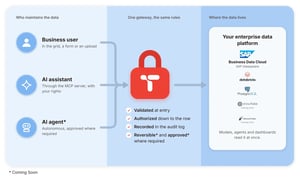
Diagram: a business user, an AI assistant through the NextTables MCP server and an AI agent all write through the same NextTables gateway, where every change is validated at entry, authorized down to the row and recorded in the audit log before it reaches the enterprise data platform; the AI agent, rollback and approval are marked Coming Soon

Frequently asked questions

1. How does NextTables connect to and write to our data platform?

NextTables connects through each platform's native interface and writes directly to your tables, so the platform you already run remains the single source of truth. NextTables itself runs as a managed SaaS app. Business data passes through during a read or write, and stays exclusively on your enterprise data platform afterwards. Only configuration metadata, such as apps, table and column config, validation rules, and role assignments, lives inside NextTables.

2. Is NextTables another system we have to integrate and maintain?

NextTables runs as a managed SaaS app, so upgrades and infrastructure are maintained by us. Your team configures apps, validation rules, and roles through the interface, in business terms. The platform you already run remains the single source of truth, with your tables, your access rules, and your security perimeter intact. NextTables sits alongside as the maintenance layer that standardizes how business teams update the data behind your reports, dashboards, and AI.

3. Can NextTables reuse our existing identity, roles, and access policies?

Yes. People sign in with Microsoft Entra ID, Google or email and password. Roles in NextTables are assigned at the folder level with read, write, create and delete rights, and permissions inherit downward to the data sources connected inside each folder. Row-level authorization is driven by a separate control table that defines which user may access which rows. You can maintain that control table directly in NextTables, or point to an access-control table you already maintain on the data platform, in which case enforcement follows your existing policy automatically.

4. Where are validation rules defined and executed?

Validation rules live in NextTables. Each app validates entries against the enterprise master data tables it is connected to, so values are checked against your source of truth before anything is written. Every rule runs at the point of entry, ahead of the write to the data platform, so only validated data lands in your tables and users see and fix invalid entries on the spot. The rule definitions are stored as configuration metadata inside NextTables, while the business data they validate stays on your enterprise data platform.

5. We run SAP BW on premise. Does NextTables work there?

Yes. NextTables for SAP BW is an add-on that runs inside your SAP BW/4HANA, SAP S/4HANA or SAP BW on HANA system, on your SAP analysis authorizations, with the same grid, search help and import. It is a separate edition with its own pages: NextTables for SAP BW.

6. How much does NextTables cost?

You pay for the people who maintain data and the tables they maintain, so your cost matches your real use. See pricing to work out your own figure, or ask for a written quote on the same page. The trial is free for 60 days, with no credit card required.

See NextTables on your own platform

Start with the deck, or book a personalized demo.