
Every way your team maintains SAP BW data
The full toolset, in one add-on that runs inside your SAP Business Warehouse (BW): a spreadsheet-familiar grid for business users, and standard SAP BAdIs for the exceptions your ABAP team wants to shape.
Edit and change
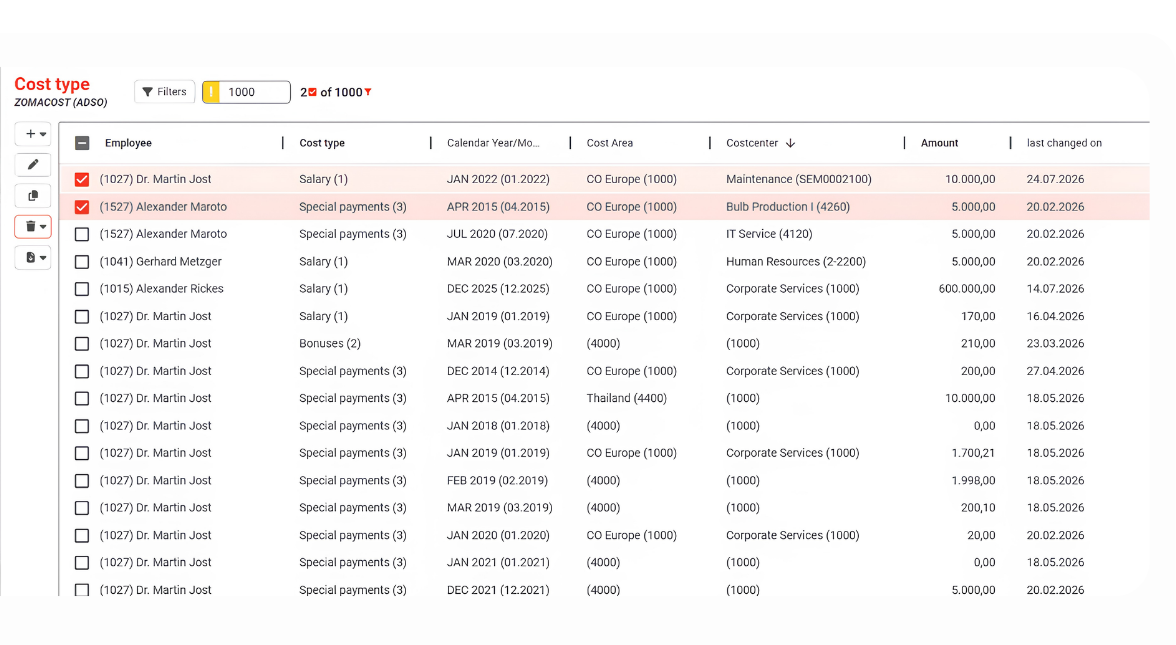
Work the grid like the spreadsheet your team already knows, on data that lives in SAP BW.
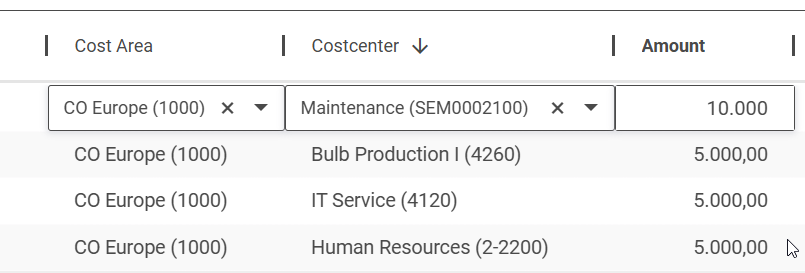
Inline editing
Click a cell, type, save. Changes write straight to your SAP BW.
Multi edit
Change, copy or delete many selected rows in one action, including very large selections.
Paste straight from Excel
Large blocks move from your spreadsheet into the grid in one keystroke.
Every data type
Text, numbers, dates, timestamps, checkboxes, long text and more, rendered per column.
Show the key, the text, or both
Key, text or both, in every combination your backend allows, and the text goes into the export too. Decimal places and rounding are set per key figure, and technical field names show on request.
Checked as you type
Validation runs field by field, so a user has the answer on leaving the cell. One field’s rule can depend on what another field holds.
Find the right value
Search help that returns results while the user types, straight from SAP BW master data.
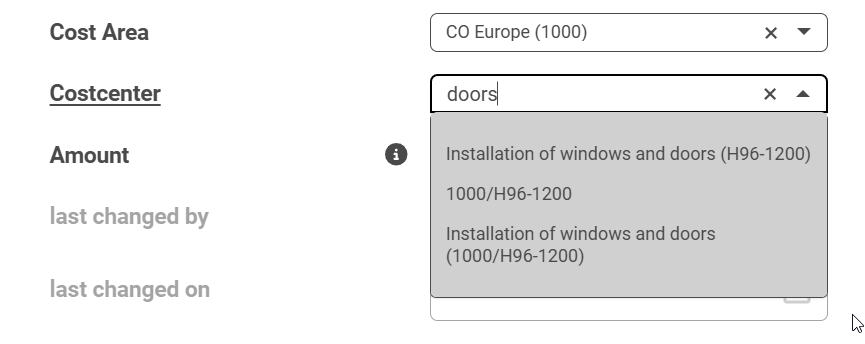
Pick from real master data
Search help offers actual InfoObject values, key and text, so people choose the right code.
Fuzzy search
Find near matches on SAP HANA, even with a typo or partial term.
Dropdown or search field
Choose the style per column, and require a valid value with strict search.
DDIC helps work out of the box
Fields with a DDIC search help or domain need no configuration at all.
Import and validate
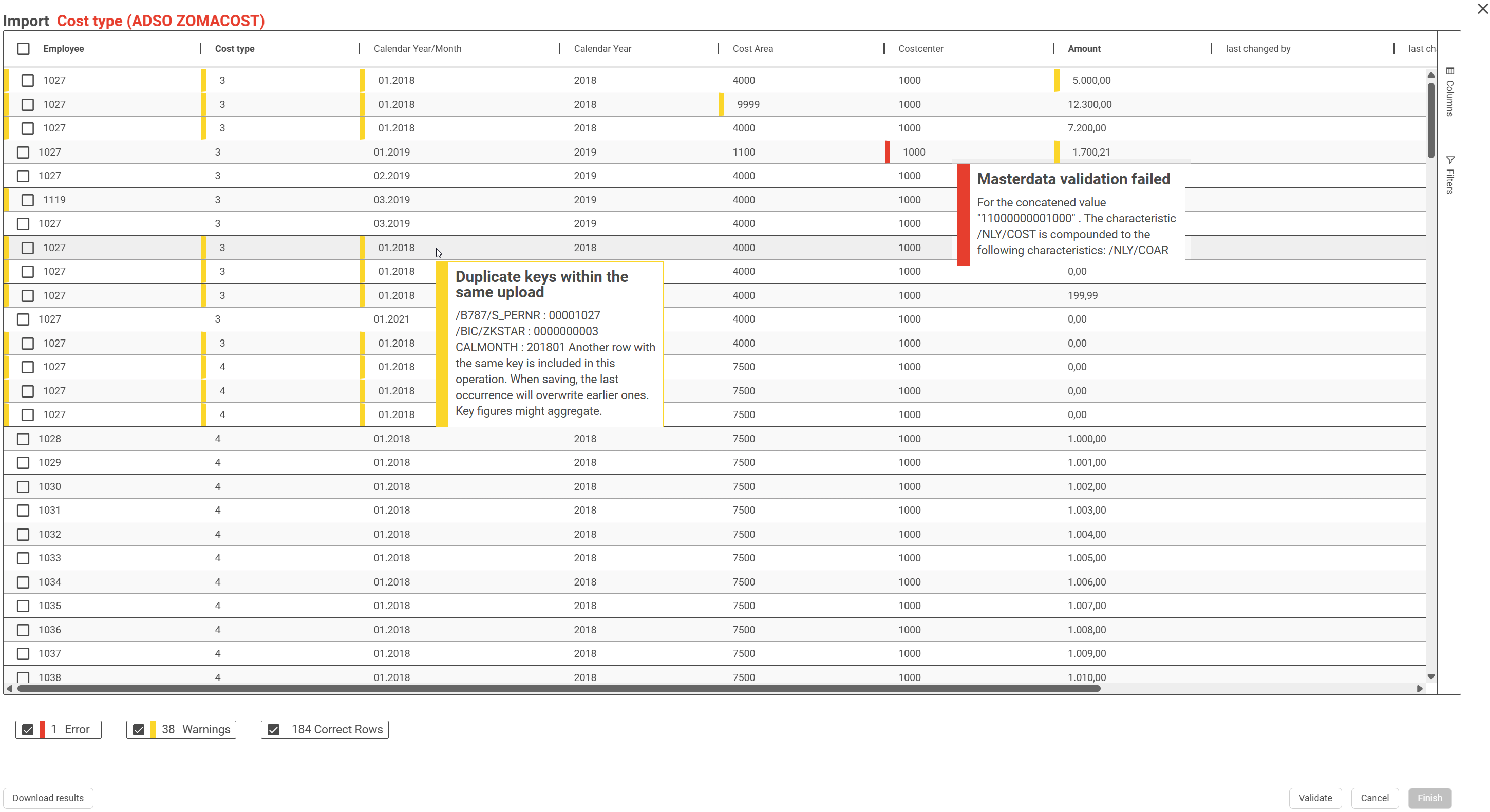
Bring larger changes in from a file, checked row by row before anything is written.
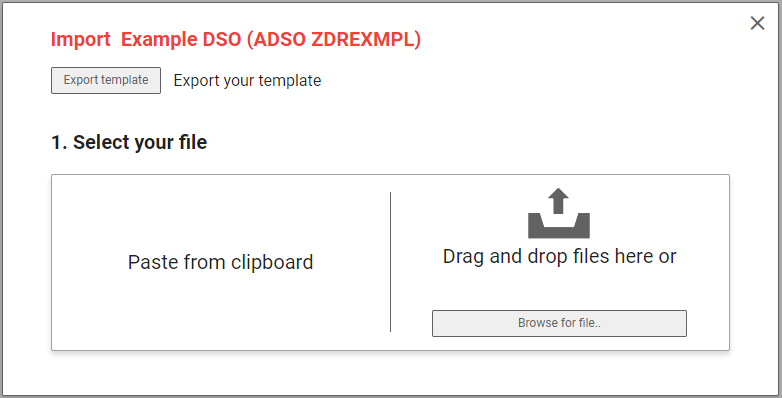
Excel, CSV, clipboard
Drag and drop a file, or paste, and map to your columns. Imports of 100 MB and more are tested and supported.
Checked against your master data
Every row is validated before anything is written, the same checks the grid applies.
Custom checks in ABAP
Enterprise
Go past the built-in checks through the import BAdI, with any rule your team can express.
Auto-correct, or hold for review
Currency symbols stripped, formats normalized, duplicate keys flagged. Rows that still fail stay out of SAP BW.
Watch every import
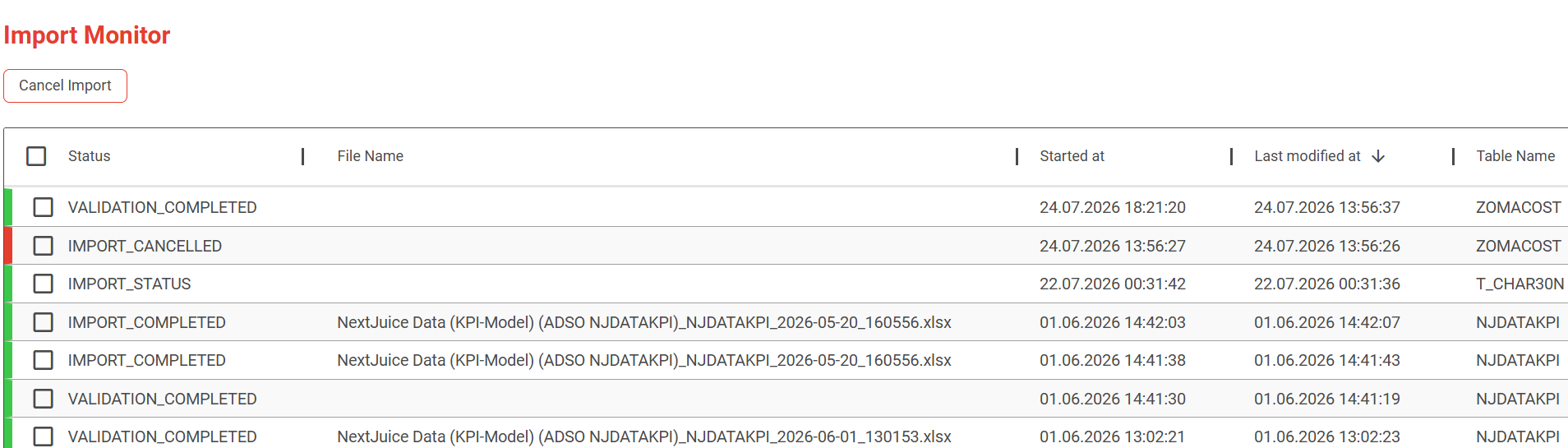
The import monitor lists each file with its status, when it started and which table it went to, and cancels one that is still running.
Take the result with you
Download the validation result from the final import screen and hand it to whoever owns the data.
Maintain the data from inside your dashboard
The grid embeds as a web object in any BI tool that supports them, so someone fixes a number without leaving the report where they spotted it.
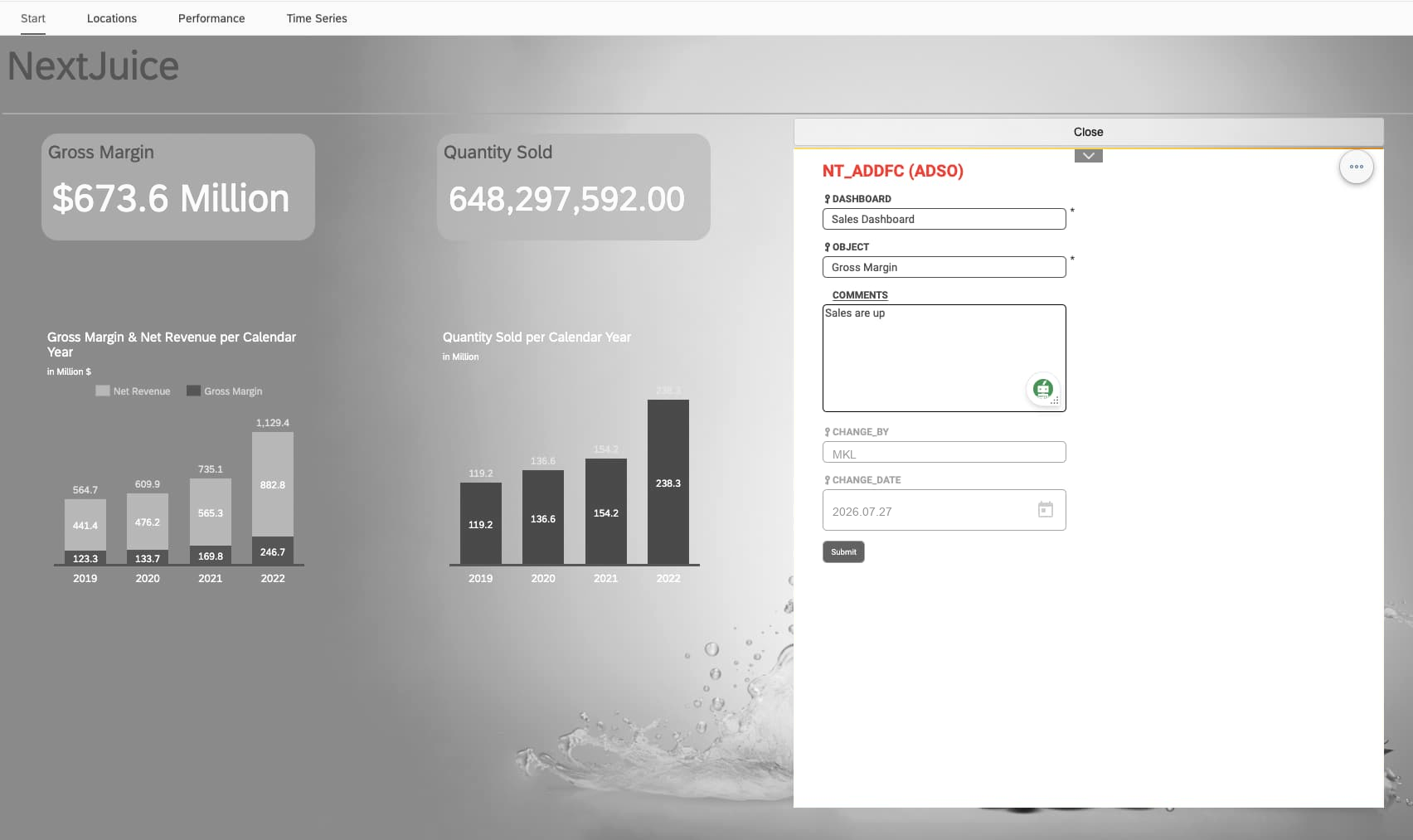
Embed in any dashboard
Drop the grid into any BI tool that supports web objects. It stays the same grid, validated at entry and on your analysis authorizations.
Or embed just a form
A single-record input mask, standalone or embedded, for the case where a whole grid is more than the reader needs.
Point it at exactly the rows you mean
Filter locally or globally, then carry that view across: URL parameters open the embedded grid pre-filtered, prefill the form, or go straight to a saved template.
A view that stays current
Enterprise
Your team defines a filter variable, the current month for example. Save it into a template, hang that template on a menu entry, and everyone who opens “This month” gets this month, every month, with nobody editing the filter.
Collaborate and organize
See each other work, and keep views and context with the data.
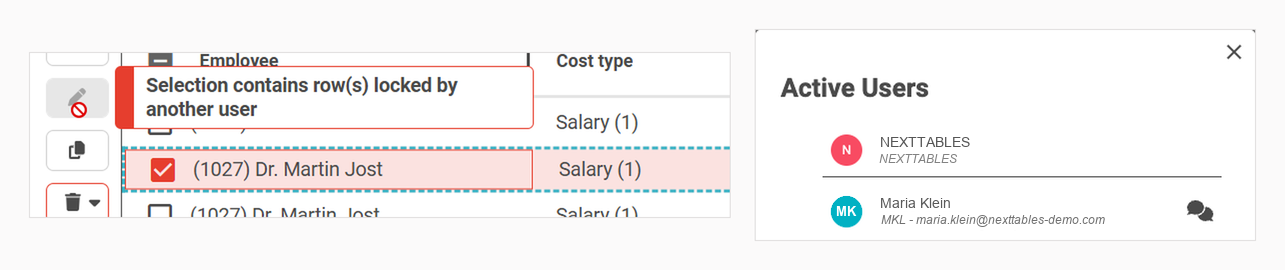
Real-time presence
See who is in a table and rows lock live while someone else edits.
Bookmarks
Save a filtered view and share it with a colleague by email.
User templates
Keep column order, sorting and filters, personal or global. A content admin promotes one person’s template into the one everybody sees.
Documentation
Enterprise
Add rich help to tables and fields in a WYSIWYG editor, open it from the column menu, and hold a version per language.
Favorites
Star the tables someone works in, and reach them from the top of the menu.
Arrange the grid your way
Sort, reorder, resize, autosize one column or all of them, and keep only the columns that matter in view. Group and aggregate with the pivot service, and export to CSV or Excel.
Maintain a header and its items together
Open a row and the table that belongs to it opens underneath, so one screen holds both levels of your data.
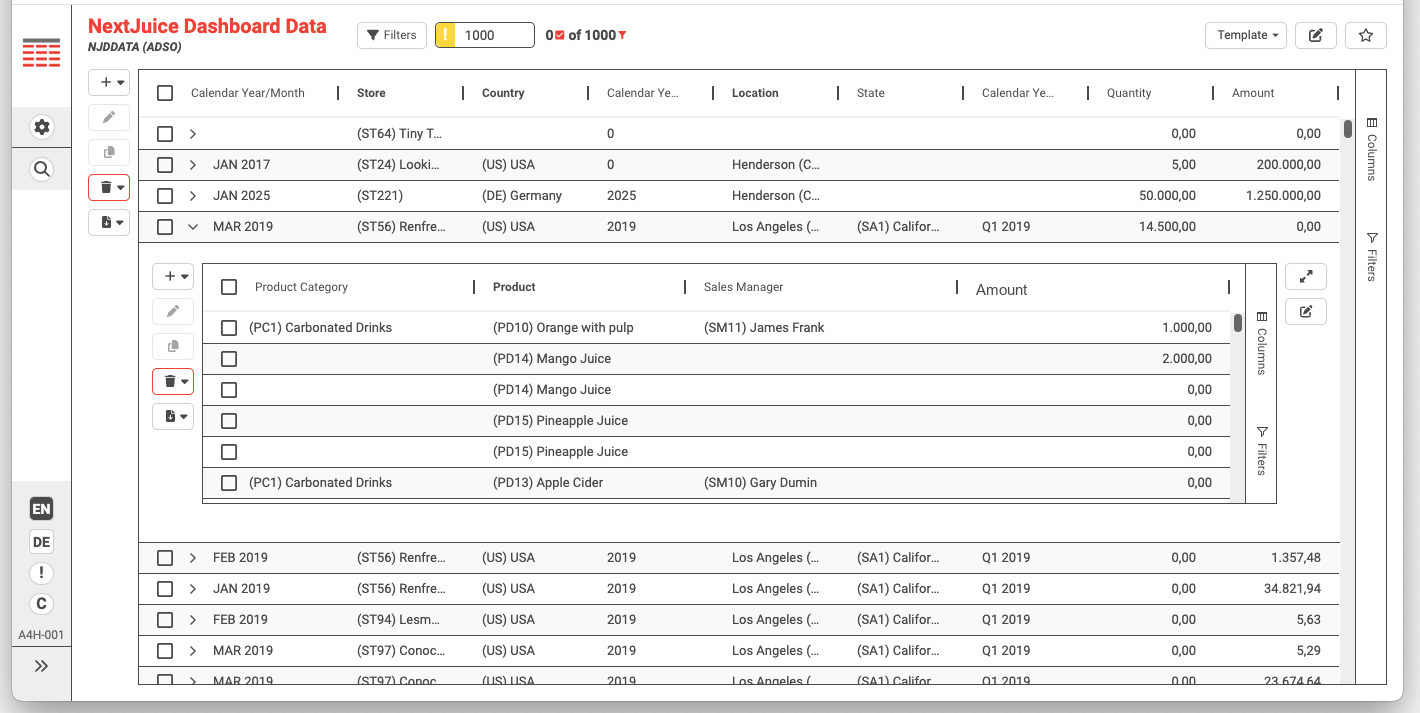
Expand a row
Click a master row and its item table opens directly below it, in the same screen.
Both levels are editable
The item table brings its own toolbar: add, edit, copy, delete and export.
Set up by configuration
Name the item table, its type, and the field that joins it to the master. Configuration covers all of it.
The pairings your model already has
A header with its line items, a cost record with its breakdown, a reference table with its values.
Set up through configuration
A configuration wizard brings a table into NextTables in minutes. Your ABAP team stays free for the exceptions.
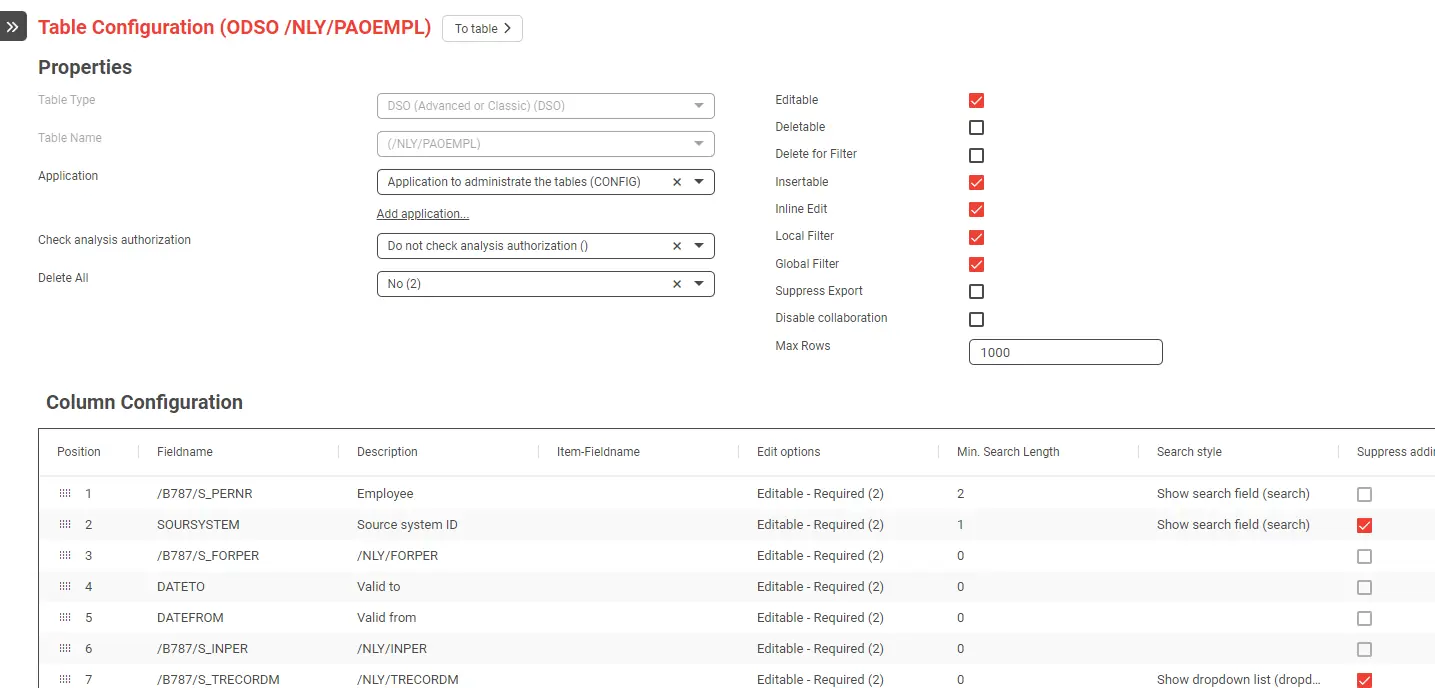
Connect in seconds
Add a table, ADSO or InfoObject through the wizard and it is ready.
Column rules
Set data types, required fields, locks and value help per column.
Table aliases
Expose one table through several scoped views for different departments.
What you can make editable
Every object type your SAP BW holds, from a DDIC table to an InfoObject.
| Object | What your team does with it |
|---|---|
| SAP DDIC tablestransparent tables | Read and write |
| SAP BW DataStore objectsADSO | Read and write Request-based, or writing directly. |
| SAP BW classic DataStore objects | Read and write Reading is request-based, writing is direct. |
| SAP BW InfoObjects | Read and write Attributes and texts. |
| ABAP CDS viewsthrough DDIC | Read only |
Built and tested for SAP BW/4HANA, SAP S/4HANA and SAP BW on HANA.
Group tables into applications
Several tables become one application a department opens, with a menu your team arranges and pages that explain it.
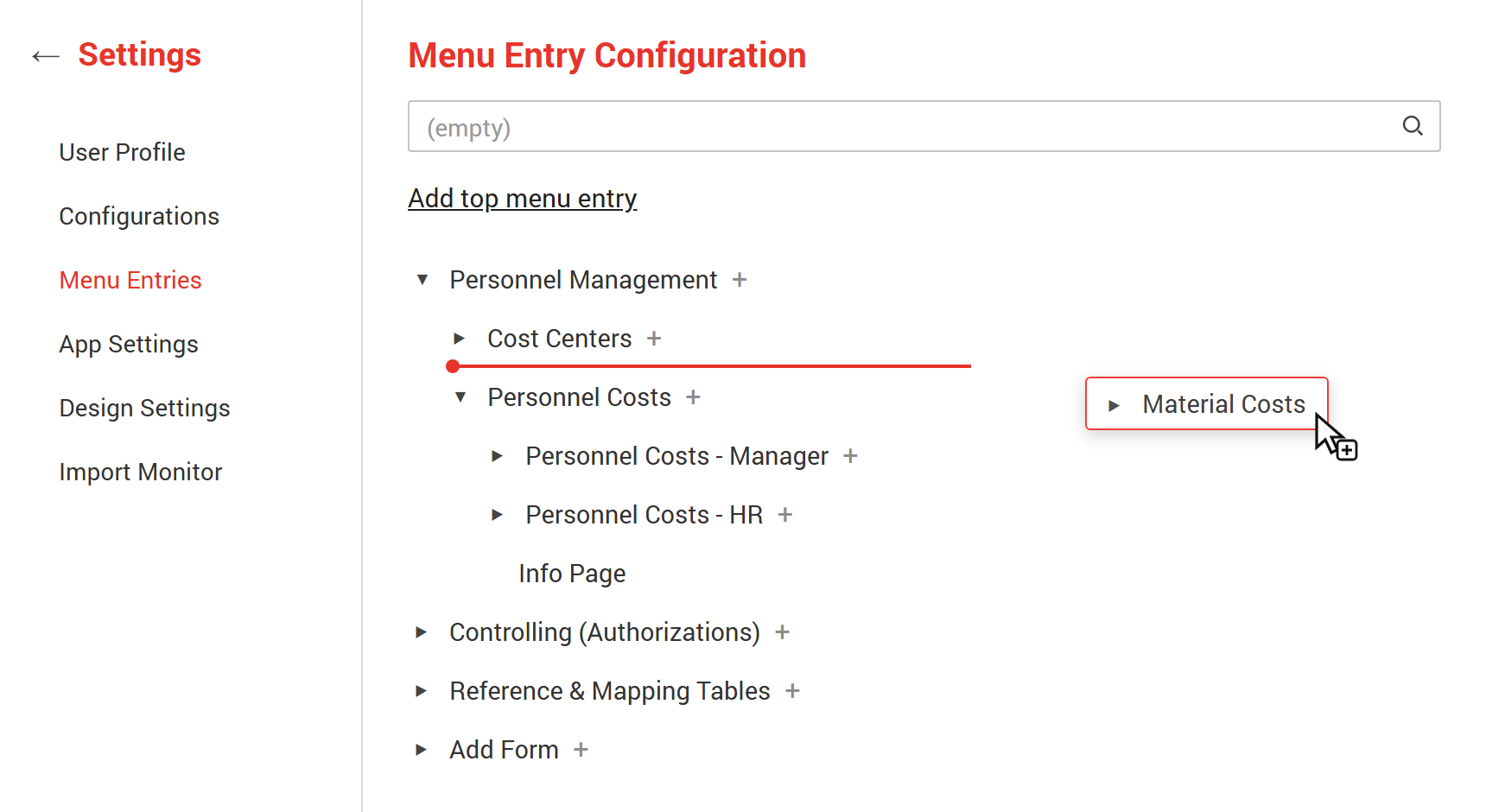
Applications
Bring several tables together as one application, and authorize it as a unit.
A menu you arrange
Build the hierarchy and reorder it by dragging, right in the configuration.
Pages
Enterprise
Write a welcome page for an application, and context pages beside its tables, in the same editor as the documentation.
In your users’ languages
Menu entries, pages and documentation each hold their text per language, and the interface follows the user.
Make it look like your own software
Your logo, your palette, your fonts, set on one settings screen.
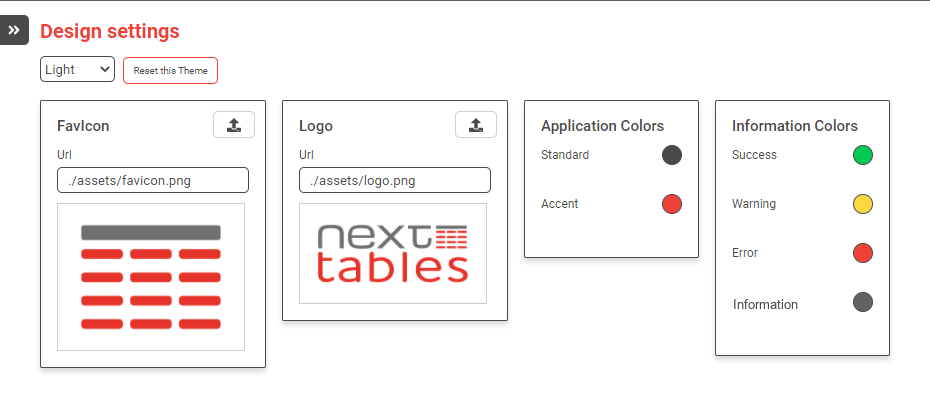
Your logo and colors
Upload a logo and a favicon, and set the application palette along with the success, warning, error and information colors.
Down to the details
Header and body fonts, button styling per state, input fields, table header and cell colors, borders, corner radius and tooltips.
Light, dark and high contrast
Three themes, each maintained separately, so every user works in the one that suits them.
Set it once, carry it over
Export a theme and import it into the next system, so development, QA and production look the same.
Extend it with standard SAP BAdIs
| BAdI & method | What your team controls |
|---|---|
| Editor · METAmetadata | Show, hide, lock or require fields; switch value help between dropdown and search; add custom toolbar buttons; run table-level checks. Override what configuration set. |
| Editor · DATAthe read | Adjust filters and values on the fly, or replace the read entirely and compose the grid yourself. This is how a fully virtual table, one with no single physical source, is presented and maintained, and how a table is reshaped, a transposition included. |
| Editor · UPDATEthe write | Derive fields on save, apply default values as a row is inserted, and validate with any rule you can express in ABAP before the row is written, blocking on an error and annotating on a warning. Rules can span fields, and the check against the data type runs anyway, without a line of code. Give a key field its value from a GUID or a number range object, and trigger an SAP BW process chain the moment data lands. |
| Import | Check and transform imported values before type conversion, for example map a description to its key or auto-correct a format. |
| Search | Provide custom value help and search logic, from redirecting to another InfoObject to a fully custom result set. |
It moves the way your other SAP changes move
Configuration travels
Application settings, menu entries and their descriptions, table settings, individual field configuration and table templates. In NextTables for SAP BW and in NextTables Cloud.
So does your ABAP
Enterprise
BAdI implementations are standard enhancements in your own system, so they move through the same transport landscape as every other object your team ships.
Your process, unchanged
Your existing release process covers NextTables too.
Administration is split three ways
Super admin
Global settings, the design and its themes, data integrity, and the welcome page every user lands on.
Config admin
Creates and configures tables and menu entries, and creates the pages that explain an application.
Content admin
Writes the documentation behind tables and fields, and curates the templates everybody shares.
Validated, authorized, auditable, in your system
Validated
Every entry is checked against your master data before it is written, in the grid and on import.
Authorized
Row-level access is your SAP analysis authorizations, inherited unchanged, plus a thin app-access layer.
Auditable
The ADSO change log you already have, or locked "last changed" fields added by configuration.
And when those authorization values themselves need maintaining, they are a table like any other: teams keep their own analysis-authorization values current in NextTables, on the same validation and the same change log.
See these on your SAP BW
Start with the deck, or book a walkthrough with our team.